
 HP OmniBook 3Best overall
- Processor
- AMD Ryzen 3 (4 cores, up to 4.1 GHz)
- Memory
- 8GB DDR5
- Storage
- 512GB SSD
- Display
- 17.3-inch Full HD
Most recommended by reviewers
Check price at Amazon


How we make money. If you buy through our links we may earn a commission. It never changes what we recommend. Learn more ›
We earn a commission when you buy through our links, at no extra cost to you. How this works.
A backlit keyboard matters if you type in dim rooms, late at night, or in a shared bedroom where a bright screen is a nuisance. It is also handy for students and office workers who glance at the keys while working. Not every HP model ships with one, so the configuration matters as much as the brand.
The HP OmniBook 3 with 16GB RAM and 512GB storage is our top pick for most people, since it pairs a backlit keyboard with enough memory to run several apps at once. The other picks cover a budget option, a touchscreen model and a larger-memory business machine.
1 OmniBook 3 | 2 OmniBook 3 | 3 Touchscreen Laptop | 4 Business Laptop | |
|---|---|---|---|---|
| Best for | Best overall | Best budget | Best touchscreen | Best for work |
| Processor | AMD Ryzen 3 (4 cores, up to 4.1 GHz) | AMD Ryzen 3 (4 cores, up to 4.1 GHz) | Intel Core i5-1334U (10 cores) | Intel Core i5-1334U (10 cores) |
| Memory | 8GB DDR5 | 8GB DDR5 | 16GB DDR4 | 8GB RAM |
| Storage | 512GB SSD | 256GB SSD | 1TB SSD | 256GB PCIe SSD |
| Display | 17.3-inch Full HD | 17.3-inch Full HD IPS | 17.3-inch HD+ touchscreen | 15.6-inch HD, anti-glare, 250 nits |
| Keyboard | Full-size backlit with numeric keypad | Full-size backlit with numeric keypad | Backlit with numeric keypad | Backlit with numeric keypad |
| Check price at Amazon | Check price at Amazon | Check price at Amazon | Check price at Amazon |
HP OmniBook 3Best overallMost recommended by reviewers
Check price at Amazon HP OmniBook 3Best budget
 HP Touchscreen LaptopBest touchscreen
 HP Business LaptopBest for work


A large 17.3-inch screen with a backlit keyboard and enough memory for everyday multitasking.
Most recommended by reviewers
Check price at AmazonPrices and availability on Amazon change often.
For a backlit keyboard with a numeric keypad and a big screen on a budget-friendly laptop, the HP OmniBook 3 17.3" is the pick we'd choose for this search.
The full-size backlit keyboard comes with a numeric keypad, which makes late-night typing and data entry easier to manage. Its 17.3-inch Full HD screen gives plenty of room for spreadsheets and side-by-side work, and the AMD Ryzen 3 processor is a relatively modern chip from a known brand. Owners on forums describe it as a fairly standard, entry-level office machine that sells for a decent price, with one commenter noting the grandparents paid $500 for a model listed around $800.
The 8GB of DDR5 memory is the main limit, and owners recommend adding a second 8GB stick if the model allows it. There is no dedicated GPU, so gaming is limited to 2D titles, Roblox, Minecraft and lighter esports games. Its 512GB SSD gives it more storage than the budget OmniBook 3 17-inch model, which has 256GB.
If it's not for you, the HP OmniBook 3 17" with 256GB storage suits buyers who want to spend less, while the HP 17.3" Touchscreen Laptop suits anyone who needs 16GB of memory and touch navigation.


The lowest-priced large-screen HP here with a backlit keyboard for everyday use.
Prices and availability on Amazon change often.


A touchscreen 17.3-inch HP with a backlit keyboard, 16GB of RAM and a 1TB drive.
Prices and availability on Amazon change often.

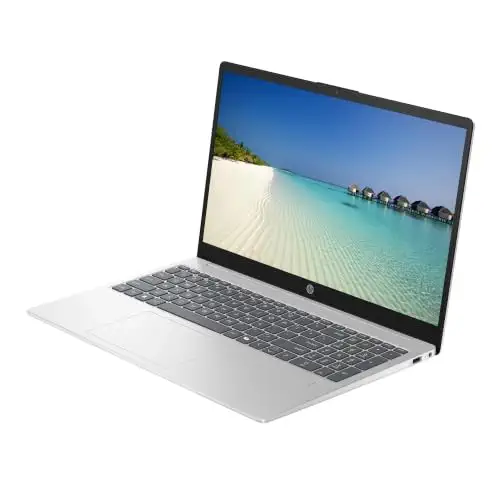


A business-class HP with a backlit keyboard, Windows 11 Pro and a fingerprint reader.
Prices and availability on Amazon change often.
Choose the OmniBook 3 if you want a big screen and a backlit keyboard for everyday use. Pick the touchscreen model if you want touch control, and the business laptop if you need Windows 11 Pro and a fingerprint reader for work.
Many people who touch-type do not need a backlit keyboard. A backlit keyboard also uses more battery, so you may want to keep the laptop plugged in when using it. Check that the configuration you buy actually includes the backlight.
The HP OmniBook 3 models, the HP 17.3-inch touchscreen laptops and the HP 15.6-inch business laptop all include a backlit keyboard. Not every version of a model has one, so check the listing.
Most HP laptops let you adjust the backlight with a keyboard key or the Windows Mobility settings. Keeping the laptop plugged in helps, since the backlight drains the battery faster.
Owners in community threads most often mention limited RAM at 8GB, which can slow down Windows 11. Adding a second 8GB stick, where the model supports it, is the usual fix.
Why trust ConsumerEcho
We started from four Amazon listings for HP laptops with a backlit keyboard, checking each one is in stock and that the keyboard is backlit. We weighed specs against what reviewers and owners said about them.
Our expert team tests products when it is needed and researches online and in interviews. Every guide is fact-checked and edited by a real person.
The ConsumerEcho editorial team · Updated Nov 15, 2026
How we pickEditorial standardsAffiliate disclosureReport a mistake
We earn a commission when you buy through our links, at no extra cost to you. It never decides the winner.





