
 Lenovo Legion Pro 7i Gen 10Best overall
- GPU
- NVIDIA RTX 5080, 16GB GDDR7
- CPU
- Intel Core Ultra 9 275HX, 24 cores
- Memory
- 32GB DDR5
- Storage
- 1TB SSD
Most recommended by reviewers
Check price at Amazon


How we make money. If you buy through our links we may earn a commission. It never changes what we recommend. Learn more ›
We earn a commission when you buy through our links, at no extra cost to you. How this works.
If you want a Legion Pro 7i, the first thing to check is the GPU. A 4080 is the number you searched for, but Lenovo now sells this laptop with newer RTX 5080 and 5090 chips, so the same name can cover very different machines.
Our top pick is the Lenovo Legion Pro 7i Gen 10 with an Intel Ultra 9 275HX, RTX 5080, 32GB RAM and a 16-inch OLED screen. It suits buyers who want the Legion Pro 7i's gaming power without paying for the top GPU. The other picks cover more storage, a bigger budget and a no-frills configuration.
1 Pro 7i Gen 10 | 2 Pro 7i | 3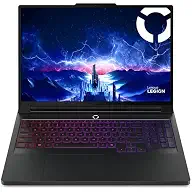 Pro 7i Gen 10 | 4Pro 7i | |
|---|---|---|---|---|
| Best for | Best overall | Best for storage | Best for top performance | Best value for storage |
| GPU | NVIDIA RTX 5080, 16GB GDDR7 | NVIDIA RTX 5080, 16GB GDDR7 | NVIDIA RTX 5090, 24GB | NVIDIA RTX 5080, 16GB GDDR7 |
| CPU | Intel Core Ultra 9 275HX, 24 cores | Intel Core Ultra 9 275HX | Intel Core Ultra 9 275HX | Intel Core Ultra 9 275HX |
| Memory | 32GB DDR5 | 32GB DDR5 | 64GB DDR5 | 32GB DDR5 |
| Storage | 1TB SSD | 2TB SSD plus docking station storage | 2TB NVMe SSD | 2TB SSD plus 1TB docking station |
| Display | 16-inch WQXGA OLED, 240Hz | 16-inch WQXGA OLED, 240Hz | 16-inch WQXGA, 240Hz | 16-inch WQXGA OLED, 240Hz |
| Check price at Amazon | Check price at Amazon | Check price at Amazon | Check price at Amazon |
Lenovo Legion Pro 7i Gen 10Best overallMost recommended by reviewers
Check price at Amazon Lenovo Legion Pro 7iBest for storage
 Lenovo Legion Pro 7i Gen 10Best for top performanceLenovo Legion Pro 7iBest value for storage


The Legion Pro 7i with an RTX 5080 and 32GB RAM, a strong balance of gaming power and storage for most buyers.
Most recommended by reviewers
Check price at AmazonPrices and availability on Amazon change often.
For a buyer searching for a Legion Pro 7i with an RTX 4080, the Lenovo Legion Pro 7i Gen 10 with RTX 5080 is our pick for best overall, since it moves up to the newer 5080 GPU while keeping a 16-inch OLED screen with a 240Hz refresh rate.
The RTX 5080 with 16GB of GDDR7 memory handles current games well, and the Intel Core Ultra 9 275HX with 24 cores gives it plenty of processing headroom. Owners on Reddit have shared their Gen 10 builds with enthusiasm, with one saying they regret nothing about upgrading to 64GB of RAM. The OLED panel offers a 240Hz refresh rate, and the machine can be expanded to 64GB of RAM and 8TB of storage. Owners on r/GamingLaptops report that the Legion Pro 7i Gen 10 is well cooled with a vapor chamber and has upgradeable SO-DIMM RAM and two M.2 slots.
The 1TB SSD fills up quickly once you start installing large game libraries, so you should plan on adding storage or choosing a model with more built in. If you want the largest GPU memory available in this lineup, the RTX 5090 model with 24GB is the stronger choice, though it costs nearly twice as much.
If it's not for you, the 2TB version suits buyers who want more built-in storage, and the RTX 5090 model suits anyone who wants the most GPU power and is willing to pay nearly twice the price.


The same RTX 5080 build as our top pick but with double the storage, aimed at large game libraries.
Prices and availability on Amazon change often.


The most powerful Legion Pro 7i in the list, with an RTX 5090 and 64GB RAM for demanding work and games.
Prices and availability on Amazon change often.

An RTX 5080 build with 2TB internal storage and a docking station drive, for buyers who want the most space at a moderate price.
Prices and availability on Amazon change often.
Start with the GPU. The RTX 5080 handles most games at high settings, and the RTX 5090 is for buyers who need the most power. Then choose storage: 1TB is enough for a few large games, while 2TB suits larger libraries.
If you mostly play older or lighter games, a cheaper laptop with a lower-tier GPU will do. The Legion Pro 7i is heavy and expensive for casual use.
Reader discussions describe the Legion Pro 7i as a strong gaming laptop, especially with an RTX 5080 and OLED screen. Some readers have reported cooling issues on earlier Legion models, so keep temperatures in check and consider a cooling pad.
Install Windows updates and drivers after first boot, then watch temperatures while gaming. Readers recommend a cooling pad or stand for airflow, and some suggest undervolting the CPU to reduce heat.
The 7i uses Intel processors and the 7a uses AMD. The Legion Pro 7i shown here is the Intel version with an Ultra 9 processor.
None of the in-stock Legion Pro 7i listings in this range use an i7 processor; they use the Intel Ultra 9 275HX. The top pick is the RTX 5080 build with 1TB storage.
Why trust ConsumerEcho
We compared four Amazon listings that are in stock now, drawn from the Lenovo Legion Pro 7i range. Each one was checked against its listed specs, reader discussions and price.
Our expert team tests products when it is needed and researches online and in interviews. Every guide is fact-checked and edited by a real person.
The ConsumerEcho editorial team · Updated Nov 15, 2026
How we pickEditorial standardsAffiliate disclosureReport a mistake
We earn a commission when you buy through our links, at no extra cost to you. It never decides the winner.





