
 ASUS Vivobook 17XBest overall
- Processor
- Intel Core i9-13900H
- Memory
- 16GB DDR4
- Storage
- 1TB NVMe SSD
- Display
- 17.3-inch IPS FHD
Most recommended by reviewers
Check price at Amazon


How we make money. If you buy through our links we may earn a commission. It never changes what we recommend. Learn more ›
We earn a commission when you buy through our links, at no extra cost to you. How this works.
If you type in dim rooms, on a late-night flight or in a bedroom after lights out, a backlit keyboard saves you from squinting at keys. It is a small feature that makes a big difference, and it matters most when you use the laptop every day.
Our top pick is the ASUS Vivobook 17X, which pairs a backlit keyboard with a capable processor and plenty of memory for the money. The other picks cover lighter two-in-one designs, budget machines and a larger-screen option, so you can choose the trade-off that suits you.
1 ASUS Vivobook 17X | 2 ASUS ZenBook Flip S 13 | 3 ASUS Vivobook Flip 14 | 4 WISESWAN Core i3 Laptop | 5 ASUS Zenbook Duo | |
|---|---|---|---|---|---|
| Best for | Best overall | Best two-in-one | Best for newer hardware | Best budget | Best for multitasking |
| Processor | Intel Core i9-13900H | Intel Core i7-1165G7 | Intel Core Ultra 7 256V | Intel Core i3, 2 cores, up to 3.4GHz | Intel Core Ultra 9 285H |
| Memory | 16GB DDR4 | 16GB LPDDR4X | 16GB LPDDR5X | 12GB | 32GB LPDDR5X |
| Storage | 1TB NVMe SSD | 1TB NVMe SSD | 1TB M.2 PCIe 4.0 SSD | 256GB SSD, expandable with TF card | 2TB (1TB SSD plus docking station) |
| Display | 17.3-inch IPS FHD | 13.3-inch 4K OLED touch | 14-inch OLED touch, 1920x1200 | 15.6-inch Full HD | Dual 14-inch WUXGA OLED touch |
| Backlit keyboard | Yes | Yes, two levels | Yes, two levels | Yes | Yes |
| Check price at Amazon | Check price at Amazon | Check price at Amazon | Check price at Amazon | Check price at Amazon |
ASUS Vivobook 17XBest overallMost recommended by reviewers
Check price at Amazon ASUS ZenBook Flip S 13Best two-in-one
 ASUS Vivobook Flip 14Best for newer hardware
 WISESWAN Core i3 LaptopBest budget
 ASUS Zenbook DuoBest for multitasking


A large-screen laptop with a backlit keyboard, a 14-core Intel Core i9 and 16GB of memory.
Most recommended by reviewers
Check price at AmazonPrices and availability on Amazon change often.
The ASUS Vivobook 17X is our top pick for anyone searching for a laptop with backlit keys, because it pairs a usable backlit keyboard with a strong processor, 16GB of memory and a large 17.3-inch screen at a sensible price.
The keyboard backlighting is modest, but reviewers note it is enough for typing in a dark room, which is exactly what most buyers searching this term want. The Intel Core i9-13900H and 1TB NVMe SSD give it plenty of headroom for work and multitasking, and reviewers call it the best ASUS laptop with a backlit keyboard for the money. Its 17.3-inch IPS display is among the largest screens in this lineup.
The trade-off is size and weight, since at 17.3 inches it is bulkier and less convenient to carry than a 14-inch laptop. If portability matters more than screen size, the smaller options in this lineup may suit you better.
If it's not for you, the ASUS Vivobook Flip 14 OLED 2-in-1 suits buyers who want a newer Intel Core Ultra processor and a bright touch OLED screen, while the WISESWAN 15.6-inch laptop is the choice for a tight budget.


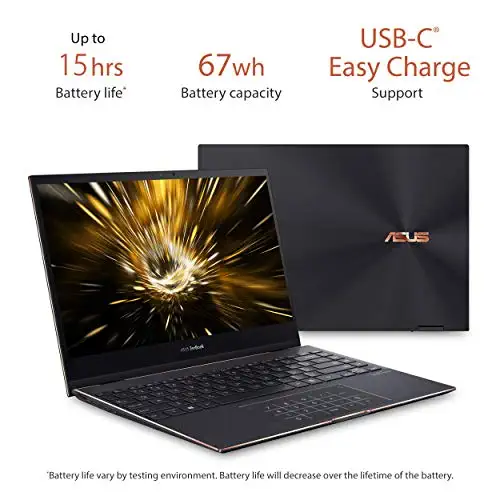


A slim 13.3-inch convertible with a 4K OLED touch screen and a backlit keyboard.
Prices and availability on Amazon change often.


A 14-inch touch convertible with the newer Intel Core Ultra 7 chip and a backlit keyboard.
Prices and availability on Amazon change often.


A low-cost 15.6-inch laptop with a backlit keyboard and 12GB of memory for school and office tasks.
Prices and availability on Amazon change often.


A premium laptop with two 14-inch OLED touch screens, a backlit keyboard and 32GB of memory.
Prices and availability on Amazon change often.
Skip models with very little memory or a slow processor if you plan heavy work. Gaming laptops are heavy and run hot, so avoid them for simple typing.
Yes, backlit keys use more power than standard keys. Choose a model with a large battery and an auto-off setting.
If you often type in the dark, yes. It is a small feature that saves squinting and makes late-night work easier.
Why trust ConsumerEcho
We built this shortlist from five Amazon listings that were in stock, checking each for a backlit keyboard and comparing its processor, memory, storage and screen. Expert reviews and reader discussions were weighed to show which models owners and reviewers recommend.
Our expert team tests products when it is needed and researches online and in interviews. Every guide is fact-checked and edited by a real person.
The ConsumerEcho editorial team · Updated Nov 15, 2026
How we pickEditorial standardsAffiliate disclosureReport a mistake
We earn a commission when you buy through our links, at no extra cost to you. It never decides the winner.




