
Add Consumer Echo as a preferred source on Google

How we make money. If you buy through our links we may earn a commission. It never changes what we recommend. Learn more ›

Best 27-Inch Monitor With Camera and Speakers (2026)

We earn a commission when you buy through our links, at no extra cost to you. How this works.

If you work from home or take classes online, a monitor with a camera and speakers built in saves you from juggling a separate webcam and speakers on your desk. What matters most is how sharp the webcam is, whether the microphone picks up your voice cleanly, and how the screen looks for the work you do all day.

We looked for 27-inch monitors that list a built-in camera, microphone and speakers on the same listing, then compared resolution, refresh rate, panel type and connections. Our top pick is the ASUS BE279QSK, which puts the webcam, microphone array and stereo speakers in one monitor with an IPS panel that suits calls and everyday work. The CUNPU and the 2K Thinlerain cover a sharper screen and a lower price, so you can choose the trade-off that suits your desk.

The rundown

1ASUS BE279QSK 27-Inch Full HD Monitor, 27-Inch Monitor With Camera and SpeakersASUS BE279QSK 27-Inch Full HD Monitor With Webcam2CUNPU 27-Inch QHD Monitor With Pop-Up, 27-Inch Monitor With Camera and SpeakersCUNPU 27-Inch QHD Monitor With Pop-Up Camera3Thinlerain 27-Inch 2K Monitor With Pop-Up, 27-Inch Monitor With Camera and SpeakersThinlerain 27-Inch 2K Monitor With Pop-Up Webcam
Best forBest overallBest for sharp detailBest budget
Screen27-inch Full HD IPS, frameless27-inch QHD 2560 x 144027-inch 2K 2560 x 1440 IPS
CameraBuilt-in Full HD webcam, USB upstreamPop-up 5 MP webcam, hides when retractedPop-up 3 MP webcam with microphone and privacy shutter
AudioMic array and stereo speakersDual-channel microphone and speaker, 3.5 mm outputDual built-in speakers
PortsHDMI, DisplayPort, VGA, audio in, earphone jackNot listedHDMI, DisplayPort, USB-C; cables included
Stand150 mm height, +35/-5 tilt, 180 swivel, 90 pivotHeight, swivel, pivot and tilt; VESA mountHeight, tilt, swivel and 90 pivot
See priceat AmazonSee priceat AmazonSee priceat Amazon
1Best overall
ASUS BE279QSK 27-Inch Full HD Monitor, 27-Inch Monitor With Camera and SpeakersASUS BE279QSK 27-Inch Full HD Monitor, 27-Inch Monitor With Camera and Speakers, view 2ASUS BE279QSK 27-Inch Full HD Monitor, 27-Inch Monitor With Camera and Speakers, view 3ASUS BE279QSK 27-Inch Full HD Monitor, 27-Inch Monitor With Camera and Speakers, view 4ASUS BE279QSK 27-Inch Full HD Monitor, 27-Inch Monitor With Camera and Speakers, view 5
1 / 5

ASUS BE279QSK 27-Inch Full HD Monitor With Webcam

Webcam, mic array and speakers in one 27-inch Full HD IPS monitor.

Screen
27-inch Full HD IPS, frameless
Camera
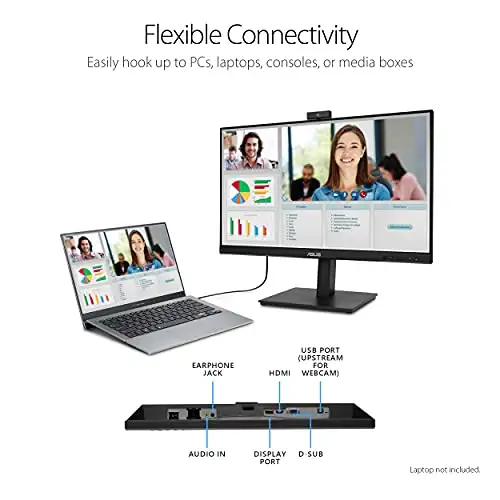
Built-in Full HD webcam, USB upstream
Audio
Mic array and stereo speakers
Ports
HDMI, DisplayPort, VGA, audio in, earphone jack
Stand
150 mm height, +35/-5 tilt, 180 swivel, 90 pivot

Most recommended by reviewers

Check price at Amazon

Prices and availability on Amazon change often.

Why it wins

  • Webcam, mic array and speakers built in
  • IPS panel with wide viewing angles
  • Full stand adjustments, including portrait rotation
  • Flicker-free and low blue light certifications

One catchFull HD on a 27-inch screen looks softer than QHD.

Why it's our top pick

The ASUS BE279QSK puts the webcam, mic array and stereo speakers in one monitor, so there's nothing extra to clip to your desk. Its IPS panel gives wide viewing angles, and the stand adjusts for height, tilt, swivel and a 90° pivot for portrait work. A USB upstream connection carries the camera to your computer, while HDMI and DisplayPort handle the screen.

Expert reviewers advise a camera of at least 1080p for clear calls, and this webcam meets that. Reviewers also say external speakers sound better, so think of the built-in audio as good for calls and everyday use. The listing adds flicker-free and low blue light certifications for longer days at the screen.

2Best for sharp detail
CUNPU 27-Inch QHD Monitor With Pop-Up, 27-Inch Monitor With Camera and SpeakersCUNPU 27-Inch QHD Monitor With Pop-Up, 27-Inch Monitor With Camera and Speakers, view 2CUNPU 27-Inch QHD Monitor With Pop-Up, 27-Inch Monitor With Camera and Speakers, view 3CUNPU 27-Inch QHD Monitor With Pop-Up, 27-Inch Monitor With Camera and Speakers, view 4CUNPU 27-Inch QHD Monitor With Pop-Up, 27-Inch Monitor With Camera and Speakers, view 5
1 / 5

CUNPU 27-Inch QHD Monitor With Pop-Up Camera

A QHD 120 Hz screen with a pop-up 5 MP camera and built-in mic and speaker.

Screen
27-inch QHD 2560 x 1440
Refresh
120 Hz via HDMI 2.0 and DisplayPort 1.4
Camera
Pop-up 5 MP webcam, hides when retracted
Audio
Dual-channel microphone and speaker, 3.5 mm output
Stand
Height, swivel, pivot and tilt; VESA mount
Check price at Amazon

Prices and availability on Amazon change often.

Pros

  • QHD detail at 120 Hz
  • Pop-up camera hides when not in use
  • FreeSync and G-Sync compatibility
  • Kensington lock slot and VESA mount

Cons

  • 8-bit panel, so color-critical editing is not its strength
  • Built-in speakers suit calls; external speakers sound better, as expert reviewers note
  • Sold by a third-party seller rather than Amazon directly
3Best budget
Thinlerain 27-Inch 2K Monitor With Pop-Up, 27-Inch Monitor With Camera and SpeakersThinlerain 27-Inch 2K Monitor With Pop-Up, 27-Inch Monitor With Camera and Speakers, view 2Thinlerain 27-Inch 2K Monitor With Pop-Up, 27-Inch Monitor With Camera and Speakers, view 3Thinlerain 27-Inch 2K Monitor With Pop-Up, 27-Inch Monitor With Camera and Speakers, view 4Thinlerain 27-Inch 2K Monitor With Pop-Up, 27-Inch Monitor With Camera and Speakers, view 5
1 / 5

Thinlerain 27-Inch 2K Monitor With Pop-Up Webcam

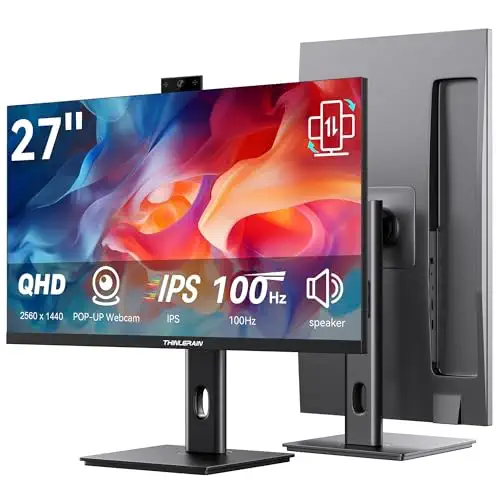
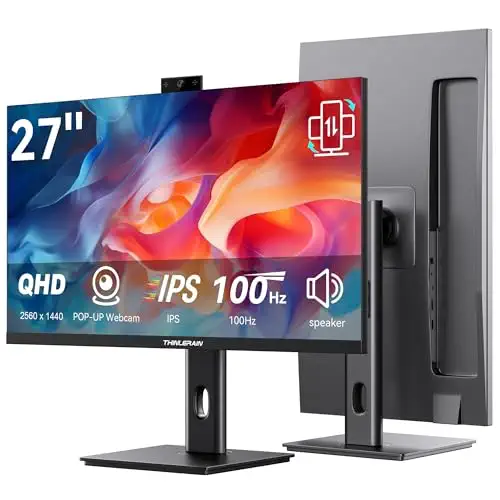
A 2K 100 Hz IPS screen with a pop-up 3 MP webcam and dual speakers.

Screen
27-inch 2K 2560 x 1440 IPS
Refresh
100 Hz, 100% sRGB, 350 nits
Camera
Pop-up 3 MP webcam with microphone and privacy shutter
Audio
Dual built-in speakers
Ports
HDMI, DisplayPort, USB-C; cables included
Stand
Height, tilt, swivel and 90 pivot
Check price at Amazon

Prices and availability on Amazon change often.

Pros

  • 2K IPS at 100 Hz
  • Pop-up camera with a physical privacy shutter
  • Dual built-in speakers
  • Stand rotates to portrait for documents and code

Cons

  • Webcam, mic and speakers need the USB-C cable connected to a computer
  • The 3 MP camera is less detailed than the 5 MP option

FAQ

Which monitor suits you?

If you mostly want clean video calls and a simple desk, the ASUS BE279QSK covers the basics in one unit. If you spend long days on screen and want a sharper picture, the CUNPU and the 4K Thinlerain are worth a look. If you want the lowest cost that still includes a camera and speakers, the 2K Thinlerain and the SKitphrati are the options.

What should you look for in a camera monitor?
  • Webcam resolution: expert reviewers advise at least 1080p for a clear picture on calls.
  • Camera quality: dedicated external webcams generally look sharper than built-in ones, so a separate camera may still be worth it if your job depends on how you look on calls.
  • Audio: built-in speakers are fine for calls, but reviewers say external speakers or a headset give better sound.
  • Panel type: IPS panels hold their color better when you are not sitting straight on, which helps when the screen is shared with others.
  • Connection: check how the camera connects to your computer, since most of these models need a USB cable.
When a built-in camera is not the right choice?

If you don't take calls from your desk, a standard 27-inch monitor without a camera is usually simpler and easier to replace. If color accuracy for photo or video editing is your main need, look at a monitor built for color work, since none of the models here is aimed at that job.

Are there 27-inch monitors with built-in cameras and speakers?

Yes. The monitors in this guide are 27-inch screens with a webcam, microphone and speakers built into the body, so you don't need separate devices on your desk. Most of them need a USB cable to your computer for the camera to work.

What is the best 27-inch monitor with a built-in camera, microphone, and speakers?

For most people the ASUS BE279QSK is the best fit, because its webcam, mic array and speakers come in one listing with a Full HD IPS panel. If a sharper picture matters more to you, the CUNPU adds a QHD screen and a 5 MP pop-up camera.

What are the best 27-inch monitors with speakers?

Among the monitors here, the ASUS models use stereo speakers and the Thinlerain models use dual speakers. Built-in speakers are fine for calls and video, but reviewers say external speakers or a headset give better audio quality. For music or movies, pair the monitor with dedicated speakers.

Does Dell make a 27-inch monitor with a camera and speakers?

Yes. Dell sells a 27-inch video conferencing monitor with a pop-up webcam and speakers, and reviewers rate it for work calls. It is not one of the Amazon picks in this guide, so compare it directly if you are buying from Dell.

Meet the reviewer

Jhoana de Toro

Jhoana de Toro

Contributing Reviewer

I'm a writer, horror junkie, and home baker who believes life is better with a good book in one hand and a freshly baked treat in the other. When I'm not researching products, you'll find me chasing after my preschooler, getting lost in a creepy novel, or putting my mixer to good use in the kitchen. I love finding products that are genuinely worth the money and sharing my useful finds with readers. After all, nothing's scarier than spending money on something that doesn't live up to the hype!

    Why trust ConsumerEcho

    How we made this guide

    • 6 monitors compared
    • 21 expert reviews read

    Every pick is a 27-inch monitor sold on Amazon with a webcam, microphone and speakers built into the listing, checked against its listing details. Expert reviews and maker specs were used for what they say about cameras, audio and panel quality.

    Our expert team tests products when it is needed and researches online and in interviews. Every guide is fact-checked and edited by a real person.

    The ConsumerEcho editorial team · Updated Oct 17, 2026

    Checking our work: 6 sources

    We earn a commission when you buy through our links, at no extra cost to you. It never decides the winner.