
 Lenovo Chromebook 2-in-1Best overall
- Weight
- 3.3 lb
- Thickness
- 0.69 in
- Display
- 14-inch WUXGA IPS touchscreen
- Processor
- Intel N150
Most recommended by reviewers
Check price at Amazon


How we make money. If you buy through our links we may earn a commission. It never changes what we recommend. Learn more ›
We earn a commission when you buy through our links, at no extra cost to you. How this works.
If you want a laptop you can carry all day and still tap the screen to scroll, drag or sketch, you're really choosing between a light Chromebook and a small Windows convertible. The trade-offs are weight, screen size and how much you plan to run at once.
Our top pick is the Lenovo Chromebook 2-in-1 with its 14-inch touchscreen, Intel N150 chip and 3.3 pound body. It's the most flexible choice for daily work and browsing, and it flips into tent or tablet mode. The other two picks cover a smaller, cheaper convertible and a budget Chromebook for light use.
1 Chromebook 2-in-1 | 2 Flagship Chromebook | 3 Convertible Laptop | |
|---|---|---|---|
| Best for | Best overall | Best budget | Best small convertible |
| Weight | 3.3 lb | 2.86 lb | Not listed |
| Thickness | 0.69 in | 0.73 in | Not listed |
| Display | 14-inch WUXGA IPS touchscreen | 14-inch Full HD touchscreen IPS | 11-inch HD IPS touchscreen, 1366x768 |
| Processor | Intel N150 | MediaTek Kompanio 520 | Intel N series, up to 3.60GHz |
| Memory and storage | 4GB RAM, 128GB UFS | 4GB RAM, 64GB eMMC | 8GB DDR5, 128GB SSD |
| Ports | 2x USB-C, 2x USB-A, HDMI | USB-A, USB-C, microSD, 3.5mm jack | 2x USB-C, USB-A, HDMI, headphone jack |
| Check price at Amazon | Check price at Amazon | Check price at Amazon |
Lenovo Chromebook 2-in-1Best overallMost recommended by reviewers
Check price at Amazon Lenovo Flagship ChromebookBest budget
 Lenovo Convertible LaptopBest small convertible
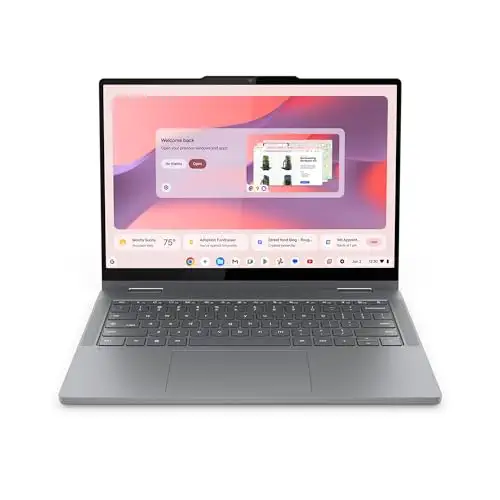


A 14-inch touchscreen Chromebook that folds into tent and tablet modes, for everyday work and browsing.
Most recommended by reviewers
Check price at AmazonPrices and availability on Amazon change often.
For a light touchscreen laptop that also folds into a tablet, we'd pick the Lenovo Chromebook 2-in-1 14-inch, which pairs a 3.3 lb body with a larger 14-inch WUXGA touchscreen.
At 3.3 lb and 0.69 inches thick, it is slim enough to carry all day, and its hinge flips it between laptop, tent and tablet modes. The 14-inch IPS touchscreen is the largest display among the picks, and it offers two USB-C, two USB-A and an HDMI port for connecting accessories. Its 128GB of storage gives more room than the budget Chromebook's 64GB.
The 4GB of RAM is modest, so heavy multitasking with many browser tabs open may feel constrained. It is also a bit heavier than the budget Chromebook at 2.86 lb.
If it's not for you, the Lenovo Flagship Chromebook 14-inch Touchscreen suits shoppers who want the lightest body and a lower price, while the Lenovo 11-inch Convertible Laptop with Touchscreen suits those who want a compact size and full Windows 11 Pro with 8GB of RAM, though its 1366x768 screen is lower resolution.


A lower-priced 14-inch touchscreen Chromebook that's light enough for school or a daily commute.
Prices and availability on Amazon change often.


A small 11-inch convertible with a touchscreen and full Windows 11 Pro, for those who want a compact device.
Prices and availability on Amazon change often.
Choose the 14-inch 2-in-1 if you want the biggest touchscreen and flexible modes. Choose the 14-inch Chromebook if price and weight matter most. Choose the 11-inch convertible if you need Windows and the smallest size.
The Lenovo Chromebook 2-in-1 is a strong all-round choice at 3.3 pounds, with a 14-inch touchscreen that folds into tablet mode. For a lower price, the 14-inch Chromebook weighs 2.86 pounds.
It depends on how you use it. A touchscreen is useful for scrolling, tapping and drawing, and a 2-in-1 hinge adds tablet use. If you only type and browse, a regular laptop may be enough.
Why trust ConsumerEcho
This shortlist is built from three Amazon listings that are in stock right now. We weighed the weight and screen details on each listing against what owners said in community discussions about budget and used laptops.
Our expert team tests products when it is needed and researches online and in interviews. Every guide is fact-checked and edited by a real person.
The ConsumerEcho editorial team · Updated Nov 21, 2026
How we pickEditorial standardsAffiliate disclosureReport a mistake
We earn a commission when you buy through our links, at no extra cost to you. It never decides the winner.


