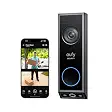
LIMYIOM 4K Center Screen WebcamBest overall
- Resolution
- 4K Ultra HD at 60fps
- Field of view
- 73°, fixed
- Autofocus
- PDAF
- Microphone range
- Up to 26 feet
Most recommended by reviewers
Check price at Amazon


How we make money. If you buy through our links we may earn a commission. It never changes what we recommend. Learn more ›
We earn a commission when you buy through our links, at no extra cost to you. How this works.
If you spend hours on video calls, you have probably noticed that your eyes never quite meet the person on the other end. A center screen webcam mounts on top of your monitor's middle edge so the lens sits closer to where you look, which makes calls feel more like talking face to face.
Our top pick is the LIMYIOM 4K Center Screen Webcam. It offers the highest resolution and the most features on this list, and it suits people who want the sharpest picture and a clear microphone for meetings, classes, or streams. The other picks cover budget use and a simpler 1080P option.
1 LIMYIOM 4K Center Screen Webcam | 2 IYOFINE Eye to Cam 3 | 3 Poeubmo 1080P Center Screen Webcam | |
|---|---|---|---|
| Best for | Best overall | Best budget | Best for compatibility |
| Resolution | 4K Ultra HD at 60fps | 1080P at 30fps | 1080P |
| Field of view | 73°, fixed | Not listed | 70°, wide angle |
| Microphone range | Up to 26 feet | Built-in noise-cancelling, stated 10-foot pickup | Noise-reducing array, stated 8m pickup |
| Check price at Amazon | Check price at Amazon | Check price at Amazon |
LIMYIOM 4K Center Screen WebcamBest overallMost recommended by reviewers
Check price at Amazon IYOFINE Eye to Cam 3Best budget
 Poeubmo 1080P Center Screen WebcamBest for compatibility


A 4K center screen webcam with a built-in microphone and a suction mount for most laptops and monitors.
Most recommended by reviewers
Check price at AmazonPrices and availability on Amazon change often.
The LIMYIOM 4K Center Screen Webcam is our top pick for anyone who wants the sharpest picture and the clearest voice pickup in this group.
It is the only pick here that offers 4K video at 60fps, and it pairs that with a 73 degree fixed field of view and PDAF autofocus, which reviewers describe as faster and more stable than standard autofocus. Its noise-canceling microphone has a stated pickup range of up to 26 feet, the longest of the three picks, so it suits noisy rooms and conference settings. Setup is plug and play on Mac, Windows, and Chromebook with no drivers needed.
The 4K output only pays off if your internet connection and video app can carry it. On a standard call, 1080P would look similar, so you may not notice the extra resolution in everyday use. If you mainly want a simple, low-cost upgrade over a built-in laptop camera, the budget pick may be enough.
If it's not for you, the IYOFINE Eye to Cam 3 suits buyers who want autofocus and a noise-canceling mic at the lowest price, while the Poeubmo 1080P suits those who need broad operating system support, including Linux, and a longer cable.


A 1080P center screen webcam with autofocus and a suction cup mount for low-cost eye contact.
Prices and availability on Amazon change often.
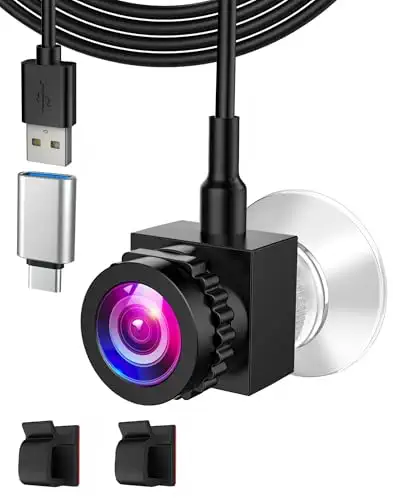




A 1080P center screen webcam with a USB-C and USB-A adapter and broad operating system support.
Prices and availability on Amazon change often.
A center screen webcam suits anyone who spends long periods on video calls and wants the camera to sit closer to where they look. It is most useful for remote work, teaching, and client meetings.
A center screen webcam is a small camera that mounts at the middle of your monitor's top edge, so you look closer to the lens during calls.
The listings for these picks describe plug-and-play setup with no driver required, but confirm on the product page for your system.
4K gives a sharper image, but it helps only if your internet connection and video app can carry the higher quality.
Why trust ConsumerEcho
This shortlist is built from three Amazon listings that are in stock now. Each one was weighed on its stated resolution, mounting, microphone, and compatibility with common video apps.
Our expert team tests products when it is needed and researches online and in interviews. Every guide is fact-checked and edited by a real person.
The ConsumerEcho editorial team · Updated Nov 21, 2026
How we pickEditorial standardsAffiliate disclosureReport a mistake
We earn a commission when you buy through our links, at no extra cost to you. It never decides the winner.