
 ASUS ProArt PA34VCNVBest overall
- Size
- 34 inch
- Resolution
- 3440 x 1440
- Curve
- 3800R
- Panel
- IPS
Most recommended by reviewers
Check price at Amazon


How we make money. If you buy through our links we may earn a commission. It never changes what we recommend. Learn more ›

Reviewed by
Fact checker and editor
An experienced e-commerce editor and fact-checker specialising in product information, pricing, specifications and online retail content.
We earn a commission when you buy through our links, at no extra cost to you. How this works.
A curved monitor can make a long workday easier on the eyes, but only if the curve and size suit your desk and your tasks. If you spend hours in spreadsheets, documents and browser tabs, you want a wide, sharp screen that doesn't tire you out.
Our top pick is the ASUS ProArt PA34VCNV. It has a gentle curve, factory calibration and a full set of ports, and it is the most complete all-round choice here. The other picks cover a budget option and a larger dual-QHD screen for multitasking.
1 ASUS ProArt PA34VCNV | 2 LG 34WR55QK-B | 3 Samsung Business Curved Ultrawide | |
|---|---|---|---|
| Best for | Best overall | Best budget | Best for multitasking |
| Size | 34 inch | 34 inch | 49 inch |
| Resolution | 3440 x 1440 | 3440 x 1440 | Dual QHD (5120 x 1440) |
| Curve | 3800R | Not listed | 1000R |
| Colour | 100% sRGB, Delta E under 2 | Up to 99% sRGB | Not listed |
| USB-C power delivery | 96W | 65W | 90W |
| Refresh rate | Not listed | 100Hz | 120Hz |
| Check price at Amazon | Check price at Amazon | Check price at Amazon |
ASUS ProArt PA34VCNVBest overallMost recommended by reviewers
Check price at Amazon LG 34WR55QK-BBest budget
 Samsung Business Curved UltrawideBest for multitasking

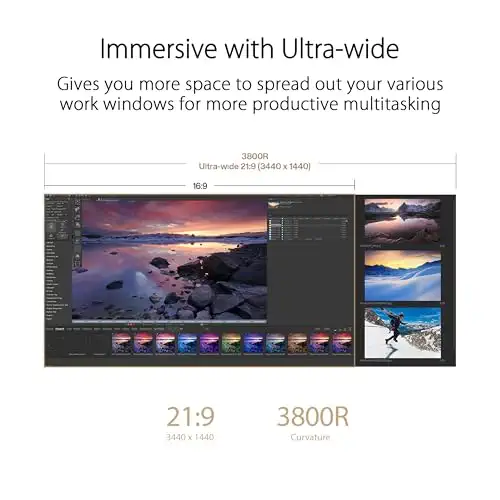


A gently curved 34-inch ultrawide with factory calibration and a full set of ports, for office work that needs accurate colour.
Most recommended by reviewers
Check price at AmazonPrices and availability on Amazon change often.
The ASUS ProArt PA34VCNV is our pick for a curved monitor built around serious work, with a factory calibration that keeps colour accurate straight out of the box.
The 34-inch panel uses an IPS type with a gentle 3800R curve, 3440 x 1440 resolution and 100% sRGB coverage, and it arrives factory calibrated with a Delta E under 2, which is the kind of colour accuracy professional work depends on. Its 96W USB-C power delivery is the highest of the picks we considered, and the port selection covers docking, Ethernet and daisy-chaining. Reviewers note that it is color-accurate and bright enough for most people, and it comes with a five-year warranty. Owners on r/ASUS report that the PA34VCNV can shut its screen off over time when used with a MacBook, requiring the monitor buttons to turn it back on.
The ASUS is a basic ultrawide that skips some newer technologies, which is how it keeps its price down. If you want a feature list rather than a plain, accurate workhorse, that trade-off will matter to you.
If it's not for you, the LG 34WR55QK-B suits a tighter budget with 100Hz and 65W charging, and the Samsung 49-inch suits anyone who wants two monitors' worth of screen in one curved panel.


A budget-friendly 34-inch curved ultrawide with USB-C charging and a reader mode for long reading sessions.
Prices and availability on Amazon change often.


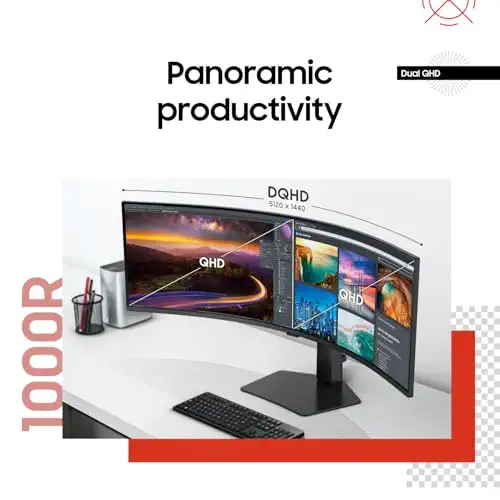


A very wide 49-inch dual-QHD curve with a built-in docking hub and speakers, for people who want two windows side by side.
Prices and availability on Amazon change often.
A curved ultrawide works best for wide spreadsheets, side-by-side documents and timelines. Reviewers note the curve matters most at 34 inches and up, and that it can distort straight lines, which is a problem for precise drawing or photo editing. If that is your work, a flat 4K monitor may suit you better.
It can be. A curved ultrawide gives you a wide screen for spreadsheets and multiple windows. For precise tasks with straight lines, a flat monitor is usually the safer choice.
The ASUS ProArt PA34VCNV is our top pick. It has factory calibration, a full set of ports and a five-year warranty.
A 34-inch ultrawide is the most common size for work. Smaller curved screens are less justified, since the benefit of the curve shows mainly at 34 inches and up.
Check the resolution, panel type and ports first. Then decide how much curve you want; a gentler curve suits mixed work and gaming better than a tight one.
There is no single best brand. ASUS, LG and Samsung each have strong options at different prices, so choose by the features you need.
The Samsung 34-inch ViewFinity S5 and the LG 34WR55QK-B both have wide 21:9 screens that suit films, with HDR support on the Samsung.
Meet the reviewer
Fact checker and editor
An experienced e-commerce editor and fact-checker specialising in product information, pricing, specifications and online retail content. Focused on ensuring accuracy, credibility and consumer confidence through clear, reliable and informative content.
Why trust ConsumerEcho
We built this shortlist from three Amazon listings that are in stock now, checked against expert reviews and owner discussions. Each pick is weighed on panel type, curve, resolution and how well it suits office work.
Our expert team tests products when it is needed and researches online and in interviews. Every guide is fact-checked and edited by a real person.
The ConsumerEcho editorial team · Updated Nov 16, 2026
How we pickEditorial standardsAffiliate disclosureReport a mistake
We earn a commission when you buy through our links, at no extra cost to you. It never decides the winner.
 The Best 27 Inch Monitors With Camera and Speakers
 The Best Gaming Monitors for 2026
 The Best OLED Monitors for Your Xbox Series X
 The Best Curved Gaming Monitors With Built-In Speakers
 The Best 10GbE Mini PCs
 The Best 3D Printer Scanners
 The Best Angels Horn Turntables
 The Best 3D Printers for D&D Miniatures
