
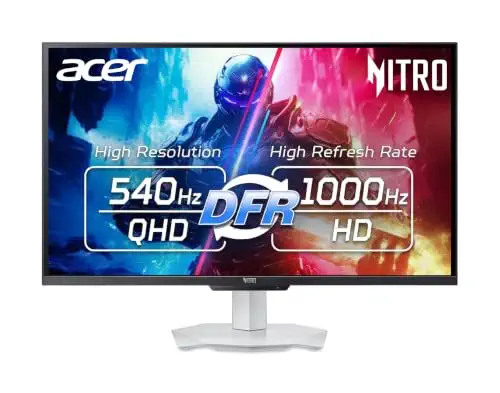
 Acer Nitro XV273U F5 27-inch 1440p 540 Hz IPSBest overall
- Panel
- 27-inch IPS
- Resolution
- 2560 x 1440
- Refresh rate
- 540 Hz (1000 Hz at 720p)
- Response
- 0.5ms GTG
Most recommended by reviewers
See priceat Amazon


How we make money. If you buy through our links we may earn a commission. It never changes what we recommend. Learn more ›
Acer Nitro XV273U F5 27-inch 1440p 540 Hz IPSBest overallRunner-up2 Alienware AW3423DWF 34-inch curved QD-OLEDBest curved OLED
We earn a commission when you buy through our links, at no extra cost to you. How this works.
A gaming monitor's most important numbers are panel type, refresh rate and response time, and the right balance depends on what you play and what you can spend. Fast, smooth motion matters most for shooters and racing games, while contrast and HDR matter more for single-player adventures.
Our top pick is the Acer Nitro XV273U F5, a 27-inch 1440p IPS that runs up to 540 Hz and gets strong marks for motion clarity and input lag. It suits competitive players who want the fastest LCD available at a reasonable price. The other picks cover a curved OLED, a 4K OLED, a 34-inch ultrawide and budget options.
| 1Acer Nitro XV273U F5 27-inch 1440p 540 Hz IPS | 2Alienware AW3423DWF 34-inch curved QD-OLED | 3 ASUS ROG Strix OLED XG32UCWMG 32-inch 4K OLED | 4 Sceptre 32-inch 1440p 210 Hz gaming monitor | |
|---|---|---|---|---|
| Best for | Best overall | Best curved OLED | Best 4K OLED | Best budget 1440p |
| Panel | 27-inch IPS | 34-inch QD-OLED, 1800R curve | 32-inch WOLED | 32-inch VA |
| Resolution | 2560 x 1440 | 3440 x 1440 (21:9) | 3840 x 2160 | 2560 x 1440 |
| Refresh rate | 540 Hz (1000 Hz at 720p) | 165 Hz | 240 Hz (480 Hz at 1080p) | 210 Hz |
| Response | 0.5ms GTG | 0.1ms | Not listed | 1ms BR |
| See priceat Amazon | See priceat Amazon | See priceat Amazon | See priceat Amazon |
Acer Nitro XV273U F5 27-inch 1440p 540 Hz IPSBest overallMost recommended by reviewers
See priceat AmazonAlienware AW3423DWF 34-inch curved QD-OLEDBest curved OLEDASUS ROG Strix OLED XG32UCWMG 32-inch 4K OLEDBest 4K OLEDSceptre 32-inch 1440p 210 Hz gaming monitorBest budget 1440p


The fastest LCD we'd recommend for competitive play, with 1440p detail at high refresh rates.
Most recommended by reviewers
Check price at AmazonPrices and availability on Amazon change often.
One catchExpensive for an LCD, and it has no speakers or USB ports.
One expert review measured input lag of 14.4ms at 540 Hz, one of the quickest LCDs tested, and found it removes almost all motion blur at high refresh rates. That makes it a strong match for shooters and esports titles where every millisecond counts.
The 1440p panel keeps more detail than a 1080p screen at the same speed, and the stand adjusts for height, tilt and pivot, so it fits most desks.


A 34-inch 1800R QD-OLED with deep blacks and wide color for immersive games and movies.
Prices and availability on Amazon change often.


A 4K OLED for detailed visuals that can switch to a 480 Hz 1080p mode when speed matters more.
Prices and availability on Amazon change often.


A large 1440p screen with high refresh rate for a fraction of premium prices.
Prices and availability on Amazon change often.
Competitive shooters reward high refresh rates and low response times, so a 240 Hz+ IPS is a strong fit. Single-player and cinematic games benefit more from OLED contrast and HDR. Ultrawide suits racing and open-world games.
Choose the panel type first: IPS for color and value, OLED for contrast, VA for black depth at a low price. Then check refresh rate and response time. Note that 1000 Hz figures usually apply only at reduced resolution.
Skip very high refresh rate figures you can't drive with your graphics card. If you mostly play in bright rooms, a glossy OLED may disappoint, and a 240 Hz screen is usually enough for most players.
The Acer Nitro XV273U F5 is our top pick for 1440p, running up to 540 Hz with very low input lag. Budget buyers can look at the Sceptre 32-inch 1440p 210 Hz model.
The ASUS ROG Strix OLED XG32UCWMG gives 4K detail at 240 Hz and can switch to 480 Hz at 1080p when speed matters more.
The Dell SE2726HG is a strong budget choice with an IPS panel, 240 Hz refresh and FreeSync Premium. The Sceptre 32-inch 1440p is the best value for a big screen.
For fast shooters 240 Hz is a clear step up from 144 Hz, but slower games gain little. Your graphics card has to reach those frame rates to make use of it.
Why trust ConsumerEcho
This shortlist is built from listing specs, expert reviews and manufacturer guidance on panel type, refresh rate and resolution. Every product was checked to be available on Amazon right now.
Our expert team tests products when it is needed and researches online and in interviews. Every guide is fact-checked and edited by a real person.
The ConsumerEcho editorial team · Updated Oct 17, 2026
How we pickEditorial standardsAffiliate disclosureReport a mistake
We earn a commission when you buy through our links, at no extra cost to you. It never decides the winner.