
 BenQ MA270UBest overall for MacBook
- Size
- 27 inch
- Resolution
- 3840 x 2160 (4K)
- Color gamut
- P3 wide color
- USB-C power delivery
- 90W
Most recommended by reviewers
Check price at Amazon


How we make money. If you buy through our links we may earn a commission. It never changes what we recommend. Learn more ›
We earn a commission when you buy through our links, at no extra cost to you. How this works.
If you work on a Mac, a 4K monitor with USB-C is the easiest way to get one cable for video, data and charging. The trick is matching the panel to how you use it, since 27-inch 4K is sharp but not always clearly better than 1440p for everyday work.
Our No. 1 pick is the BenQ MA270U. It is built for MacBook Pro and Air with a P3 color mode, 90W power delivery over USB-C and controls that work from the Mac keyboard. The other picks cover a larger screen and a budget-friendly option.
1 BenQ MA270U | 2 BenQ MA320U | 3 INNOCN 27-inch 4K USB-C Monitor | |
|---|---|---|---|
| Best for | Best overall for MacBook | Best large screen | Best budget 4K |
| Size | 27 inch | 32 inch | 27 inch |
| Resolution | 3840 x 2160 (4K) | 3840 x 2160 (4K) | 3840 x 2160 (4K) |
| Color gamut | P3 wide color | P3 wide color | Not listed |
| USB-C power delivery | 90W | 90W | Not listed |
| Ports | 2 HDMI, 2 USB-C | 2 HDMI, 2 USB-C | DisplayPort, HDMI, USB-C |
| Stand | Height and tilt adjustable | Height and tilt adjustable | Height, pivot and swivel |
| Check price at Amazon | Check price at Amazon | Check price at Amazon |
BenQ MA270UBest overall for MacBookMost recommended by reviewers
Check price at Amazon BenQ MA320UBest large screen
 INNOCN 27-inch 4K USB-C MonitorBest budget 4K


A 27-inch 4K screen with Mac-tuned color and one USB-C cable for charging and video.
Most recommended by reviewers
Check price at AmazonPrices and availability on Amazon change often.
The BenQ MA270U is our pick for anyone who wants a 4K monitor that works smoothly with a MacBook, and it fits this search especially well.
Its calibrated P3 wide color gamut is tuned for MacBook Pro and MacBook Air, so colors should look right at a glance. A single USB-C cable handles video and charging, with 90W of power delivery to keep the laptop topped up, and brightness and volume follow the Mac keyboard. The stand adjusts for height and tilt, which makes a desk setup comfortable. Owners on r/Monitors report that the BenQ MA270U gives cleaner, more stable text for design work and supports Display P3 with an M-Book mode that gets close to Apple device colors.
The 27-inch screen is smaller than the 32-inch BenQ MA320U, so text sharpness is the main thing to judge by eye. If you want more room for documents and apps, the larger model is the one to consider, though it costs more.
If it's not for you, the BenQ MA320U suits buyers who want a 32-inch screen with the same Mac tuning, while the INNOCN 27-inch 4K USB-C Monitor suits buyers on a tighter budget who don't need Mac-specific color tuning.


The same Mac-focused setup as the 27-inch model, on a larger 32-inch 4K panel.
Prices and availability on Amazon change often.


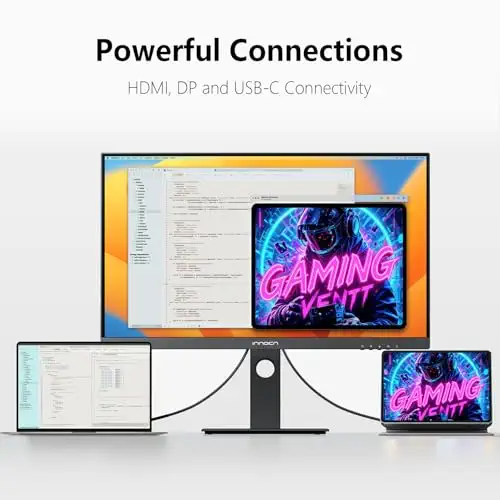


A lower-priced 27-inch 4K monitor with USB-C, HDMI and DisplayPort for laptops and Macs.
Prices and availability on Amazon change often.
Choose the BenQ MA270U if you want the simplest 27-inch Mac setup. Pick the MA320U if you want the same setup on a larger screen. The INNOCN is for buyers who want 4K for less and do not need the power delivery of the BenQ models.
Owners in community discussions say 27-inch 4K can look only slightly better than 1440p, and it asks much more of a graphics card in games. If you mainly play at 1440p, a native 1440p monitor is often the simpler choice.
It depends on how you use the screen. Owners say 4K gives sharper text, but the gain can be small at 27 inches, and it costs more performance in games.
No, but USB-C lets one cable carry video, data and charging. The picks here all have USB-C, and the BenQ models offer 90W power delivery.
Community owners often prefer 32-inch 4K for productivity and immersion, since the extra space makes 4K detail more useful. The 27-inch is smaller and cheaper.
Why trust ConsumerEcho
This shortlist is built from three Amazon listings that are in stock right now, checked against their listed Mac connections, USB-C power delivery and color specs. Community discussions were used to see how owners judge 4K sharpness, scaling and the performance cost of 4K gaming.
Our expert team tests products when it is needed and researches online and in interviews. Every guide is fact-checked and edited by a real person.
The ConsumerEcho editorial team · Updated Nov 15, 2026
How we pickEditorial standardsAffiliate disclosureReport a mistake
We earn a commission when you buy through our links, at no extra cost to you. It never decides the winner.
 The Best 27 Inch Monitors With Camera and Speakers
 The Best Gaming Monitors for 2026
 The Best OLED Monitors for Your Xbox Series X
 The Best Curved Gaming Monitors With Built-In Speakers
 The Best 3D Printer Scanners
 The Best Android Phones with the Best Camera
 The Best Angels Horn Turntables
 The Best 3D Printers for D&D Miniatures
