
 ASUS TUF Gaming VG27AQM5ABest overall
- Resolution
- 2560 x 1440
- Refresh rate
- 300Hz
- Response time
- 0.3ms GTG (listing)
- Panel
- Fast IPS
Most recommended by reviewers
Check price at Amazon


How we make money. If you buy through our links we may earn a commission. It never changes what we recommend. Learn more ›

Reviewed by
Contributing Reviewer
I'm a writer, horror junkie, and home baker who believes life is better with a good book in one hand and a freshly baked treat in the other.
We earn a commission when you buy through our links, at no extra cost to you. How this works.
A 300Hz refresh rate on a 1440p screen is a big jump for fast shooters and esports titles, where smoother motion and quicker frame changes can help you track targets. The catch is that panel type matters as much as the number on the box.
Our top pick is the ASUS TUF Gaming VG27AQM5A, a 27-inch IPS monitor that pairs 300Hz with a 0.3ms response time and motion blur reduction. It suits players who want fast, clean motion without giving up colour, and the other picks cover budget and wider colour use.
1 ASUS TUF Gaming VG27AQM5A | 2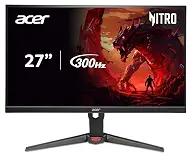 Acer Nitro XV272U F3 | 3 LG 27G640A-B | |
|---|---|---|---|
| Best for | Best overall | Best value | Best for HDR and colour |
| Resolution | 2560 x 1440 | 2560 x 1440 | 2560 x 1440 |
| Refresh rate | 300Hz | 300Hz | 300Hz |
| Response time | 0.3ms GTG (listing) | 0.5ms GTG (listing) | 1ms GtG (listing) |
| Panel | Fast IPS | IPS | IPS |
| Colour gamut | 95% DCI-P3 | 99% sRGB | Up to 95% DCI-P3 (listing) |
| Sync | G-SYNC and variable refresh | AMD FreeSync Premium | Not listed |
| Check price at Amazon | Check price at Amazon | Check price at Amazon |
ASUS TUF Gaming VG27AQM5ABest overallMost recommended by reviewers
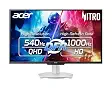
Check price at Amazon Acer Nitro XV272U F3Best value
 LG 27G640A-BBest for HDR and colour


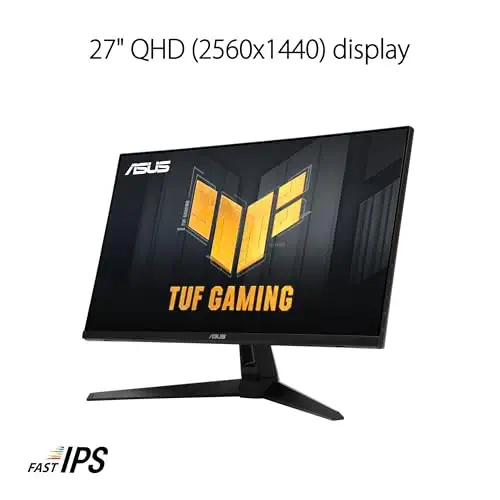


A fast IPS 1440p monitor with 300Hz, 0.3ms response and strong motion control, aimed at competitive players who want clean motion.
Most recommended by reviewers
Check price at AmazonPrices and availability on Amazon change often.
For a 1440p monitor that runs at 300Hz, the ASUS TUF Gaming VG27AQM5A is the one we'd pick, combining a fast IPS panel with a 0.3ms GTG response time and G-SYNC support.
The ASUS pairs 2560 x 1440 resolution and a 300Hz refresh rate with Fast IPS, rated at 0.3ms GTG. Its ELMB Sync feature is the standout: it lets motion blur reduction and variable refresh run together to reduce ghosting and tearing. The 95% DCI-P3 colour coverage and Shadow Boost for dark scenes add useful extras for a gaming screen.
The listing does not give a brightness figure, so any HDR-style highlight performance is unconfirmed. Buyers who care most about HDR or the lowest price should look at the other picks in this shortlist.
If it's not for you, the Acer Nitro XV272U F3 suits buyers wanting strong value and 99% sRGB coverage, while the LG 27G640A-B fits those who want HDR400 and USB Type-C.
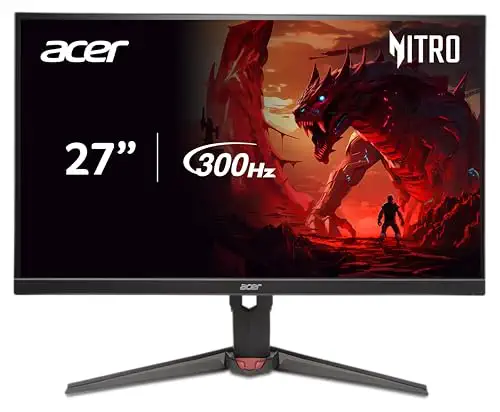


A 300Hz IPS monitor with a 0.5ms response and accurate colour for less money, backed by an expert review that rated its colour accuracy highly.
Prices and availability on Amazon change often.


A 300Hz IPS monitor with HDR400 and wide colour for players who want vivid visuals alongside fast motion.
Prices and availability on Amazon change often.
A 300Hz screen helps most in fast shooters and competitive esports, where extra frames make motion easier to follow. For slower games, films or general use, a 144Hz or 165Hz screen gives most of the benefit for less money.
For most players, yes. 240Hz is widely treated as the competitive standard in the discussions we checked, and 300Hz adds a smaller, less noticeable step on top.
Not necessarily. A high-end card helps keep frame rates near 300Hz in demanding games, but the monitor itself is the same either way. Match the GPU to the frame rates you want.
It depends. OLED offers fast response and deep blacks; VA gives strong contrast at a lower price but can show more smearing in dark scenes, according to one expert review. The 300Hz models in this list are IPS panels.
Meet the reviewer
Contributing Reviewer
I'm a writer, horror junkie, and home baker who believes life is better with a good book in one hand and a freshly baked treat in the other. When I'm not researching products, you'll find me chasing after my preschooler, getting lost in a creepy novel, or putting my mixer to good use in the kitchen. I love finding products that are genuinely worth the money and sharing my useful finds with readers. After all, nothing's scarier than spending money on something that doesn't live up to the hype!
Why trust ConsumerEcho
We built this shortlist from three Amazon listings that are in stock now and match a 1440p resolution with a 300Hz refresh rate. We weighed the specs on each listing against what expert reviewers and owners said about panel type, response time and value.
Our expert team tests products when it is needed and researches online and in interviews. Every guide is fact-checked and edited by a real person.
The ConsumerEcho editorial team · Updated Nov 16, 2026
How we pickEditorial standardsAffiliate disclosureReport a mistake
We earn a commission when you buy through our links, at no extra cost to you. It never decides the winner.
 The Best 27 Inch Monitors With Camera and Speakers
 The Best Gaming Monitors for 2026
 The Best OLED Monitors for Your Xbox Series X
 The Best Curved Gaming Monitors With Built-In Speakers
 The Best 3D Printer Scanners
 The Best Angels Horn Turntables
 The Best 3D Printers for D&D Miniatures
 The Best 50 Inch Smart TVs
