
 Dell Latitude 5400Best overall
- Processor
- Intel Core i5-8365U
- Memory
- 16GB DDR4
- Storage
- 512GB SSD
- Display
- 14-inch FHD (1920x1080)
Most recommended by reviewers
Check price at Amazon


How we make money. If you buy through our links we may earn a commission. It never changes what we recommend. Learn more ›
We earn a commission when you buy through our links, at no extra cost to you. How this works.
If you're shopping for a Dell Latitude 5400, the main decision is how much memory and storage you need, because the configurations differ a lot. Most buyers want a dependable business laptop for school, office work or travel, and the Latitude line has a reputation for solid build quality.
Our top pick is the Dell Latitude 5400 with 16GB of RAM and 512GB of storage, which gives the most room for multitasking and files without a large price jump. The other picks cover tighter budgets, touchscreen use and more storage.
1 Latitude 5400 | 2 Latitude 5400 | 3 Latitude 5400 | 4 Latitude 5400 | 5Latitude 5400 | |
|---|---|---|---|---|---|
| Best for | Best overall | Best budget | Best for more memory | Best for touchscreen | Best for a stronger processor |
| Processor | Intel Core i5-8365U | Intel Core i5-8365U | Intel Core i5-8365U | Intel Core i5-8365U | Intel Core i7-8665U |
| Memory | 16GB DDR4 | 8GB DDR4 | 16GB DDR4 | 32GB | 16GB DDR4 |
| Storage | 512GB SSD | 256GB SSD | 512GB SSD | 1TB SSD | 512GB PCIe SSD |
| Display | 14-inch FHD (1920x1080) | 14-inch non-touch | 14-inch non-touch | 14-inch FHD touchscreen | 14-inch Full HD |
| Check price at Amazon | Check price at Amazon | Check price at Amazon | Check price at Amazon | Check price at Amazon |
Dell Latitude 5400Best overallMost recommended by reviewers
Check price at Amazon Dell Latitude 5400Best budget
 Dell Latitude 5400Best for more memory
 Dell Latitude 5400Best for touchscreenDell Latitude 5400Best for a stronger processor


A well-balanced Latitude with enough memory and storage for everyday work and multitasking.
Most recommended by reviewers
Check price at AmazonPrices and availability on Amazon change often.
For a search on the Dell Latitude 5400, we'd pick the 16GB and 512GB model as the best overall, since it balances memory, storage and security well for everyday business work.
The 16GB of DDR4 memory handles multitasking comfortably, and the 512GB SSD leaves room for files and software without constant clean-up. The built-in fingerprint reader gives quick, secure login, and the machine comes with Windows 11 Pro and an Intel Core i5-8365U processor. Owners have not yet shared their own reports for this listing, so these points come from the specs themselves.
This is a renewed unit, so expect a used machine with a shorter warranty than new. If you need a touchscreen, the 32GB and 1TB model is the one to consider, though it costs the most of the shortlist. If it's not for you, the 8GB and 256GB budget model is the lightest and cheapest option, while the 16GB non-touch version matches the top pick's memory and storage without the fingerprint reader.
If it's not for you, the 32GB touchscreen model suits heavy multitaskers who want a touch display, and the 8GB budget model suits buyers who want the lowest price.

The lowest-cost route into a Latitude 5400 for basic school and office tasks.
Prices and availability on Amazon change often.


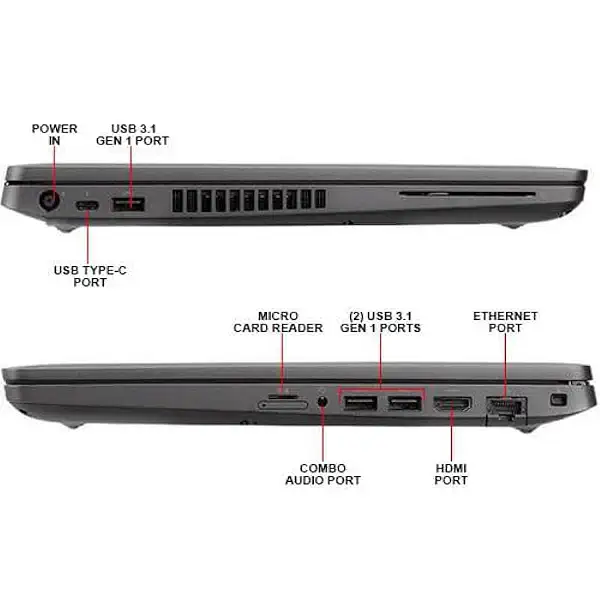

The same Latitude 5400 build with the same memory and storage as the top pick, from a different listing.
Prices and availability on Amazon change often.


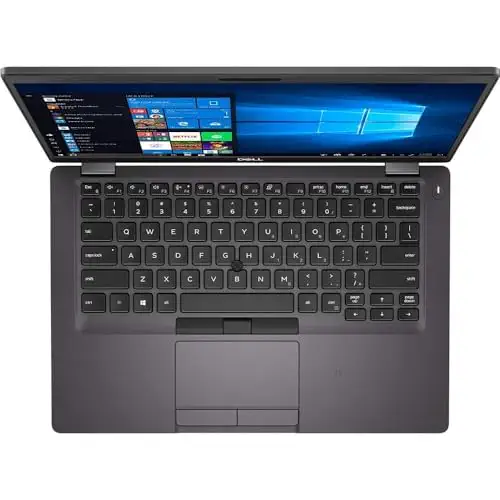


The high-end option with a touchscreen, plenty of memory and a large drive.
Prices and availability on Amazon change often.
An i7 configuration for users who want more processing power in the same Latitude body.
Prices and availability on Amazon change often.
Buy the 16GB and 512GB configuration if you want the best balance of performance and price. The 8GB model suits basic tasks only, while the 32GB touchscreen model fits people who work with very large files.
Remote workers, students and travelers who need a portable business machine will find the Latitude 5400 a practical choice. Gamers and video editors will be better served by a laptop with a dedicated graphics chip.
Dell still sells Latitude laptops, but the 5400 is an older generation. Newer Latitude models such as the 5450 have replaced it in new sales, so the listings here are mostly renewed units.
It is a solid business laptop for office work, school and travel, with a light build and good ports. It is not built for gaming or demanding creative work, and the configuration you choose matters most.
Common complaints include heat under sustained load and battery wear over time. Check the cooling and battery condition on a renewed unit before buying.
The Latitude 5410 is an older model that came out several years before the 5450. Newer Latitude models are generally faster and have newer processors.
Why trust ConsumerEcho
We built this shortlist from five Amazon listings for the Dell Latitude 5400, checked for stock and the specs each listing states. We weighed how the configurations differ in memory, storage and display, along with what owners and reviewers said about the model's real-world use.
Our expert team tests products when it is needed and researches online and in interviews. Every guide is fact-checked and edited by a real person.
The ConsumerEcho editorial team · Updated Nov 15, 2026
How we pickEditorial standardsAffiliate disclosureReport a mistake
We earn a commission when you buy through our links, at no extra cost to you. It never decides the winner.




