HP 15.6 Touchscreen LaptopBest overall
- Screen
- 15.6 inch HD touchscreen (1366 x 768)
- Processor
- AMD Ryzen 3 7320U
- Memory
- 8 GB LPDDR5
- Storage
- 256 GB SSD
Most recommended by reviewers
Check price at Amazon


How we make money. If you buy through our links we may earn a commission. It never changes what we recommend. Learn more ›
We earn a commission when you buy through our links, at no extra cost to you. How this works.
If you want to tap, swipe and draw on a laptop without spending much, a touchscreen model under $300 is a real option, but the budget is tight and the trade-offs are clear. Most of these machines use modest processors and 4 to 8 GB of memory, so they suit browsing, streaming, school work and light office tasks rather than gaming or heavy editing.
Our top pick is the HP 15.6 inch touchscreen laptop, because it gives you the largest touch display, a Ryzen 3 processor and 8 GB of memory in one machine. The other picks cover convertible designs, Chromebooks and refurbished 11.6 inch 2-in-1s, so you can choose by how you plan to use the screen.
1 HP 15.6 Touchscreen Laptop | 2 Lenovo Chromebook Slim 3 | 3 ASUS Chromebook Flip CX1 | 4 Dell Latitude 3190 | 5 HP X360 Convertible | |
|---|---|---|---|---|---|
| Best for | Best overall | Best Chromebook | Best 360-degree flip | Best budget 2-in-1 | Best 2-in-1 for travel |
| Screen | 15.6 inch HD touchscreen (1366 x 768) | 14 inch Full HD touchscreen (1920 x 1080) | 14 inch FHD NanoEdge touchscreen | 11.6 inch HD multi-touch (1366 x 768) | 11.6 inch HD touchscreen |
| Processor | AMD Ryzen 3 7320U | MediaTek Kompanio 520 | Intel Celeron N4500 | Intel Celeron N5030 | Intel quad-core up to 3.29 GHz |
| Memory | 8 GB LPDDR5 | 4 GB RAM | 8 GB RAM | 8 GB DDR4 | 8 GB |
| Storage | 256 GB SSD | 64 GB eMMC, plus microSD slot | 128 GB eMMC | 128 GB SSD | 128 GB |
| OS | Windows 11 Home | Chrome OS | Not listed | Windows 11 Pro | Not listed |
| Check price at Amazon | Check price at Amazon | Check price at Amazon | Check price at Amazon | Check price at Amazon |
HP 15.6 Touchscreen LaptopBest overallMost recommended by reviewers
Check price at Amazon Lenovo Chromebook Slim 3Best Chromebook
 ASUS Chromebook Flip CX1Best 360-degree flip
 Dell Latitude 3190Best budget 2-in-1
 HP X360 ConvertibleBest 2-in-1 for travel


The largest touchscreen on this list, with a Ryzen 3 processor and 8 GB of memory.
Most recommended by reviewers
Check price at AmazonPrices and availability on Amazon change often.
For a touchscreen laptop under $300, the HP 15.6 inch is the pick that gives you the most screen and a current Windows 11 setup.
The HP has the largest touchscreen in this group at 15.6 inches, and it pairs that with 8 GB of LPDDR5 memory and a 256 GB PCIe NVMe SSD, which is more storage than the other picks offer. Its AMD Ryzen 3 7320U processor and Radeon graphics are aimed at everyday work and light entertainment, and Windows 11 Home gives you a familiar desktop with touch controls. The 8 GB memory matches the ASUS, Dell and HP convertibles, while the Lenovo Chromebook has only 4 GB.
The biggest trade-off is the screen resolution. At 1366 x 768 the display is low resolution for a 15-inch panel, so text and video will look softer than on a Full HD screen like the Lenovo or ASUS. If sharpness matters more to you than size, one of the 14-inch Full HD picks may suit you better.
If it's not for you, the Lenovo Chromebook Slim 3 suits anyone wanting a sharper Full HD touchscreen and simple Chrome OS, and the ASUS Chromebook Flip CX1 suits those who want a 360-degree flip for tablet use.


A Full HD touchscreen Chromebook with Wi-Fi 6 and good battery life for school.
Prices and availability on Amazon change often.


A 360-degree flipping 14 inch touchscreen that works as a laptop, tent or tablet.
Prices and availability on Amazon change often.


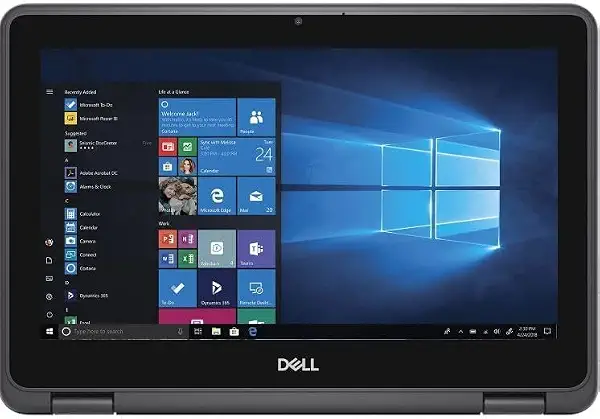

A renewed business 2-in-1 with an 8 GB memory upgrade and a multi-touch screen.
Prices and availability on Amazon change often.


A light 11.6 inch 2-in-1 with a full range of ports and Intel quad-core performance.
Prices and availability on Amazon change often.
If you mainly need touch for browsing, notes and streaming, the Chromebooks are the simplest choice. If you want Windows software, choose the HP 15.6 inch or the renewed Dell business 2-in-1.
Prioritise at least 8 GB of memory and an SSD over a larger screen. Renewed units can be good value, but check the condition grade and warranty first.
On this budget, HP and Lenovo offer the most touchscreen options. The HP 15.6 inch gives the most screen space for the price.
It can be, for basic tasks like browsing, school work and streaming. Expect limits on performance and storage, and avoid it for gaming or heavy editing.
Not really. The processors and graphics on these machines are built for everyday use, and reader discussions say touch laptops at this price rarely have capable graphics.
Why trust ConsumerEcho
This shortlist is built from five Amazon listings that are in stock now, weighed against owner discussions on laptop communities. We compared screen type, processor, memory, storage and price for each touchscreen model.
Our expert team tests products when it is needed and researches online and in interviews. Every guide is fact-checked and edited by a real person.
The ConsumerEcho editorial team · Updated Nov 21, 2026
How we pickEditorial standardsAffiliate disclosureReport a mistake
We earn a commission when you buy through our links, at no extra cost to you. It never decides the winner.