
Add Consumer Echo as a preferred source on Google

How we make money. If you buy through our links we may earn a commission. It never changes what we recommend. Learn more ›

The Best NUC Mini PCs

We earn a commission when you buy through our links, at no extra cost to you. How this works.

A NUC is a small, quiet computer that fits behind a monitor or on a shelf, and most people buy one to run office work, a home server or a Home Assistant setup without taking up desk space. The right one depends on how much memory and storage you need and whether you plan to add a graphics card later.

Our No. 1 pick is the ASUS NUC 13 Pro with a Core i5-13420H, 16GB RAM and 512GB SSD. It is the most sensible all-round configuration for most buyers, and the other picks cover a budget option, a step-up with newer hardware and a larger-memory build for heavier work.

The rundown

1ASUS NUC 13 Pro, nuc mini pcASUS NUC 13 Pro2Intel NUC 14 Essential, nuc mini pcIntel NUC 14 Essential3ASUS NUC 14 Pro, nuc mini pcASUS NUC 14 Pro4ASUS NUC 15 Pro, nuc mini pcASUS NUC 15 Pro
Best forBest overallBest budgetBest step-upBest for newer connectivity
ProcessorIntel Core i5-1340P, 12 cores (4P+8E), up to 4.6 GHzIntel N97Intel Core Ultra 7 155H, 16 cores, up to 4.8 GHzIntel Core Ultra 7 255H, 16 cores, up to 5.1 GHz
Memory16GB DDR4-3200, upgradeable to 64GB8GB32GB DDR5-5600, expandable to 96GB32GB DDR5-5600, up to 64GB
Storage512GB M.2 PCIe Gen4 NVMe SSD256GB SSD1TB PCIe 4.0 M.2 SSD1TB dual PCIe Gen4 NVMe slots, up to 2TB
Display outputs2x HDMI 2.1, 2x Thunderbolt 4Not listed2x HDMI 2.1, 2x Thunderbolt 4Not listed
ConnectivityWi-Fi 6E, Bluetooth 5.3, 2.5GbE EthernetWi-Fi 6E, Bluetooth 5.3, 2.5GbE EthernetWi-Fi 6E, Bluetooth 5.3, 2.5GbE EthernetWi-Fi 7, Bluetooth 5.4, 2.5GbE Ethernet, Thunderbolt 4
Operating systemWindows 11 ProWindows 11 ProNot listedWindows, Linux compatible
Check price at AmazonCheck price at AmazonCheck price at AmazonCheck price at Amazon
1ASUS NUC 13 Pro, nuc mini pcASUS NUC 13 ProBest overall
Processor
Intel Core i5-1340P, 12 cores (4P+8E), up to 4.6 GHz
Memory
16GB DDR4-3200, upgradeable to 64GB
Storage
512GB M.2 PCIe Gen4 NVMe SSD
Display outputs
2x HDMI 2.1, 2x Thunderbolt 4

Most recommended by reviewers

Check price at Amazon
1Best overall
ASUS NUC 13 Pro, nuc mini pcASUS NUC 13 Pro, nuc mini pc, view 2ASUS NUC 13 Pro, nuc mini pc, view 3ASUS NUC 13 Pro, nuc mini pc, view 4ASUS NUC 13 Pro, nuc mini pc, view 5
1 / 5

ASUS NUC 13 Pro

The sensible all-round NUC for office work, browsing and a home server.

Processor
Intel Core i5-1340P, 12 cores (4P+8E), up to 4.6 GHz
Memory
16GB DDR4-3200, upgradeable to 64GB
Storage
512GB M.2 PCIe Gen4 NVMe SSD
Display outputs
2x HDMI 2.1, 2x Thunderbolt 4
Connectivity
Wi-Fi 6E, Bluetooth 5.3, 2.5GbE Ethernet
Operating system
Windows 11 Pro

Most recommended by reviewers

Check price at Amazon

Prices and availability on Amazon change often.

Why we picked the ASUS NUC 13

For most everyday use, the ASUS NUC 13 Pro with its Core i5-1340P is the NUC we'd pick first, offering a balanced mix of performance, storage and room to grow.

What we like

The Core i5-1340P has 12 cores with up to 4.6 GHz on the performance cores, and the 16GB of memory and 512GB NVMe drive cover most daily work out of the box. The memory can be upgraded to 64GB later, which gives this model a longer useful life than its starting specs suggest. Two Thunderbolt 4 ports and two HDMI 2.1 outputs make it straightforward to run multiple monitors. Owners on r/homelab have noted that Intel NUCs can get pricey, so the lower cost of this configuration is worth weighing.

Worth knowing

The memory is DDR4, so it costs less today but will not keep pace with newer DDR5 systems. If you want the newest platform and are willing to spend more, the NUC 14 Pro and NUC 15 Pro offer DDR5 memory and more processing headroom.

If it's not for you, the ASUS NUC 14 Pro Ultra 7 155H suits buyers who want DDR5 memory and 32GB standard, while the Intel NUC 14 Essential N97 fits a tight budget and light office tasks.

2Best budget
Intel NUC 14 Essential, nuc mini pcIntel NUC 14 Essential, nuc mini pc, view 2Intel NUC 14 Essential, nuc mini pc, view 3Intel NUC 14 Essential, nuc mini pc, view 4Intel NUC 14 Essential, nuc mini pc, view 5
1 / 5

Intel NUC 14 Essential

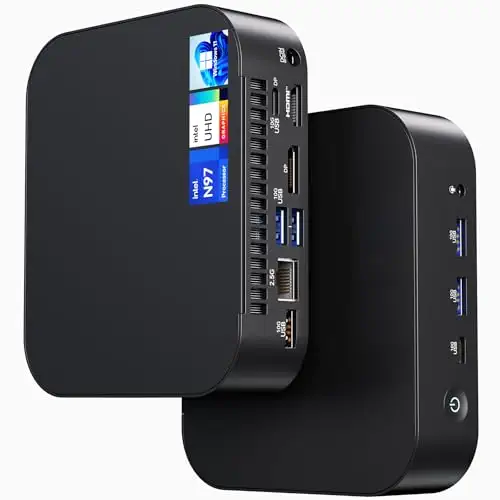
A low-cost NUC for light office work, digital signage and simple home tasks.

Processor
Intel N97
Memory
8GB
Storage
256GB SSD
Connectivity
Wi-Fi 6E, Bluetooth 5.3, 2.5GbE Ethernet
Operating system
Windows 11 Pro
Check price at Amazon

Prices and availability on Amazon change often.

Pros

  • Lowest price of the four picks
  • Low power draw for an always-on machine
  • Easy RAM and SSD access for upgrades

Cons

  • 8GB memory and a 256GB drive are tight for heavier work
  • Processor is well below the Core i5 and i7 models
3Best step-up
ASUS NUC 14 Pro, nuc mini pcASUS NUC 14 Pro, nuc mini pc, view 2ASUS NUC 14 Pro, nuc mini pc, view 3ASUS NUC 14 Pro, nuc mini pc, view 4ASUS NUC 14 Pro, nuc mini pc, view 5
1 / 5

ASUS NUC 14 Pro

A newer NUC with more memory and storage for heavier multitasking and creative work.

Processor
Intel Core Ultra 7 155H, 16 cores, up to 4.8 GHz
Graphics
Intel Arc integrated GPU
Memory
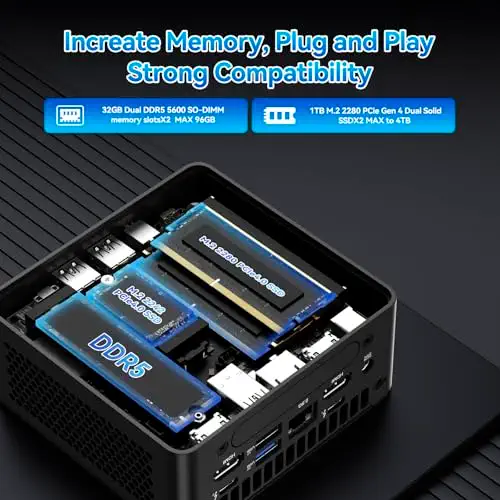
32GB DDR5-5600, expandable to 96GB
Storage
1TB PCIe 4.0 M.2 SSD
Display outputs
2x HDMI 2.1, 2x Thunderbolt 4
Connectivity
Wi-Fi 6E, Bluetooth 5.3, 2.5GbE Ethernet
Warranty
3 years, per listing
Check price at Amazon

Prices and availability on Amazon change often.

Pros

  • Newer processor and DDR5 memory
  • Tool-free case makes upgrades simple
  • 32GB and 1TB standard, with room to expand

Cons

  • Costs well above the Core i5 model
  • The integrated Arc graphics are not a gaming option
4Best for newer connectivity
ASUS NUC 15 Pro, nuc mini pcASUS NUC 15 Pro, nuc mini pc, view 2ASUS NUC 15 Pro, nuc mini pc, view 3ASUS NUC 15 Pro, nuc mini pc, view 4ASUS NUC 15 Pro, nuc mini pc, view 5
1 / 5

ASUS NUC 15 Pro

The newest model on the list, with Wi-Fi 7 and an NPU for local AI tasks.

Processor
Intel Core Ultra 7 255H, 16 cores, up to 5.1 GHz
Memory
32GB DDR5-5600, up to 64GB
Storage
1TB dual PCIe Gen4 NVMe slots, up to 2TB
Connectivity
Wi-Fi 7, Bluetooth 5.4, 2.5GbE Ethernet, Thunderbolt 4
Operating system
Windows, Linux compatible
Check price at Amazon

Prices and availability on Amazon change often.

Pros

  • Newest processor and Wi-Fi 7 on this list
  • Up to 64GB memory and 2TB storage
  • Works with Linux as well as Windows

Cons

  • Highest price on the list
  • Few independent reviews exist yet to confirm real-world results

FAQ

Which NUC is right for you?

For general office work and a home server, the ASUS NUC 13 Pro with a Core i5 is the easiest choice. If you run heavier multitasking or creative software, the Core Ultra 7 model with 32GB of memory is worth the extra cost. The N97 model suits basic tasks and digital signage.

What should you look for in a NUC?
  • Memory: 16GB is a comfortable minimum for most work; 32GB gives more room for virtual machines and browser tabs.
  • Storage: check whether the drive is M.2 NVMe and whether there is a spare slot for expansion.
  • Displays: count the monitors you plan to run and check the number of HDMI and Thunderbolt outputs.
  • Graphics: NUCs use integrated graphics, so they suit office work and video playback rather than gaming.
When a NUC is not the right choice?

If you want to play recent games or run heavy 3D rendering, a desktop with a dedicated graphics card will serve you better. Home Assistant alone runs well on a Raspberry Pi, so a NUC is only worth the extra cost if you plan to run other services alongside it.

Which NUC is best for me?

For most people, the ASUS NUC 13 Pro with a Core i5, 16GB memory and a 512GB SSD is the best balance of price and performance. Choose the Core Ultra 7 model if you want more memory and newer hardware.

What are the cheapest NUC options?

The Intel NUC 14 Essential with an N97 processor and 8GB memory is the lowest-cost option on this list. It suits light office work and digital signage rather than heavy multitasking.

Can a NUC run Home Assistant?

Yes. Reader discussions show NUCs running Home Assistant well, though a Raspberry Pi can run a basic setup on its own. A NUC makes more sense if you plan to run other services on the same machine.

Can I upgrade the memory and storage later?

Most of the listed NUCs let you upgrade memory and storage. The ASUS NUC 13 Pro can go up to 64GB of memory, and the NUC 14 Pro supports up to 96GB.

Meet the reviewer

Luka Lucheski

Luka Lucheski

Commerce Writer & Editor

Luka Lucheski is a content writer and editor with more than five years of experience in commerce content and digital publishing. He specializes in product reviews, buying guides, and comparison content. Over the years, he has edited and reviewed hundreds of articles across a wide range of categories, from tech and software to ecommerce and everyday consumer products.

    Why trust ConsumerEcho

    How we made this guide

    • 4 Amazon listings compared
    • 6 Expert and reader sources read
    • 4 Picks shown

    This shortlist is built from four Amazon listings, all checked for stock on the day of the build. We weighed the configurations, the specs listed on each listing, and what editorial reviews and owners on community forums have said about these machines.

    Our expert team tests products when it is needed and researches online and in interviews. Every guide is fact-checked and edited by a real person.

    The ConsumerEcho editorial team · Updated Nov 16, 2026

    Checking our work: 13 sources

    We earn a commission when you buy through our links, at no extra cost to you. It never decides the winner.