
 Redragon M901KBest overall
- Side buttons
- 12
- Total programmable buttons
- 19
- Max DPI
- 12,400
- Connection
- Wired
Most recommended by reviewers
Check price at Amazon


How we make money. If you buy through our links we may earn a commission. It never changes what we recommend. Learn more ›
We earn a commission when you buy through our links, at no extra cost to you. How this works.
If you play MMOs or MOBAs, you know the hard part isn't aiming. It's reaching the twelve spells, potions and macros you need without taking your hand off the mouse. A gaming mouse with a thumb grid acts like a number pad under your thumb, and that changes how fast you can react.
Our top pick is the Redragon M901K, which packs 19 remappable buttons with 12 on the side and holds up well for the price. The other three picks cover a bigger premium grid, a wireless option and a budget wired model, so you can match the layout to your game.
1 Redragon M901K | 2 Razer Naga V2 HyperSpeed | 3 Corsair Scimitar Elite Wireless SE | 4 RED SAMURAI Wireless | |
|---|---|---|---|---|
| Best for | Best overall | Best premium | Best wireless with a macro grid | Best budget wireless |
| Side buttons | 12 | Not listed | Not listed | 12 |
| Max DPI | 12,400 | Not listed | 33,000 | 16,000 |
| Connection | Wired | HyperSpeed 2.4 GHz and Bluetooth | Wireless (1,000 Hz polling), Bluetooth, USB | 2.4 GHz wireless and USB-C wired |
| Programmable buttons | Not listed | 19 | 16 | 16 |
| Battery life | Not listed | Up to 250 hours (2.4 GHz), 400 hours (Bluetooth) | Up to 150 hours | Up to 71 hours per charge |
| Check price at Amazon | Check price at Amazon | Check price at Amazon | Check price at Amazon |
Redragon M901KBest overallMost recommended by reviewers
Check price at Amazon Razer Naga V2 HyperSpeedBest premium
 Corsair Scimitar Elite Wireless SEBest wireless with a macro grid
 RED SAMURAI WirelessBest budget wireless

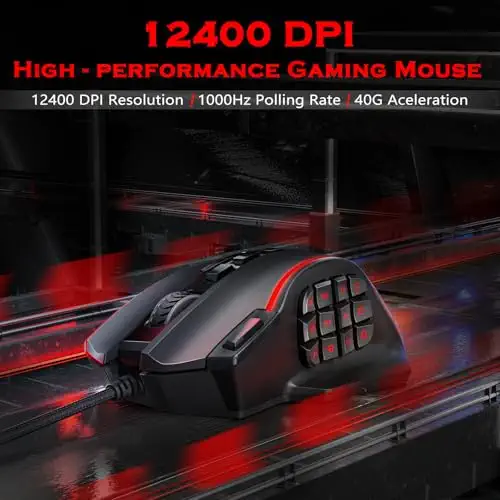


A wired MMO mouse with 12 side buttons and 19 remappable controls, built for players who need a big thumb grid.
Most recommended by reviewers
Check price at AmazonPrices and availability on Amazon change often.
For a gaming mouse with a number pad under your thumb, the Redragon M901K is the pick we'd recommend first, and it does that job at a price that feels fair for the button count.
The twelve side buttons are the reason this mouse stands out, giving you a thumb-operated keypad for MMO and MOBA macros. It pairs those 19 remappable buttons with five memory profiles, so your setups can switch with a click, and reviewers note its adjustable DPI and weight tuning with up to eight removable 2.4-gram weights. Owners on r/MouseReview have not reported on this model, so our read comes from its specs and reviewer notes. The price is modest for this many buttons.
The biggest trade-off is that it is wired, so it will not suit anyone who wants cable-free play. If you need wireless, the Corsair Scimitar Elite Wireless SE and Razer Naga V2 HyperSpeed both offer cable-free options at higher prices, with the Razer lasting up to 250 hours on 2.4 GHz.
If it's not for you, the Razer Naga V2 HyperSpeed suits players who want premium wireless and long battery life, while the RED SAMURAI Wireless MMO Mouse fits a tighter budget with 12 side keys and both wireless and wired modes.


A wireless MMO mouse with 19 programmable buttons and a swappable thumb grid for top-end play.
Prices and availability on Amazon change often.


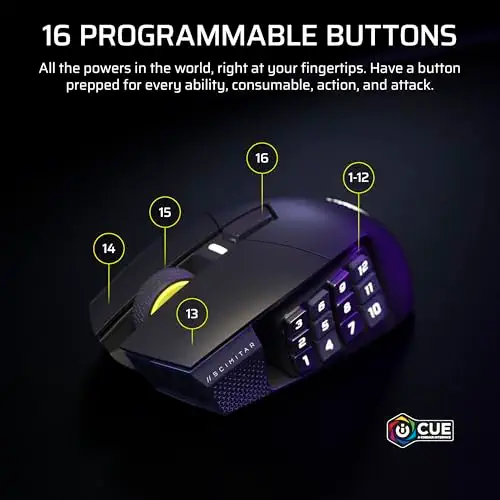


A wireless MMO mouse with 16 buttons and Stream Deck integration for players who want macros and streaming controls.
Prices and availability on Amazon change often.


A budget wireless mouse with 12 side buttons and 16,000 DPI for MMO play without a cable.
Prices and availability on Amazon change often.
If you play MMOs, MOBAs or any game with many hotkeys, a side-button grid puts your spells under your thumb. Many players find it cuts the need to reach for the keyboard.
If you mostly play fast shooters that reward a light mouse, a large side grid can add weight and accidental presses. Consider a simpler model in that case.
For MMOs and MOBAs, yes, because you can bind many spells and macros to thumb buttons. Shooter players often prefer fewer buttons.
Wired avoids battery and latency concerns. Wireless gives freedom of movement. Pick based on what matters more to you.
Most of the picks work with Windows and macOS, though some macro software is Windows only.
Yes. Experts note that many side buttons can take time to learn, so expect a short adjustment period.
Why trust ConsumerEcho
We built this shortlist from four Amazon listings, checked for stock and for a side-button grid that works like a number pad. Picks are weighed by how often editorial reviews and reader communities recommend them, and by how many thumb buttons they offer.
Our expert team tests products when it is needed and researches online and in interviews. Every guide is fact-checked and edited by a real person.
The ConsumerEcho editorial team · Updated Nov 22, 2026
How we pickEditorial standardsAffiliate disclosureReport a mistake
We earn a commission when you buy through our links, at no extra cost to you. It never decides the winner.


