
 Wacom Cintiq Pro 27Best for studio work
- Screen size
- 27 inches
- Resolution
- 4K UHD (3840 x 2160)
- Refresh rate
- 120 Hz
- Colour coverage
- 99% Adobe RGB, 98% DCI-P3
Most recommended by reviewers
Check price at Amazon


How we make money. If you buy through our links we may earn a commission. It never changes what we recommend. Learn more ›
We earn a commission when you buy through our links, at no extra cost to you. How this works.
If you want to draw straight onto the screen rather than look up at a monitor, a pen display is the tool to buy. The right one depends on your budget, how big a canvas you want, and how much colour accuracy your work needs.
Our top pick is the Wacom Cintiq 22, which reviewers see as a go-to for buyers who want Wacom quality without the price of the Pro line.
1 Wacom Cintiq Pro 27 | 2 Wacom Cintiq 22 | 3 HUION Kamvas 13 | 4 XPPen Artist 12 | 5 HUION Kamvas Pro 16 | |
|---|---|---|---|---|---|
| Best for | Best for studio work | Best overall | Best budget screen | Best portable pick | Best for a mid-size screen |
| Screen size | 27 inches | 22 inches | 13.3 inches | 11.9 inches | 15.6 inches |
| Resolution | 4K UHD (3840 x 2160) | Full HD (1920 x 1080) | Not listed | 1920 x 1080 | Not listed |
| Colour coverage | 99% Adobe RGB, 98% DCI-P3 | Not listed | 99% sRGB | Not listed | 120% sRGB, 92% Adobe RGB |
| Pen | Wacom Pro Pen 3, 8,192 pressure levels | Wacom Pro Pen 2, 8,192 pressure levels, tilt recognition | PenTech 4.0, 16,384 pressure levels | X4 pen, 16,384 pressure levels, 60-degree tilt | Battery-free, 60-degree tilt |
| Connection | Requires a computer | Requires a computer | USB-C, requires a computer | Single USB-C, requires a computer | 3-in-1 USB-C cable, requires a computer |
| Check price at Amazon | Check price at Amazon | Check price at Amazon | Check price at Amazon | Check price at Amazon |
Wacom Cintiq Pro 27Best for studio workMost recommended by reviewers
Check price at Amazon Wacom Cintiq 22Best overall
 HUION Kamvas 13Best budget screen
 XPPen Artist 12Best portable pick
 HUION Kamvas Pro 16Best for a mid-size screen


A large 4K pen display for professionals who need the most screen and colour accuracy.
Most recommended by reviewers
Check price at AmazonPrices and availability on Amazon change often.
For studio work, the Wacom Cintiq Pro 27 is the display we'd choose, and it suits artists who want the biggest, most colour-accurate screen available here.
At 27 inches, it has the largest canvas of any pick, with a 4K UHD panel, 99% Adobe RGB and 98% DCI-P3 coverage, and a 120 Hz refresh rate that reviewers say makes the Pro Pen 3 feel smooth. Owners on the wider Wacom community echo that Cintiq models are the ones art schools often recommend for classes. Eight customisable ExpressKeys and four quarter-inch mount points add plenty of room to build a workflow around it.
It is heavy, not easily portable, and reviewers note it is quite pricey and fan cooled, which can be a little noisy. If you need to move your setup often, the lighter Cintiq 22 or the XPPen Artist 12 3rd will suit you better.
If it's not for you, the Wacom Cintiq 22 offers Wacom pen feel at a lower price and weight, and the XPPen Artist 12 3rd suits anyone who draws on the move.


A 22-inch Wacom pen display that delivers the brand's pen feel at a far lower price than the Pro line.
Prices and availability on Amazon change often.

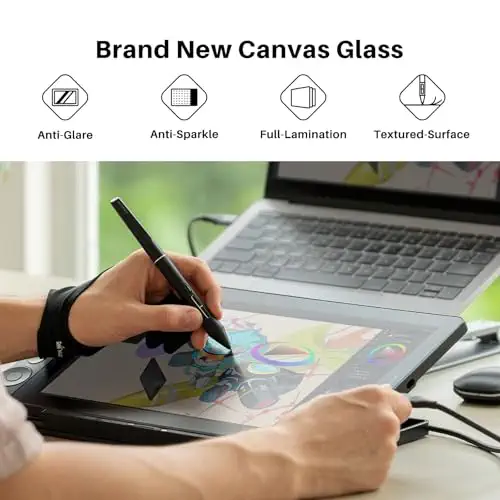


A compact 13.3-inch pen display with strong colour accuracy and a USB-C connection.
Prices and availability on Amazon change often.


An 11.9-inch pen display that is light enough to carry between classes or to a café.
Prices and availability on Amazon change often.


A 15.6-inch screen with a touch bar, six shortcut keys and an adjustable stand.
Prices and availability on Amazon change often.
Smaller screens of 11 to 13 inches are light and affordable, and suit sketching or travel. Mid-size 15 to 16 inch screens give you more room for detailed work. The 22 and 27 inch Wacom displays are for studios that draw large pieces at a desk.
The Wacom Cintiq 22 is our top overall pick for most artists. It offers Wacom's pen feel and a large canvas at a moderate price. For studios, the Cintiq Pro 27 is the strongest option.
Wacom has a long reputation for pen feel and reliability, and its Cintiq line is widely recommended in art schools. Huion offers good colour accuracy and features for less money, so it is a strong choice on a budget.
Yes. Every pen display on this list has its own screen but must be connected to a computer to work.
Why trust ConsumerEcho
This shortlist is built from five Amazon listings that were in stock at the time of checking, weighed against expert reviews and reader discussions on drawing tablets. Recommendations focus on screen size, color coverage, pen performance and budget.
Our expert team tests products when it is needed and researches online and in interviews. Every guide is fact-checked and edited by a real person.
The ConsumerEcho editorial team · Updated Nov 22, 2026
How we pickEditorial standardsAffiliate disclosureReport a mistake
We earn a commission when you buy through our links, at no extra cost to you. It never decides the winner.


