Add Consumer Echo as a preferred source on Google

How we make money. If you buy through our links we may earn a commission. It never changes what we recommend. Learn more ›

The Best Bluetooth Mouse Without Dongle

We earn a commission when you buy through our links, at no extra cost to you. How this works.

If your laptop has no spare USB port, or you simply don't want another tiny receiver to lose, a Bluetooth mouse that pairs directly with your computer is the easy answer. Here are the options that connect with no dongle at all, from a no-frills budget mouse to a premium model with programmable buttons.

The Logitech MX Master 3S is our top pick for most people who spend hours at a desk. It pairs over Bluetooth, tracks on almost any surface, and is quiet to use. The picks below cover a travel-sized option, a budget choice and a switch-between-devices model.

The rundown

1Logitech MX Master 3S, bluetooth mouse without dongleLogitech MX Master 3S2Logitech M240 Compact, bluetooth mouse without dongleLogitech M240 Compact3Logitech M196 Compact, bluetooth mouse without dongleLogitech M196 Compact4TECKNET Bluetooth Mouse, bluetooth mouse without dongleTECKNET Bluetooth Mouse
Best forBest overallBest for travelBest budgetBest for switching between devices
ConnectionBluetooth only (no receiver included)Bluetooth, no USB receiverBluetooth, no USB receiverTriple Bluetooth, 3-device switching
CompatibilityWindows, Mac, Linux, ChromeNot listedApple, Windows, ChromebookNot listed
Battery lifeNot listedListed as up to 18 months1 AA, listed 12-month life2 AA (not included), listed up to 2 years
ButtonsNot listed3, not customisable3, not customisableNot listed
Check price at AmazonCheck price at AmazonCheck price at AmazonCheck price at Amazon
1Best overall
Logitech MX Master 3S, bluetooth mouse without dongleLogitech MX Master 3S, bluetooth mouse without dongle, view 2Logitech MX Master 3S, bluetooth mouse without dongle, view 3Logitech MX Master 3S, bluetooth mouse without dongle, view 4Logitech MX Master 3S, bluetooth mouse without dongle, view 5
1 / 5

Logitech MX Master 3S

A premium Bluetooth-only mouse with quiet clicks, fast scrolling and customisable buttons, built for long desk sessions.

Connection
Bluetooth only (no receiver included)
Sensor
8000 DPI, works on glass
Click noise
About 90% quieter than standard clicks
Compatibility
Windows, Mac, Linux, Chrome

Most recommended by reviewers

Check price at Amazon

Prices and availability on Amazon change often.

Why we picked the Logitech MX Master

For a Bluetooth mouse that needs no dongle, the Logitech MX Master 3S is the one we'd pick for most people.

What we like

The MX Master 3S pairs straight over Bluetooth, so there is no receiver to lose or a spare port to find. Its 8000 DPI sensor tracks on almost any surface, including glass, and its clicks are about 90% quieter than standard ones, which suits shared rooms. Owners on r/mice are not quoted here, but the listing highlights its MagSpeed scrolling and app-based button customisation, which set it apart from the basic options.

Worth knowing

This is a full-size mouse, heavier and larger than travel models, so it is less suited to carrying around. If you want something to slip into a bag, the compact picks are a better fit.

If it's not for you, the Logitech M240 suits travelers who want a small, quiet, ambidextrous mouse, and the Logitech M196 is the budget choice for basic everyday use.

2Best for travel
Logitech M240 Compact, bluetooth mouse without dongleLogitech M240 Compact, bluetooth mouse without dongle, view 2Logitech M240 Compact, bluetooth mouse without dongle, view 3Logitech M240 Compact, bluetooth mouse without dongle, view 4Logitech M240 Compact, bluetooth mouse without dongle, view 5
1 / 5

Logitech M240 Compact

A small, quiet Bluetooth mouse that fits in a bag and pairs in seconds with no dongle.

Connection
Bluetooth, no USB receiver
Range
Up to 10 m / 33 ft
Battery life
Listed as up to 18 months
Buttons
3, not customisable
Check price at Amazon

Prices and availability on Amazon change often.

Pros

  • Compact and ambidextrous
  • Quiet clicks
  • Works with Windows, Mac, Linux, ChromeOS, iPadOS and Android

Cons

  • Only three non-customisable buttons
  • The 18-month battery life is a manufacturer claim
3Best budget
Logitech M196 Compact, bluetooth mouse without dongleLogitech M196 Compact, bluetooth mouse without dongle, view 2Logitech M196 Compact, bluetooth mouse without dongle, view 3Logitech M196 Compact, bluetooth mouse without dongle, view 4Logitech M196 Compact, bluetooth mouse without dongle, view 5
1 / 5

Logitech M196 Compact

A low-cost Bluetooth mouse with a contoured shape, recycled plastic and a long listed battery life.

Connection
Bluetooth, no USB receiver
Battery
1 AA, listed 12-month life
Buttons
3, not customisable
Compatibility
Apple, Windows, Chromebook
Check price at Amazon

Prices and availability on Amazon change often.

Pros

  • Low price
  • Lightweight and fits in any bag
  • Works on most surfaces

Cons

  • Basic feature set
  • Battery life is a manufacturer claim
4Best for switching between devices
TECKNET Bluetooth Mouse, bluetooth mouse without dongleTECKNET Bluetooth Mouse, bluetooth mouse without dongle, view 2TECKNET Bluetooth Mouse, bluetooth mouse without dongle, view 3TECKNET Bluetooth Mouse, bluetooth mouse without dongle, view 4TECKNET Bluetooth Mouse, bluetooth mouse without dongle, view 5
1 / 5

TECKNET Bluetooth Mouse

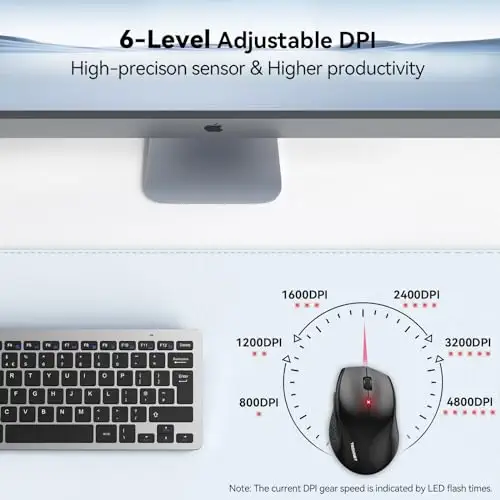
A full-size silent Bluetooth mouse that can be paired with three devices and switched with one button.

Connection
Triple Bluetooth, 3-device switching
DPI
6 levels, 800 to 4800
Battery
2 AA (not included), listed up to 2 years
Warranty
36 months (registered only)
Check price at Amazon

Prices and availability on Amazon change often.

Pros

  • Switches between three devices
  • Six adjustable DPI levels
  • Silent clicks

Cons

  • Batteries not included
  • Full-size shape may not suit small hands

FAQ

Who needs a Bluetooth mouse without a dongle?

A Bluetooth mouse suits anyone with no spare USB port, or anyone who wants to avoid a tiny receiver that can be lost. It is also useful for tablets and some laptops with limited ports.

What to check before you buy?
  • Confirm your computer supports Bluetooth.
  • Check whether batteries are included.
  • Decide whether you need programmable buttons.
Can I connect a wireless mouse without a dongle?

Yes. A Bluetooth mouse pairs directly with your computer over Bluetooth, so no USB receiver is needed. Your computer must have Bluetooth built in or via an adapter.

Are wireless mice better than Bluetooth?

Neither is better in general. Bluetooth mice save a USB port, while receiver-based mice can connect faster and more reliably on some systems.

What is the best brand of Bluetooth mouse?

Logitech is a common choice for Bluetooth mice, with models at several price points. Judge individual models rather than the brand alone.

Is there a mouse that doesn't need a surface?

Some mice track on glass and most surfaces, but none truly needs no surface at all. The MX Master 3S tracks on almost any surface, including glass.

Why trust ConsumerEcho

How we made this guide

  • 4 Listings compared
  • 3 Community lists read
  • 1 Editorial review read

The shortlist is built from four Amazon listings that are in stock now, each confirmed as Bluetooth-only with no USB receiver. We weighed the Bluetooth setup, battery life, scroll and sensor features, and size against what reader lists and one editorial review say about these models.

Our expert team tests products when it is needed and researches online and in interviews. Every guide is fact-checked and edited by a real person.

The ConsumerEcho editorial team · Updated Nov 15, 2026

Checking our work: 9 sources

We earn a commission when you buy through our links, at no extra cost to you. It never decides the winner.