
 ASUS ROG PG32UCDM3 32-inch 4K OLEDBest overall
- Resolution
- 3840 x 2160
- Refresh rate
- 240 Hz
- Panel
- QD-OLED
- HDR
- DisplayHDR 500 True Black
Most recommended by reviewers
Check price at Amazon


How we make money. If you buy through our links we may earn a commission. It never changes what we recommend. Learn more ›
 ASUS ROG PG32UCDM3 32-inch 4K OLEDBest overallRunner-up2
 ASUS VA249QG 24-inch Gaming MonitorBest budget

Reviewed by
Commerce Writer & Editor
Luka Lucheski is a content writer and editor with more than five years of experience in commerce content and digital publishing.
We earn a commission when you buy through our links, at no extra cost to you. How this works.
Choosing an ASUS monitor comes down to what you will use it for: fast gaming, colour-critical creative work, or a sensible everyday screen. The ASUS ROG PG32UCDM3 32-inch 4K OLED is the best all-round choice, a 4K, 240Hz QD-OLED that reviewers rate as the best ASUS monitor they have tested. Other models in this guide suit a smaller budget, a 1440p gaming setup, a 27-inch QD-OLED or colour-accurate ProArt work, so you can match the screen to your budget and desk.
Every product here is in stock on Amazon today and is built around one clear use.
1 ROG PG32UCDM3 32-inch 4K OLED | 2 VA249QG 24-inch Gaming Monitor | 3 TUF Gaming VG27AQM5A 27-inch 1440p | 4 ROG Strix 26.5-inch 1440p QD-OLED | 5 ProArt PA278QV 27-inch 1440p | |
|---|---|---|---|---|---|
| Best for | Best overall | Best budget | Best 1440p gaming | Best 360Hz OLED | Best for creative work |
| Resolution | 3840 x 2160 | 1920 x 1080 | 2560 x 1440 | 2560 x 1440 | 2560 x 1440 |
| Refresh rate | 240 Hz | 120 Hz | 300 Hz | 360 Hz | Not listed |
| Panel | QD-OLED | IPS | Fast IPS | QD-OLED | IPS |
| Response | Not listed | 1 ms MPRT | 0.3 ms GTG | 0.03 ms | Not listed |
| Check price at Amazon | Check price at Amazon | Check price at Amazon | Check price at Amazon | Check price at Amazon |
ASUS ROG PG32UCDM3 32-inch 4K OLEDBest overallMost recommended by reviewers
Check price at Amazon ASUS VA249QG 24-inch Gaming MonitorBest budget
 ASUS TUF Gaming VG27AQM5A 27-inch 1440pBest 1440p gaming
 ASUS ROG Strix 26.5-inch 1440p QD-OLEDBest 360Hz OLED
 ASUS ProArt PA278QV 27-inch 1440pBest for creative work


A large 4K OLED gaming monitor for buyers who want the top ASUS picture.
Most recommended by reviewers
Check price at AmazonPrices and availability on Amazon change often.
One catchPremium price well above most ASUS monitors.


A low-cost 1080p gaming screen with fast refresh and eye-care features.
Prices and availability on Amazon change often.


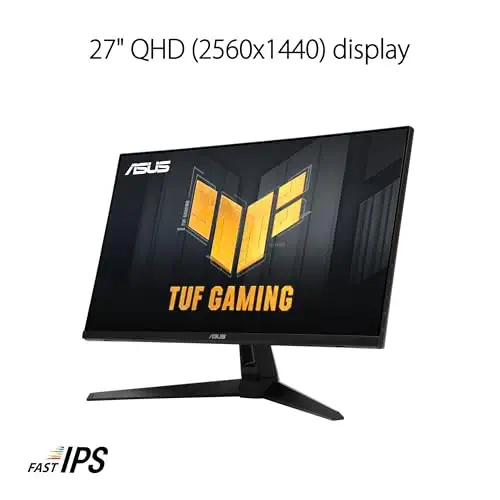


A 27-inch 1440p Fast IPS gaming monitor with very high refresh rate.
Prices and availability on Amazon change often.


A 360Hz QD-OLED for players who want OLED speed at 1440p.
Prices and availability on Amazon change often.
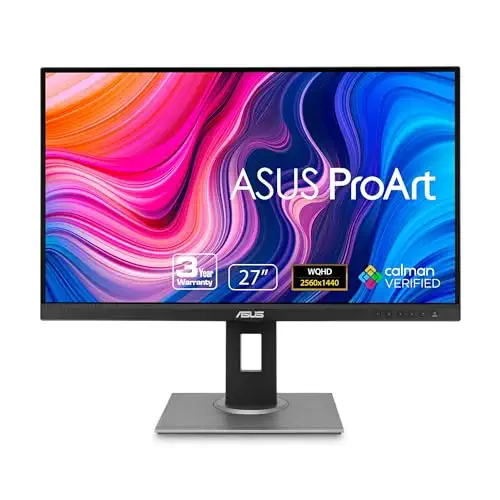


A Calman-verified IPS monitor for photo, video and design work.
Prices and availability on Amazon change often.
Gamers who want the fastest motion should look at the high-refresh picks. Creators who need accurate colour should choose the ProArt. Budget buyers can start with the 24-inch VA249QG.
OLED models cost more and need care to limit burn-in. If you show static images for hours each day, a standard IPS or Fast IPS panel may suit you better.
The ROG Swift PG32UCDM3 is the best overall pick. It offers a 4K OLED picture and 240Hz refresh rate.
The PG32UCDM3 leads for picture quality. For high refresh at 1440p, the XG27ACDNG is a strong option.
Models with HDMI 2.1 and VRR, such as the TUF VG27AQM5A, work well with PS5.
The ProArt PA278QV is the colour-accurate choice, with Calman verification and 100% sRGB coverage.
Reviewers generally rate ASUS monitors well for value and features, especially the TUF and ROG lines.
Meet the reviewer
Commerce Writer & Editor
Luka Lucheski is a content writer and editor with more than five years of experience in commerce content and digital publishing. He specializes in product reviews, buying guides, and comparison content. Over the years, he has edited and reviewed hundreds of articles across a wide range of categories, from tech and software to ecommerce and everyday consumer products.
Why trust ConsumerEcho
This shortlist is built from five Amazon listings, checked for stock and set against the specs and advice of expert reviews and retailer guides. Each pick is weighed for panel type, refresh rate, resolution and the job it is best suited to.
Our expert team tests products when it is needed and researches online and in interviews. Every guide is fact-checked and edited by a real person.
The ConsumerEcho editorial team · Updated Nov 10, 2026
How we pickEditorial standardsAffiliate disclosureReport a mistake
We earn a commission when you buy through our links, at no extra cost to you. It never decides the winner.



