
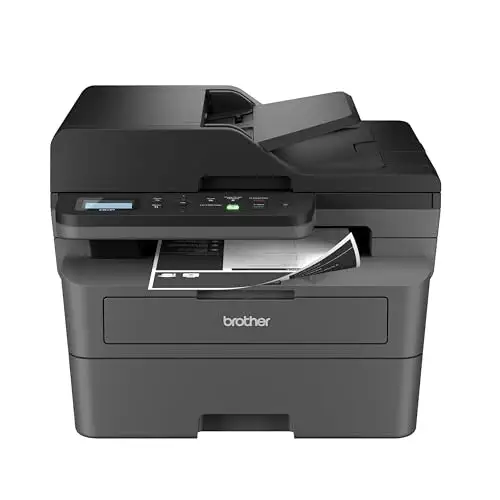
 Brother DCP-L2640DWBest overall
- Print speed
- Up to 36 ppm
- Scan speed
- Up to 23.6 ipm black, 7.9 ipm color
- Document feeder
- 50 pages
- Connectivity
- Dual-band Wi-Fi, Ethernet, USB
Most recommended by reviewers
Check price at Amazon


How we make money. If you buy through our links we may earn a commission. It never changes what we recommend. Learn more ›
Brother DCP-L2640DWBest overallRunner-up2 Epson Workforce Pro WF-4820Best for a busy small office

Reviewed by
Content Editor & Fact-checker
As a proofreader, I focus on the finer details, so it's only natural that I bring the same eye for detail to the world of e-commerce.
We earn a commission when you buy through our links, at no extra cost to you. How this works.
An all-in-one printer does three jobs in one box: it prints, scans and copies. For a home office or a small business, that means one machine on the desk instead of three, and a single set of supplies to keep track of.
Our top pick is the Brother DCP-L2640DW. It is a compact black-and-white laser that prints quickly, has a 50-page document feeder for multi-page scanning and copying, and connects over dual-band Wi-Fi or Ethernet. The other four picks cover color inkjet, bigger offices and tighter budgets.
| 1Brother DCP-L2640DW | 2Epson Workforce Pro WF-4820 | 3 HP OfficeJet Pro 8135 | 4 Canon PIXMA TR4520 | 5 Canon PIXMA TS6520 | |
|---|---|---|---|---|---|
| Best for | Best overall | Best for a busy small office | Best bang for the buck | Best for light home use | Best budget color |
| Print speed | Up to 36 ppm | 25 ppm black, 12 ppm color (ISO) | Up to 20 ppm black, 10 ppm color | Not listed | Not listed |
| Document feeder | 50 pages | 35 pages | Not listed | Built-in ADF | Not listed |
| Connectivity | Dual-band Wi-Fi, Ethernet, USB | Wi-Fi, Ethernet | Not listed | Wireless, USB | Dual-band Wi-Fi |
| Duplex | Yes | Yes | Yes | Not listed | Yes |
| Check price at Amazon | Check price at Amazon | Check price at Amazon | Check price at Amazon | Check price at Amazon |
Brother DCP-L2640DWBest overallMost recommended by reviewers
Check price at AmazonEpson Workforce Pro WF-4820Best for a busy small officeHP OfficeJet Pro 8135Best bang for the buckCanon PIXMA TR4520Best for light home useCanon PIXMA TS6520Best budget color


A compact black-and-white laser with a 50-page feeder and fast printing, built for steady office work.
Most recommended by reviewers
Check price at AmazonPrices and availability on Amazon change often.
The Brother DCP-L2640DW is our pick for most small offices, because it pairs fast black-and-white printing with a 50-page feeder and flexible networking in one compact body.
At up to 36 ppm, it is the fastest printer among the picks we compared, which matters when a busy desk is churning out documents all day. The 50-page automatic document feeder makes multi-page scanning and copying quick, and dual-band Wi-Fi, Ethernet and USB give you several ways to connect. Owners report it ran about 6,000 pages in a work setting without any problems. Owners on r/printers report that the older L2540DW has run for 12 years, and that it can sit unused for months and still print well.
This is a black-and-white only machine, so it will not serve you for color photos or colored documents. If you need color, one of the other picks on this list will fit better.
If it's not for you, the Epson Workforce Pro WF-4820 suits offices that need color printing and a 250-sheet tray, though its cartridges are costlier, and the HP OfficeJet Pro 8135 suits buyers who want affordable color for home offices.


A color inkjet built for volume, with a 35-sheet feeder and a 250-sheet tray.
Prices and availability on Amazon change often.
The WF-4820 is aimed at offices that print a lot of color and black text in the same week. Its 25 ppm black speed and 250-sheet tray mean fewer refills, and the feeder makes batch scanning practical.
Expert reviewers call it a workhorse for offices and workgroups, though the ink cost is the main thing to plan for. Check the duplex scanning limit before you buy if you scan both sides often.


A compact home-office color printer with a touchscreen, auto duplex and a 225-sheet tray.
Prices and availability on Amazon change often.
The OfficeJet Pro 8135 is the budget-friendly color option for a home office. You get auto duplex, a 225-sheet tray and a touchscreen, plus printing straight from a phone.
Expert reviewers praise its color output on a range of papers, and it stays compact for a small desk. The trade-off is the Instant Ink subscription, which becomes a monthly cost once the trial ends.


A small wireless color inkjet that handles photos and documents, with Alexa voice control.
Prices and availability on Amazon change often.
The TR4520 suits a household or light home office that wants photo-quality color without a large machine. It fits easily on a desk and the feeder keeps copies simple.
Expert reviewers note it prints well in several formats and that the Alexa link is handy for shopping lists and printing from a voice command. Expect document printing to be on the slow side.
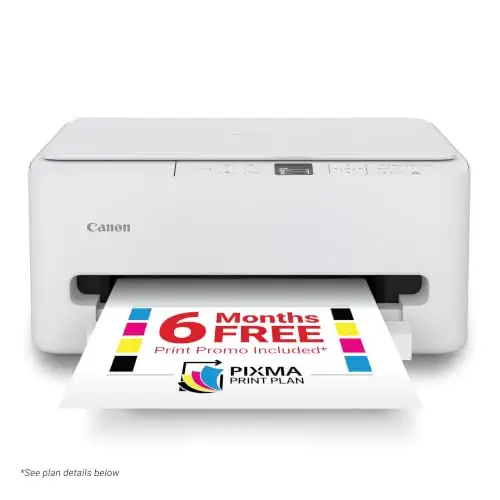


A budget color all-in-one with dual-band Wi-Fi and automatic 2-sided printing.
Prices and availability on Amazon change often.
The TS6520 is the lowest-priced color option in this shortlist. It offers dual-band Wi-Fi and automatic duplex printing, which saves paper for a home office or hybrid worker.
The research for this model is thin, so the case rests on the listing. It's a reasonable pick for light use, but check the scanning and copying speed yourself before buying.
If you mostly print black text and scan paperwork, the Brother DCP-L2640DW is the simplest choice. If you print color photos or colored documents, the Canon and HP color inkjets cover that. For a busy office with a shared network, the Epson WF-4820 handles the volume.
For mostly text, the Brother DCP-L2640DW is the strongest pick, with fast printing and a 50-page feeder. For color, the HP OfficeJet Pro 8135 is the budget choice.
Brother's black-and-white laser models get strong owner reports for reliability and cheap consumables, while HP's color inkjets suit budget color printing. The better fit depends on whether you print mostly text or color.
An all-in-one saves desk space and one set of supplies. A separate scanner can give better scan quality for photos or art, but for paperwork, an all-in-one with a feeder is usually enough.
The Epson Workforce Pro WF-4820 is built for volume, with a 250-sheet tray and a 35-sheet feeder. Check the ink cost before buying.
Meet the reviewer
Content Editor & Fact-checker
As a proofreader, I focus on the finer details, so it's only natural that I bring the same eye for detail to the world of e-commerce. Whether it's scanning product listings, testing the claims, or comparing competitors, I cover both quality and value for money. My goal is to provide honest and detail-focused reviews to make your online buying experience better.
Why trust ConsumerEcho
We built this shortlist from five Amazon listings, each checked to be in stock and sold through Amazon. We weighed what expert reviews and owners say about print quality, scanning, copying and running costs.
Our expert team tests products when it is needed and researches online and in interviews. Every guide is fact-checked and edited by a real person.
The ConsumerEcho editorial team · Updated Nov 16, 2026
How we pickEditorial standardsAffiliate disclosureReport a mistake
We earn a commission when you buy through our links, at no extra cost to you. It never decides the winner.





