 XWKJLIE Fox 3D ScannerBest overall
- Accuracy
- 0.07mm
- Resolution
- 0.10mm
- Scan range
- 40 to 1200mm
- Weight
- 210g
Most recommended by reviewers
Check price at Amazon


How we make money. If you buy through our links we may earn a commission. It never changes what we recommend. Learn more ›
We earn a commission when you buy through our links, at no extra cost to you. How this works.
If you want to start 3D scanning without a steep learning curve, the first decision is which kind of scanner suits your projects. Owners often say the scan itself is only the start, because the cleanup and modeling take real time, so it helps to pick something forgiving and well supported.
Our No. 1 pick is the 3DMakerpro Fox, which combines markerless tracking, 0.07mm accuracy and a range of object sizes at a sensible price. The other picks cover a budget option, a larger-format scanner and a more advanced choice for people who want to grow into it.
1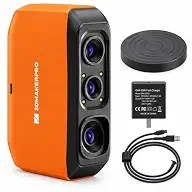 XWKJLIE Fox 3D Scanner | 2 3DMakerpro Fox 3D Scanner | 3 3DMakerpro Moose Lite | 4 Creality CR-Scan Raptor | |
|---|---|---|---|---|
| Best for | Best overall | Best budget | Best for a shaky hand | Best for growing into it |
| Accuracy | 0.07mm | 0.07mm | 0.05mm | 0.02mm |
| Resolution | 0.10mm | Not listed | 0.10mm | Not listed |
| Scan range | 40 to 1200mm | 40 to 1200mm | 15 to 1500mm | 5 to 2000mm |
| Export formats | OBJ, STL, PLY, ASC | OBJ, STL, PLY, ASC | Not listed | Not listed |
| Frame rate | Not listed | Not listed | 10 FPS | Up to 60fps blue laser |
| Check price at Amazon | Check price at Amazon | Check price at Amazon | Check price at Amazon |
XWKJLIE Fox 3D ScannerBest overallMost recommended by reviewers
Check price at Amazon 3DMakerpro Fox 3D ScannerBest budget
 3DMakerpro Moose LiteBest for a shaky hand
 Creality CR-Scan RaptorBest for growing into it
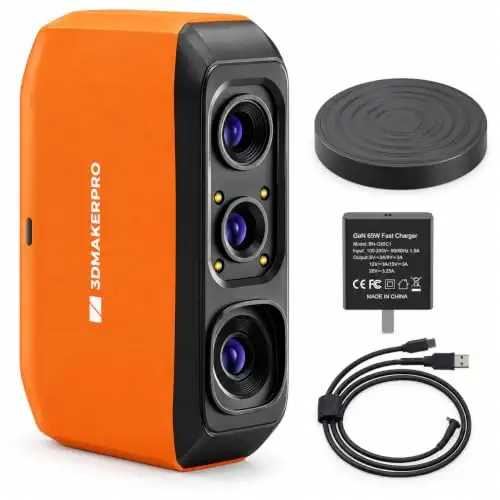


A markerless handheld scanner with 0.07mm accuracy that suits beginners who want clean results without stickers or markers.
Most recommended by reviewers
Check price at AmazonPrices and availability on Amazon change often.
The XWKJLIE Fox 3D Scanner is our top pick for a beginner, because it pairs 0.07mm accuracy with markerless AI tracking that spares you from placing target stickers on your object.
At 210g it is light enough for long handheld sessions, and its 40 to 1200mm scan range covers everything from small collectibles to full-size subjects with one device. The AI SLAM tracking re-locks onto scanned areas when it loses track, so you can keep going instead of restarting. Owners on the product's forums describe the setup as quick once the software is running, and the JMStudio workflow includes one-click processing that turns raw scans into printable meshes. Owners on r/3DScanning report that the Fox is touchy without good reference markers, and one owner found a printed turntable reference plate helped.
Good results still take a learning curve and some basic modeling skills, as both the listing and owners note. Expect to spend time refining scans before they are ready for printing or CAD work.
If it's not for you, the 3DMakerpro Fox matches its 0.07mm accuracy at a lower price for those on a tight budget, while the 3DMakerpro Moose Lite suits steadier-hand-challenged users who want optical anti-shake and will pay roughly twice the Fox's cost.


A lower-cost entry point into the same Fox family for beginners willing to learn the software.
Prices and availability on Amazon change often.


A handheld scanner with optical anti-shake and a re-scan function, aimed at users who find steady scanning hard.
Prices and availability on Amazon change often.


A higher-end scanner with blue and infrared modes and 0.02mm accuracy for people who expect their projects to outgrow entry models.
Prices and availability on Amazon change often.
If you want accurate models for 3D printing and small objects, the Fox is the easiest place to start. If your hands are not steady, the Moose Lite is worth the extra cost. If you expect to grow into professional work, the Raptor covers the higher accuracy you will need.
Owners often say that for simple parts, calipers are faster than preparing an object for a scan. If you only need a rough copy of a single object, a phone-based photogrammetry app may be enough to try before you buy hardware.
It depends on how often you need to copy objects. Owners say scans are a starting point, not a finished part, so expect to spend time modeling. For occasional simple parts, calipers can be quicker.
The Fox is the easiest choice for home use because it is lightweight, markerless and covers a wide range of object sizes. Check that your computer can run the software first.
Results depend on the object's surface and the lighting.
For most beginners the XWKJLIE Fox offers the best balance of accuracy and ease of use. Choose the Raptor only if you need higher accuracy than the entry models provide.
Why trust ConsumerEcho
We started from four Amazon listings that were in stock and available to buy now. Each shortlisted scanner was weighed on accuracy, scan size, ease of setup for beginners, and the extra software and computer needs that reviewers and owners raised.
Our expert team tests products when it is needed and researches online and in interviews. Every guide is fact-checked and edited by a real person.
The ConsumerEcho editorial team · Updated Nov 15, 2026
How we pickEditorial standardsAffiliate disclosureReport a mistake
We earn a commission when you buy through our links, at no extra cost to you. It never decides the winner.