
 Lenovo ChromebookBest overall
- Screen
- 11.6-inch IPS
- Weight
- 2.69 lb
- Processor
- Intel N150, 4-core
- Memory
- 4GB LPDDR5X
Most recommended by reviewers
Check price at Amazon


How we make money. If you buy through our links we may earn a commission. It never changes what we recommend. Learn more ›

Reviewed by
Content Reviewer & Fact-Checker
I’m an e-commerce content reviewer and fact-checker with a background in copywriting and over six years of professional experience.
We earn a commission when you buy through our links, at no extra cost to you. How this works.
If you want a light, simple laptop for school, travel or browsing, an 11-inch Chromebook is hard to beat. The best all-round pick is the Lenovo Chromebook Duet, because it is compact, folds into a tablet and suits smaller hands. The rest of the list covers rugged builds, longer battery life and cheaper deals.
Each pick below was chosen for a specific need, so you can match the one that fits how you will use it.
1 Lenovo Chromebook | 2 HP Chromebook 11 | 3 ASUS Chromebook C203XA | 4 ASUS Chromebook CR11 | 5 Dell Convertible Chromebook | |
|---|---|---|---|---|---|
| Best for | Best overall | Best budget | Best for tough use | Best for long battery and new Chrome features | Best 2-in-1 value |
| Screen | 11.6-inch IPS | 11.6-inch HD | 11.6-inch HD, 180-degree hinge | 11.6-inch anti-glare HD | 11-inch HD IPS touchscreen |
| Processor | Intel N150, 4-core | Intel Celeron N3060 | MediaTek Quad-Core MT8173C | Intel N100 | Intel Quad-Core up to 2.2GHz |
| Memory | 4GB LPDDR5X | 2GB | 4GB | 4GB | 4GB |
| Storage | Not listed | 16GB eMMC | 32GB eMMC | 64GB eMMC | 32GB |
| Check price at Amazon | Check price at Amazon | Check price at Amazon | Check price at Amazon | Check price at Amazon |
Lenovo ChromebookBest overallMost recommended by reviewers
Check price at Amazon HP Chromebook 11Best budget
 ASUS Chromebook C203XABest for tough use
 ASUS Chromebook CR11Best for long battery and new Chrome features
 Dell Convertible ChromebookBest 2-in-1 value


A light, well-equipped 11.6-inch Chromebook with a privacy webcam and strong battery for everyday use.
Most recommended by reviewers
Check price at AmazonPrices and availability on Amazon change often.
For a light, well-equipped 11-inch Chromebook, the Lenovo 11.6-inch (2026) is our pick for most people searching this category.
At 2.69 pounds with a slim 0.73-inch profile, it is easy to slip into a backpack for classes or travel. It pairs an Intel N150 four-core processor with 4GB of LPDDR5X memory, and its 50Wh battery is backed by a 65W USB-C charger for quick top-ups. The physical privacy shutter on the 720p webcam and the Google H1 security chip are thoughtful touches that many budget models skip. Its dual USB-C ports, dual USB-A and HDMI give it more connectivity than most picks here.
The 4GB of memory is soldered to the board, so it cannot be upgraded later. Compared with the 2GB HP, it has double the memory, and it shares the same 4GB as the ASUS and Dell models. If you want a rugged build or a touchscreen, you will need to look at the other picks.
If it's not for you, the ASUS Chromebook C203XA suits classrooms and accident-prone use with its military-grade body and spill-resistant keyboard, while the HP Chromebook 11 inch fits buyers who need the lowest price.


A cheap, lightweight 11-inch Chromebook for basic browsing and documents.
Prices and availability on Amazon change often.
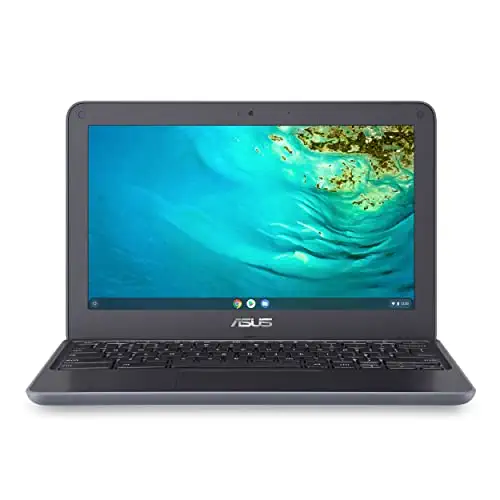
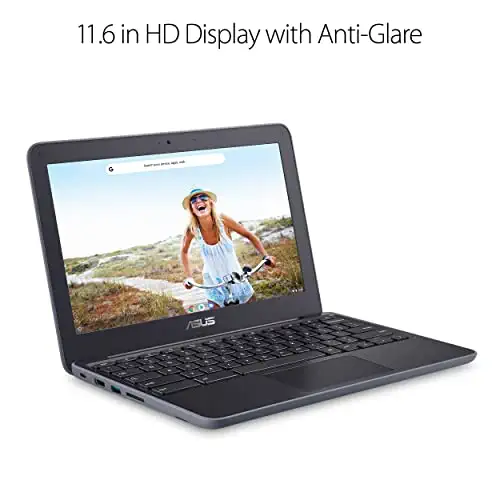


A rugged, spill-resistant 11.6-inch Chromebook built for classrooms and rough handling.
Prices and availability on Amazon change often.


A ruggedized 11.6-inch Chromebook with Wi-Fi 6E, 64GB storage and a free three-month AI plan.
Prices and availability on Amazon change often.


A low-cost 11-inch convertible Chromebook with a touchscreen that folds into tablet mode.
Prices and availability on Amazon change often.
For everyday school and browsing, the Lenovo Chromebook 11.6 inch is the best all-round choice. For the lowest price, the HP Chromebook 11 is a simple option. If the device will take knocks in a classroom, the ASUS C203XA is built for it.
For most 11-inch buyers, the Lenovo Chromebook 11.6 inch is the best pick. It combines a light body, a 50Wh battery and a privacy webcam.
Yes, for browsing, documents, streaming and school work. It is not suited to heavy gaming or video editing.
Check the current price on Amazon.
Model years vary. Check the listing for the exact model year before buying, since support depends on age.
They run Chrome OS, so they do not support traditional Windows software, and local storage is limited.
Chrome OS runs on less powerful hardware than Windows or macOS, so manufacturers can build them more cheaply.
Meet the reviewer
Content Reviewer & Fact-Checker
I’m an e-commerce content reviewer and fact-checker with a background in copywriting and over six years of professional experience. My experience in creating and refining digital content allows me to assess product information, review written content for accuracy and clarity, and help ensure shoppers have access to reliable, informative and engaging content.
Why trust ConsumerEcho
This shortlist is built from five Amazon listings that are in stock now, checked against expert reviews and owner discussions. We weighed screen size, battery life, memory, storage and build for everyday school and travel use.
Our expert team tests products when it is needed and researches online and in interviews. Every guide is fact-checked and edited by a real person.
The ConsumerEcho editorial team · Updated Nov 16, 2026
How we pickEditorial standardsAffiliate disclosureReport a mistake
We earn a commission when you buy through our links, at no extra cost to you. It never decides the winner.



