Acer Chromebook Plus Spin 714Best overall
- Processor
- Intel Core Ultra 5 115U, 8 cores, up to 4.2 GHz
- Memory
- 8GB
- Storage
- 256GB SSD
- Display
- 14-inch WUXGA IPS touchscreen, 100% sRGB
Most recommended by reviewers
Check price at Amazon


How we make money. If you buy through our links we may earn a commission. It never changes what we recommend. Learn more ›
Acer Chromebook Plus Spin 714Best overallRunner-up2 Acer Plus Spin 714 DockingBest for extra storage

Reviewed by
Commerce Writer & Editor
Luka Lucheski is a content writer and editor with more than five years of experience in commerce content and digital publishing.
We earn a commission when you buy through our links, at no extra cost to you. How this works.
If you want a Chromebook that feels premium without a laptop-sized price, the Acer Chromebook Spin 714 family is the line most people land on. It is a 14-inch 2-in-1 that folds into a tablet, and the model you choose mostly comes down to memory, storage and whether you want the stylus.
The Acer Chromebook Plus Spin 714 with Google AI, 14-inch WUXGA touchscreen, Core Ultra 5 and 8GB of memory is our top pick for most buyers. It covers the core experience reviewers praise most: a solid aluminum body, a strong trackpad and reliable everyday speed. The other picks cover more storage, a bigger budget tier and a stylus-equipped option.
| 1Chromebook Plus Spin 714 | 2Plus Spin 714 Docking | 3 Chromebook Plus Spin 714 Stylus | 4 Chromebook Spin 714 128GB | 5Chromebook Spin 714 256GB | |
|---|---|---|---|---|---|
| Best for | Best overall | Best for extra storage | Best with a stylus | Best budget | Best value |
| Processor | Intel Core Ultra 5 115U, 8 cores, up to 4.2 GHz | Intel Core Ultra 5 115U | Intel Core Ultra 5 115U, 8 cores, up to 4.2 GHz | 13th Gen Intel Core i5-1335U, 10 cores | 13th Gen Intel Core i5-1335U, 10 cores |
| Memory | 8GB | 8GB LPDDR5 | 32GB LPDDR5 | 8GB LPDDR4X | 8GB LPDDR4X |
| Storage | 256GB SSD | 256GB SSD plus 160GB via docking station | 256GB PCIe NVMe SSD | 128GB PCIe SSD | 256GB PCIe SSD |
| Display | 14-inch WUXGA IPS touchscreen, 100% sRGB | 14-inch WUXGA touch 2-in-1 | 14-inch WUXGA IPS touch, 340 nits | 14-inch WUXGA touchscreen | 14-inch WUXGA IPS touchscreen |
| Ports | 2x USB-C Thunderbolt 4, 1x USB-A 3.2, 1x HDMI 1.4b | 2x USB-C, 1x HDMI, 1x headphone | Not listed | 2x USB-C (Thunderbolt 4), 1x USB-A, 1x HDMI | 2x USB-C (Thunderbolt 4), 1x USB-A, 1x HDMI |
| Wireless | Not listed | Not listed | Wi-Fi 6E, Bluetooth 5.3 | Wi-Fi 6E, Bluetooth 5.2 | Wi-Fi 6E, Bluetooth 5.2 |
| Check price at Amazon | Check price at Amazon | Check price at Amazon | Check price at Amazon | Check price at Amazon |
Acer Chromebook Plus Spin 714Best overallMost recommended by reviewers
Check price at AmazonAcer Plus Spin 714 DockingBest for extra storageAcer Chromebook Plus Spin 714 StylusBest with a stylusAcer Chromebook Spin 714 128GBBest budgetAcer Chromebook Spin 714 256GBBest value


The balanced Spin 714: a sharp 14-inch touchscreen, Core Ultra 5 speed and a solid aluminum body at a sensible price.
Most recommended by reviewers
Check price at AmazonPrices and availability on Amazon change often.
The Acer Chromebook Plus Spin 714 with Core Ultra 5, 8GB and 256GB is our pick for most people searching this model, because it pairs a capable processor with a well-rounded set of ports.
Reviewers found performance very good, with above-average speed for productivity and web-based tasks, and reported battery life of 13.75 hours in light web browsing tests and 10.25 hours in heavier 4K video playback tests. Owners on the same listing praise the screen, keyboard, built-in stylus, ports and webcam, and one owner calls the trackpad glass-like and very responsive. The all-aluminum body is also a standout, and it meets the MIL-STD 810G drop standard. Owners on r/chromeos report mixed experiences with the Spin 714, from a month of trouble-free use to near-daily crashes and reboots.
Reviewers measured the display as brighter than most but highly prone to glare, which makes it harder to see in lit rooms or outdoors. Some owners also report a popping sound from the speakers that occurs even when muted, and the device is a bit heavier and thicker than some Ultrabook-style 2-in-1s.
If it's not for you, the Plus Spin 714 with the 32GB memory and stylus suits heavy multitaskers, while the Core i5-1335U 256GB model suits buyers who want to spend less.


Same Core Ultra 5 core as the top pick, plus a bundled dock and 160GB of extra storage for people who keep a lot of files local.
Prices and availability on Amazon change often.

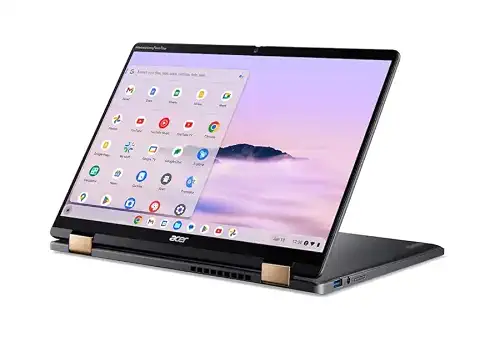


Adds a stylus pen and 32GB of memory for note-taking and heavier multitasking, at a lower price than the base model.
Prices and availability on Amazon change often.


The lowest-priced Spin 714 with a 13th Gen Core i5 and a touchscreen, for buyers who want the form factor on a tighter budget.
Prices and availability on Amazon change often.
The same 13th Gen Core i5 as the budget pick with double the storage, a good middle ground on price and space.
Prices and availability on Amazon change often.
Choose the base model if you mostly browse, write and join video calls. Choose the storage bundle if you keep many files local. Choose a stylus model if you take notes by hand. Budget buyers who can live with 128GB will get the same form factor for less.
The newer Core Ultra 5 models carry the Chromebook Plus badge, which brings built-in AI features. Older Core i5 versions do not, so check the listing title before you buy.
One expert review measured 9 hours 30 minutes on a reviewed unit, while one expert review recorded 13.75 hours in light web browsing and 10.25 hours in heavy 4K playback. Real-world life depends on brightness and workload.
Chromebooks run on Chrome OS, so they can’t install Windows-only programs, which rules out a lot of professional software and most PC games. The keyboard layout is also a bit different, with no caps-lock key and some function keys behaving differently. If you rely on specific apps, it’s worth checking they work on Chrome OS before you buy.
Reviewers praise its build, keyboard and trackpad and its performance for everyday work. The main weaknesses are a glare-prone screen and modest speakers.
This page covers only the Acer Spin 714 family, so we cannot compare it with the Lenovo model here. Compare specs, price and stylus support on both listings before deciding.
Meet the reviewer
Commerce Writer & Editor
Luka Lucheski is a content writer and editor with more than five years of experience in commerce content and digital publishing. He specializes in product reviews, buying guides, and comparison content. Over the years, he has edited and reviewed hundreds of articles across a wide range of categories, from tech and software to ecommerce and everyday consumer products.
Why trust ConsumerEcho
The shortlist is built from five Amazon listings for the Spin 714 family, checked for stock and configuration. Picks are weighed on what editorial reviews and owner discussions say about performance, battery, screen and build.
Our expert team tests products when it is needed and researches online and in interviews. Every guide is fact-checked and edited by a real person.
The ConsumerEcho editorial team · Updated Nov 16, 2026
How we pickEditorial standardsAffiliate disclosureReport a mistake
We earn a commission when you buy through our links, at no extra cost to you. It never decides the winner.