
 Wacom Intuos SmallBest overall
- Connection
- Wired USB
- Pen
- Battery-free, pressure sensitive
- ExpressKeys
- 4
Most recommended by reviewers
Check price at Amazon


How we make money. If you buy through our links we may earn a commission. It never changes what we recommend. Learn more ›
We earn a commission when you buy through our links, at no extra cost to you. How this works.
If you want to start drawing digitally, or use a tablet for notes and photo edits, a small Wacom tablet is the easiest place to begin. Small models sit comfortably on a desk and cost far less than screen tablets.
Our top pick is the Wacom Intuos Small Wired, the most affordable way into Wacom's pen-on-paper feel. The other picks cover Bluetooth wireless use, a budget option, and a newer One model, so you can match the tablet to how you plan to use it.
1 Intuos Small | 2 Intuos Small Bluetooth | 3 Intuos Creative | 4 One Small | |
|---|---|---|---|---|
| Best for | Best overall | Best wireless | Best budget | Newest model |
| Connection | Wired USB | Bluetooth or USB-A | Not listed | Bluetooth or USB-C |
| Pen | Battery-free, pressure sensitive | Battery-free, pressure sensitive | Battery-free | Battery-free, 4096 pressure levels |
| ExpressKeys | 4 | 4 | Not listed | Not listed |
| Check price at Amazon | Check price at Amazon | Check price at Amazon | Check price at Amazon |
Wacom Intuos SmallBest overallMost recommended by reviewers
Check price at Amazon Wacom Intuos Small BluetoothBest wireless
 Wacom Intuos CreativeBest budget
 Wacom One SmallNewest model
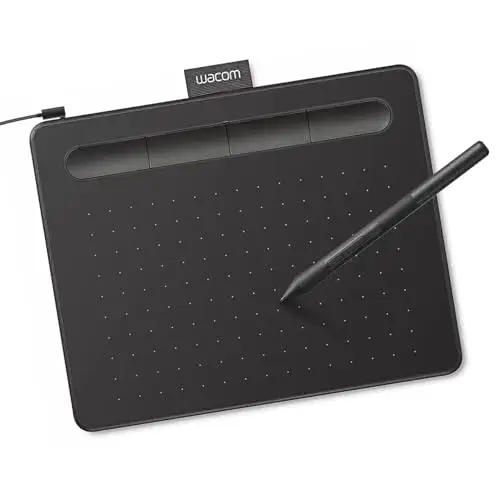


The simplest small Wacom: a battery-free pen and four shortcut keys over a USB connection.
Most recommended by reviewers
Check price at AmazonPrices and availability on Amazon change often.
For a small Wacom tablet at a sensible price, we'd pick the Wacom Intuos Small Wired, since it gives you the battery-free, pen-on-paper feel Wacom is known for with four customizable ExpressKeys.
The pen needs no battery, so there is nothing to charge and the pen stays light in hand, which suits drawing and photo editing. Owners on drawing forums mention that a screenless Intuos Small was a first tablet for one commenter at about $50, which fits the sense that this is an accessible entry point. Wacom also bundles software with the purchase, and some of its tablets come with a free year-long limited license for drawing programs. Owners on r/drawingtablet report that the Intuos Small is plug-and-play and can last for many years of heavy use, with one owner using theirs for eight years.
The wired connection is the main trade-off, since there is no Bluetooth and the tablet has to stay plugged into your computer. If you want to move between desk, sofa or classroom, the Bluetooth version is the better fit.
If it's not for you, the Wacom Intuos Small Bluetooth suits people who want to work untethered, and the Wacom One Small Bluetooth is the newer model with USB-C and tilt recognition for those willing to pay more.


The same small Intuos, with Bluetooth so you can work without the cable.
Prices and availability on Amazon change often.


A renewed small Intuos at the lowest price in this list, for buyers who want to save the most.
Prices and availability on Amazon change often.


A newer small Wacom One with Bluetooth and USB-C, aimed at beginners and everyday use.
Prices and availability on Amazon change often.
Small Wacom tablets suit beginners, students and anyone who wants to use a pen on a desk without a large budget. Owner discussions note that screenless tablets take a few days to a couple of weeks to get used to, since you draw on the tablet while looking at the monitor.
The One Small is the newer entry-level model in this list, with USB-C and Bluetooth. The Intuos Small line is older but still widely sold.
Wacom pens are designed for Wacom tablets. Listings in this guide are matched to their own tablets, so buy the pen with the tablet it comes in.
Owner discussions say older screenless Wacom tablets often age well, with some still working many years on. Lifespan depends on use and care.
Owners point out that Wacom's pen technology and build quality cost more than budget tablets, and that cheaper tablets can make drawing harder. The prices in this guide reflect that range.
Why trust ConsumerEcho
four Amazon listings were checked for availability and price, and every pick is a small Wacom model you can buy now.
Our expert team tests products when it is needed and researches online and in interviews. Every guide is fact-checked and edited by a real person.
The ConsumerEcho editorial team · Updated Nov 22, 2026
How we pickEditorial standardsAffiliate disclosureReport a mistake
We earn a commission when you buy through our links, at no extra cost to you. It never decides the winner.


