Logitech Brio 4KBest overall
- Maximum resolution
- 4K Ultra HD at 30fps
- Field of view
- 65°, 78° or 90° diagonal presets
- Windows Hello
- Yes
- Microphones
- Dual omnidirectional with noise cancelling
Most recommended by reviewers
Check price at Amazon


How we make money. If you buy through our links we may earn a commission. It never changes what we recommend. Learn more ›
We earn a commission when you buy through our links, at no extra cost to you. How this works.
If you want to sign into your PC with your face instead of a password, you need a webcam that supports Windows Hello, and it helps if the picture looks good on video calls too. The Logitech Brio 4K Webcam is our top pick: it captures sharp 4K video, handles tricky lighting well, and works with Windows Hello. The other two picks suit people who want a cheaper option or a premium business model with extra security.
1 Brio 4K | 2 Brio 4K Business | 3 Brio 4K Renewed | |
|---|---|---|---|
| Best for | Best overall | Best for business | Best budget |
| Maximum resolution | 4K Ultra HD at 30fps | 4K Ultra HD at 30fps | 4K Ultra HD |
| Field of view | 65°, 78° or 90° diagonal presets | 65°, 78° or 90° diagonal presets | 65°, 78° or 90° diagonal presets |
| Windows Hello | Yes | Yes, with optical and infrared sensors | Yes |
| Check price at Amazon | Check price at Amazon | Check price at Amazon |
Logitech Brio 4KBest overallMost recommended by reviewers
Check price at Amazon Logitech Brio 4K BusinessBest for business
 Logitech Brio 4K RenewedBest budget


A 4K webcam with Windows Hello face login that suits anyone who wants sharp video and a reliable sign-in.
Most recommended by reviewers
Check price at AmazonPrices and availability on Amazon change often.
One catchIt costs more than a basic webcam and is overkill if you only need standard video calls.

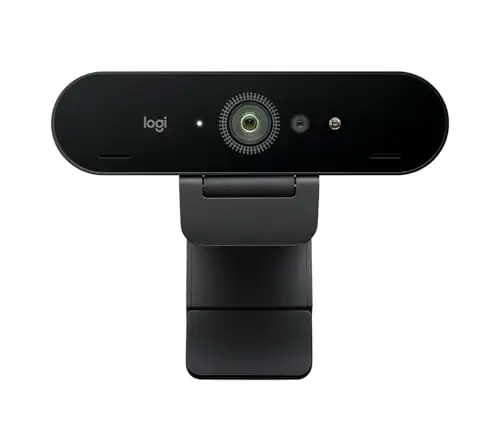


A Brio model built for office use, with the same Windows Hello face login and a slightly different finish.
Prices and availability on Amazon change often.


A renewed Brio 4K webcam with Windows Hello, sold for less than a new one.
Prices and availability on Amazon change often.
If you want the best picture and a reliable Windows Hello sign-in, the standard Brio 4K is the one to get. If you need business features, the Brio for Business is the choice, and the renewed Brio is a good way to save money.
The Brio 4K Webcam is the best overall choice. It supports 4K at 30fps and handles glare and low light well.
The Brio 4K Webcam and the Brio 4K Webcam for Business both support Windows Hello face login.
Yes. Windows asks you to add a PIN as a backup before you can use face login, so choose one that is not easy to guess.
Why trust ConsumerEcho
We compared three Amazon listings for Logitech webcams that support Windows Hello face login. Each one was checked for stock and weighed against what expert reviewers said about image quality, low-light performance and Windows Hello setup.
Our expert team tests products when it is needed and researches online and in interviews. Every guide is fact-checked and edited by a real person.
The ConsumerEcho editorial team · Updated Nov 22, 2026
How we pickEditorial standardsAffiliate disclosureReport a mistake
We earn a commission when you buy through our links, at no extra cost to you. It never decides the winner.