Add Consumer Echo as a preferred source on Google

How we make money. If you buy through our links we may earn a commission. It never changes what we recommend. Learn more ›

The Best Rotary Tools for 3D Printing

We earn a commission when you buy through our links, at no extra cost to you. How this works.

Once a print comes off the bed, the rough layer lines and support marks are what stand between it and a clean finish. A small rotary tool with a few speeds and a good set of sanding heads can do that cleanup quickly, as long as it isn't run so hot that it melts the plastic.

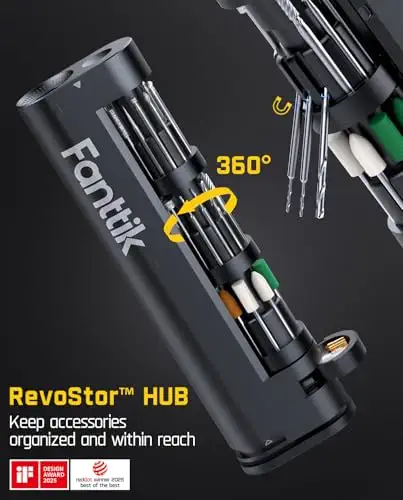
Our top pick is the Fanttik F2 Pro Cordless Rotary Tool Kit, which pairs a 5-speed motor reaching 25,000 RPM with 55 accessories and a magnetic holder. The other picks cover budget kits, a quieter option and a bigger accessory set for people who want more choice.

The rundown

1Fanttik F2 Pro, dremel for 3d printingFanttik F2 Pro2HARDELL Mini Cordless Rotary Tool, dremel for 3d printingHARDELL Mini Cordless Rotary Tool3Fanttik F2 Master Mini, dremel for 3d printingFanttik F2 Master Mini4HARDELL Mini Cordless Rotary Tool, dremel for 3d printingHARDELL Mini Cordless Rotary Tool5Fanttik F2 Pro Kit, dremel for 3d printingFanttik F2 Pro Kit
Best forBest overallBest budgetQuietestLargest accessory setBest for longer sessions
Speed range5,000 to 25,000 RPM (5 speeds)5,000 to 18,000 RPM (5 speeds)5 speed settings5,000 to 18,000 RPM (5 speeds)5,000 to 25,000 RPM (5 speeds)
Battery3,000mAh, up to 20 to 120 minutes depending on load2,000mAh, listed at up to 200 minutesNot listed2,000mAh, USB-C3,000mAh, listed at over 30 minutes of continuous grinding
Accessories55 in a magnetic RevoStor holder and case6935 in a magnetic hub7044 in a flip-top case
ChargingUSB-CUSB-CUSB-C, 60 minutes to fullNot listedNot listed
Check price at AmazonCheck price at AmazonCheck price at AmazonCheck price at AmazonCheck price at Amazon
1Fanttik F2 Pro, dremel for 3d printingFanttik F2 ProBest overall
Speed range
5,000 to 25,000 RPM (5 speeds)
Battery
3,000mAh, up to 20 to 120 minutes depending on load
Accessories
55 in a magnetic RevoStor holder and case
Charging
USB-C

Most recommended by reviewers

Check price at Amazon
1Best overall
Fanttik F2 Pro, dremel for 3d printingFanttik F2 Pro, dremel for 3d printing, view 2Fanttik F2 Pro, dremel for 3d printing, view 3Fanttik F2 Pro, dremel for 3d printing, view 4Fanttik F2 Pro, dremel for 3d printing, view 5
1 / 5

Fanttik F2 Pro

A cordless 5-speed tool with a strong magnetic motor and 55 accessories, built for sanding and finishing 3D prints.

Speed range
5,000 to 25,000 RPM (5 speeds)
Battery
3,000mAh, up to 20 to 120 minutes depending on load
Accessories
55 in a magnetic RevoStor holder and case
Charging
USB-C

Most recommended by reviewers

Check price at Amazon

Prices and availability on Amazon change often.

Why we picked the Fanttik F2 Pro

The Fanttik F2 Pro is our best overall pick for a 3D printing dremel, thanks to its five speeds reaching 25,000 RPM and a generous 55-piece accessory set stored in a magnetic holder.

What we like

The five speed steps run from 5,000 to 25,000 RPM, and the lower settings suit plastic, which is useful when cleaning up printed parts without melting them. The magnetic RevoStor holder keeps the 55 accessories within reach, so switching from sanding to polishing or cutting is quick. A rear indicator warns you before the 3,000mAh battery runs low, which helps avoid sudden shutdowns mid-job.

Worth knowing

Battery life varies widely with load, and the listed 120 minutes is the upper figure. Heavy sanding will cut runtime well below that, so plan on charging between longer sessions.

If it's not for you, the HARDELL 70-piece kit suits buyers who want the most accessories and a 360-degree LED ring for shadow-free work, while the F2 Master suits anyone who wants the quietest, lightest option at 0.22 lb.

2Best budget
HARDELL Mini Cordless Rotary Tool, dremel for 3d printingHARDELL Mini Cordless Rotary Tool, dremel for 3d printing, view 2HARDELL Mini Cordless Rotary Tool, dremel for 3d printing, view 3HARDELL Mini Cordless Rotary Tool, dremel for 3d printing, view 4HARDELL Mini Cordless Rotary Tool, dremel for 3d printing, view 5
1 / 5

HARDELL Mini Cordless Rotary Tool

A low-cost cordless kit with five speeds and 69 accessories for light sanding and polishing.

Speed range
5,000 to 18,000 RPM (5 speeds)
Battery
2,000mAh, listed at up to 200 minutes
Accessories
69
Charging
USB-C
Check price at Amazon

Prices and availability on Amazon change often.

Pros

  • Very affordable with a large accessory set
  • Lightweight and easy to hold for detail work
  • LED light helps when working on small areas

Cons

  • Listing says it is not suitable for heavy-duty work
  • Top speed is lower than the premium kits
3Quietest
Fanttik F2 Master Mini, dremel for 3d printingFanttik F2 Master Mini, dremel for 3d printing, view 2Fanttik F2 Master Mini, dremel for 3d printing, view 3Fanttik F2 Master Mini, dremel for 3d printing, view 4Fanttik F2 Master Mini, dremel for 3d printing, view 5
1 / 5

Fanttik F2 Master Mini

A compact cordless tool with a hollow cup motor that the maker says runs about 30 percent quieter, with 35 accessories.

Speed range
5 speed settings
Accessories
35 in a magnetic hub
Weight
0.22 lb
Charging
USB-C, 60 minutes to full
Check price at Amazon

Prices and availability on Amazon change often.

Pros

  • Listing says a hollow cup motor cuts noise by about 30 percent
  • Very light at 0.22 lb for long sessions
  • Waterproof and dustproof body is easy to clean

Cons

  • Smaller accessory set than the F2 Pro
  • Battery is sealed in and cannot be swapped
4Largest accessory set
HARDELL Mini Cordless Rotary Tool, dremel for 3d printingHARDELL Mini Cordless Rotary Tool, dremel for 3d printing, view 2HARDELL Mini Cordless Rotary Tool, dremel for 3d printing, view 3HARDELL Mini Cordless Rotary Tool, dremel for 3d printing, view 4HARDELL Mini Cordless Rotary Tool, dremel for 3d printing, view 5
1 / 5

HARDELL Mini Cordless Rotary Tool

A 70-piece cordless kit with a 360-degree LED ring and three collet sizes for 3D print cleanup.

Speed range
5,000 to 18,000 RPM (5 speeds)
Battery
2,000mAh, USB-C
Accessories
70
Collets
1.0, 2.3 and 3.2mm
Check price at Amazon

Prices and availability on Amazon change often.

Pros

  • 70 accessories and three collet sizes
  • 360-degree LED ring reduces shadows on the work
  • USB-C charging for easy top-ups

Cons

  • Top speed is lower than the premium kits
  • Motor is described as 4V, which may feel weaker on tougher jobs
5Best for longer sessions
Fanttik F2 Pro Kit, dremel for 3d printingFanttik F2 Pro Kit, dremel for 3d printing, view 2Fanttik F2 Pro Kit, dremel for 3d printing, view 3Fanttik F2 Pro Kit, dremel for 3d printing, view 4Fanttik F2 Pro Kit, dremel for 3d printing, view 5
1 / 5

Fanttik F2 Pro Kit

A 5-speed cordless tool with a 3,000mAh battery and a flip-top case that holds 44 accessories.

Speed range
5,000 to 25,000 RPM (5 speeds)
Battery
3,000mAh, listed at over 30 minutes of continuous grinding
Accessories
44 in a flip-top case
Weight
0.45 lb
Check price at Amazon

Prices and availability on Amazon change often.

Pros

  • Five speeds up to 25,000 RPM
  • Flip-top case with a pop-up rack keeps things tidy
  • Battery status ring shows charge at a glance

Cons

  • Fewer accessories than the F2 Pro with the magnetic hub
  • Charging cable is not included

FAQ

Who should buy a rotary tool for 3D prints?

A rotary tool suits anyone who wants to smooth layer lines, remove support marks or polish a print without buying a full sander. Community advice is consistent: use low speed on plastic, because high speed can melt PLA and PETG, and use hand tools like files and wet abrasives for finer work.

What to look for?
  • Speed control: lower speeds keep plastic from melting.
  • Accessory count and holder: a magnetic holder saves time.
  • Battery: check the stated runtime and whether it can be replaced.
When should you skip a rotary tool?

If you print large, flat parts that need a lot of material removed, a random-orbit sander or card scrapers will be faster and produce more even results. Forum users say card scrapers finish prints in far less time than rotary tools.

Can you use a rotary tool on 3D prints?

Yes. Use the lowest speed you can, because high speed can melt PLA and PETG. Smooth the surface gradually and check the print often.

Is a corded or cordless rotary tool better for prints?

Cordless tools are easier to control on a desk, while corded tools keep running longer. Either works for light finishing, but a cordless kit with several low speeds is the usual choice for prints.

Do you need a lot of accessories to finish a print?

Not necessarily. A few sanding heads and a polishing pad cover most jobs. A larger set helps if you want to try several methods.

Will a rotary tool damage my print?

It can, if you press too hard or run it too fast. Light pressure and steady movement keep the surface from burning or gouging.

Why trust ConsumerEcho

How we made this guide

  • 5 Amazon listings compared
  • 5 Products shown
  • 4 Community discussions read

This shortlist is built from 5 Amazon listings that were checked as in stock at the time of writing. We weighed the features listed for each kit, the accessory count, the speed range and the battery, alongside what owners and hobbyists say in community threads about heat, speed control and accessory quality.

Our expert team tests products when it is needed and researches online and in interviews. Every guide is fact-checked and edited by a real person.

The ConsumerEcho editorial team · Updated Nov 22, 2026

Checking our work: 8 sources

We earn a commission when you buy through our links, at no extra cost to you. It never decides the winner.