
 GIGABYTE X870E AERO X3DBest overall
- Socket
- AM5 (Ryzen 9000/8000/7000)
- Power design
- 16+2+2 phases
- Memory
- 4 x DDR5 DIMM, AMD EXPO
- M.2 slots
- 4 (2 x PCIe 5.0, 2 x PCIe 4.0)
Most recommended by reviewers
Check price at Amazon


How we make money. If you buy through our links we may earn a commission. It never changes what we recommend. Learn more ›
We earn a commission when you buy through our links, at no extra cost to you. How this works.
Picking an X870E board is mostly about what you plan to build around it. The chipset supports the newest AM5 processors, so the real decision comes down to power delivery, how many M.2 drives and USB ports you need, and how much you want to spend.
Our top pick is the Gigabyte X870E AERO X3D Dark Wood. The other picks cover a premium overclocking board, a budget option, a rear-connect build and a feature-heavy high-end ASUS.
1 GIGABYTE X870E AERO X3D | 2 ASUS ROG Strix X870E-E | 3 MSI X870E Gaming Plus | 4 GIGABYTE X870E AORUS Elite | 5 GIGABYTE X870E AORUS XTREME | |
|---|---|---|---|---|---|
| Best for | Best overall | Best ASUS option | Best budget | Best for clean builds | Best premium |
| Socket | AM5 (Ryzen 9000/8000/7000) | AM5 (Ryzen 9000/8000/7000) | AM5 (Ryzen 9000/8000/7000) | AM5 (Ryzen 9000/8000/7000) | AM5 (Ryzen 9000/8000/7000) |
| Power design | 16+2+2 phases | 18+2+2, 110A per stage | 14 phases, 60A SPS | 16+2+2 | 24+2+2 phases |
| Memory | 4 x DDR5 DIMM, AMD EXPO | DDR5, AEMP | 4 x DDR5, up to 8200+ MT/s OC | 4 x DDR5, AMD EXPO | DDR5 up to 9000 MT/s OC, 4 DIMMs |
| M.2 slots | 4 (2 x PCIe 5.0, 2 x PCIe 4.0) | 5 | 3 (1 x PCIe 5.0, 2 x PCIe 4.0) | 4 (PCIe 5.0) | 5 (including PCIe 5.0) |
| Networking | Wi-Fi 7, dual 5GbE | Wi-Fi 7 | Wi-Fi 7, 5G LAN | 2.5GbE LAN, Wi-Fi 7 | Wi-Fi 7, 10GbE |
| USB | 2 x USB4, 1 x USB 3.2 Gen 2x2 Type-C | Not listed | USB4 Type-C 40Gbps | Dual USB4, front and rear USB-C | USB4 |
| Check price at Amazon | Check price at Amazon | Check price at Amazon | Check price at Amazon | Check price at Amazon |
GIGABYTE X870E AERO X3DBest overallMost recommended by reviewers
Check price at Amazon ASUS ROG Strix X870E-EBest ASUS option
 MSI X870E Gaming PlusBest budget
 GIGABYTE X870E AORUS EliteBest for clean builds
 GIGABYTE X870E AORUS XTREMEBest premium


A high-end AM5 board with a 16+2+2 power design and four M.2 slots for builders who want performance and a distinctive look.
Most recommended by reviewers
Check price at AmazonPrices and availability on Amazon change often.
For a best overall X870E board that pairs strong power delivery with a distinctive look, the GIGABYTE X870E AERO X3D Dark Wood is our pick.
The board runs a 16+2+2 power design with a one-piece VRM heatsink, and its wood-accent heatsinks paired with a clean white and silver PCB make it stand out from typical black boards. Owners in the roundup reported the highest Cinebench 10-minute loop score at 2415. Wi-Fi 7 and dual 5GbE networking, along with four M.2 slots, round out a board that reviewers call a standout for builders who want performance with personality.
Its CPU power draw ran highest of the boards in the TechSpot roundup, at 256 Watts according to owner reports, so it may not suit a quiet, low-power build. The 16+2+2 design is also less robust on paper than the 24+2+2 AORUS XTREME, which costs far more.
If it's not for you, the ASUS ROG Strix X870E-E Gaming WiFi suits builders who want five M.2 slots and an 18+2+2 power solution, while the MSI X870E Gaming Plus WiFi suits buyers who want the lowest price of the main picks.


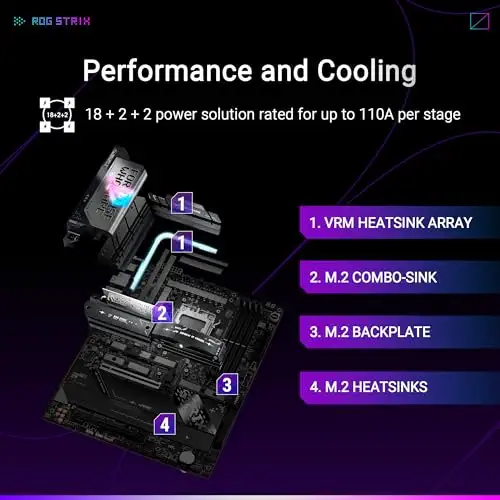
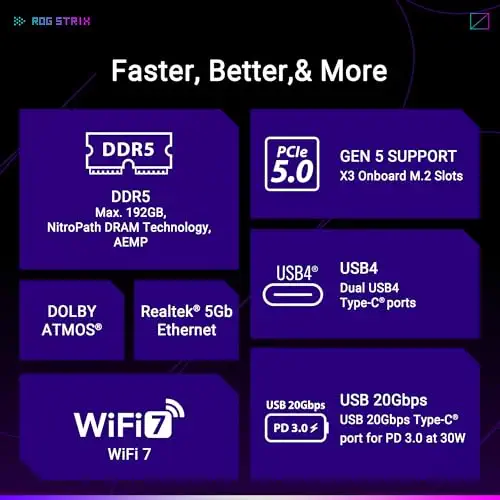

An overclocker-friendly ASUS board with an 18+2+2 power solution and five M.2 slots.
Prices and availability on Amazon change often.


A capable X870E board at a lower price, with a 14-phase power design and a PCIe 5.0 x16 slot.
Prices and availability on Amazon change often.


A well-rounded mid-range board with four M.2 slots, a 16+2+2 power design and dual USB4 ports.
Prices and availability on Amazon change often.


A flagship board with a 24+2+2 VRM, five M.2 slots and 10GbE for the most demanding builds.
Prices and availability on Amazon change often.
If you want the most power headroom and M.2 slots, choose the AERO X3D Dark Wood or the ROG Strix X870E-E. If you want the lowest price on the X870E platform, the MSI X870E Gaming Plus WiFi is the one to look at. If you need a rear-connect layout, the Gigabyte AORUS Stealth is worth a look.
X870 and X870E share the same AM5 socket, but X870E boards add extra PCIe 5.0 lanes and more connectivity. If you don't need that extra bandwidth or port count, an X870 board is usually enough. Check the feature list for the ports you need before choosing.
Any of the boards here will run the 9800X3D.
The MSI X870E Gaming Plus WiFi is the best budget pick here. It has a 14-phase, 60A SPS power design, four DDR5 slots and Wi-Fi 7 at a lower price than the other picks.
Why trust ConsumerEcho
This shortlist is built from five Amazon listings for X870E boards, checked for stock and weighed against expert roundups and community discussion. We compare power delivery, memory and storage slots, USB and networking, and price.
Our expert team tests products when it is needed and researches online and in interviews. Every guide is fact-checked and edited by a real person.
The ConsumerEcho editorial team · Updated Nov 22, 2026
How we pickEditorial standardsAffiliate disclosureReport a mistake
We earn a commission when you buy through our links, at no extra cost to you. It never decides the winner.


