
 Sablute KM81 Wireless Mechanical Keyboard and Mouse Combo, RGB BacklitBest overall
- Switches
- Linear red
- Layout
- Full-size, 104 keys
- Connection
- 2.4 GHz receiver or USB-C wired
- Wireless range
- Up to 26 ft
Most recommended by reviewers
See priceat Amazon


How we make money. If you buy through our links we may earn a commission. It never changes what we recommend. Learn more ›
Sablute KM81 Wireless Mechanical Keyboard andBest overallRunner-up2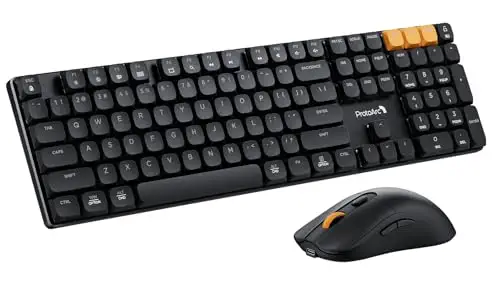 ProtoArc KM310 Wireless Mechanical KeyboardBest for office
We earn a commission when you buy through our links, at no extra cost to you. How this works.
A wireless mechanical keyboard and mouse combo gives you a tactile typing feel without a cable across your desk. The things that matter most are the switch type, whether the connection is a 2.4 GHz dongle or Bluetooth, the battery rating and its conditions, and whether the layout keeps a number pad. We compared each combo's listing details and stock on Amazon, and we used editorial reviews of wireless keyboards to decide which connection points matter most.
Our top pick is the Sablute KM81 for its full-size layout, wired or wireless modes and adjustable backlight. The ProtoArc KM310 suits quiet office work without a backlight, and the Redragon BS8773 is the compact option for smaller desks. Each one makes a different trade-off, so start with the layout you need.
| 1Sablute KM81 Wireless Mechanical Keyboard and Mouse Combo, RGB Backlit | 2ProtoArc KM310 Wireless Mechanical Keyboard and Mouse, No Backlight | 3 Redragon BS8773 Wireless Keyboard and Mouse Combo, 78 Keys, Single Blue Backlit | |
|---|---|---|---|
| Best for | Best overall | Best for office | Best budget |
| Switches | Linear red | Linear red, low-profile | Low-profile red, 30 g minimum actuation |
| Layout | Full-size, 104 keys | Full-size, 108 keys | 78 keys, compact |
| Connection | 2.4 GHz receiver or USB-C wired | Bluetooth or USB receiver, up to 3 devices | 2.4 GHz shared dongle |
| Backlight | RGB, 17 modes, 7 colors | None | Single blue |
| Mouse DPI | 4 settings | 63 g, 3 DPI (1000/1600/2400) | 800 / 1200 / 1600 / 2000 / 2400 |
| See priceat Amazon | See priceat Amazon | See priceat Amazon |
Sablute KM81 Wireless Mechanical Keyboard and Mouse Combo, RGB BacklitBest overallMost recommended by reviewers
See priceat AmazonProtoArc KM310 Wireless Mechanical Keyboard and Mouse, No BacklightBest for officeRedragon BS8773 Wireless Keyboard and Mouse Combo, 78 Keys, Single Blue BacklitBest budget


The most complete combo here, for a full-size desk that needs wired or wireless use and a lit keyboard.
Most recommended by reviewers
Check price at AmazonPrices and availability on Amazon change often.
One catchThe 1,000-hour battery rating applies only with the backlight off.
The KM81 is the most complete combo of the three on paper: a full-size 104-key layout with a number pad and calculator key, linear red switches, and a dual-function knob for volume, mute and backlight brightness. It connects two ways, through a 2.4 GHz receiver that stores under the mouse, or by USB-C for wired use.
The listing rates the keyboard at up to 1,000 hours with the backlight off, and both devices stay usable while charging. The mouse offers four DPI settings and quieter clicks. Linear switches suit anyone who wants a smooth keystroke without a bump.


A quiet, unlit full-size combo for office work that needs to switch between up to three devices.
Prices and availability on Amazon change often.


A compact, lower-cost combo for small desks that don't need a number pad.
Prices and availability on Amazon change often.
Choose the Sablute KM81 if you want a full-size layout with a number pad and the choice of wired or wireless use. It also suits people who like a lit keyboard with adjustable effects.
Choose the ProtoArc KM310 for a shared office, a desk without much light, or a setup that moves between a laptop, tablet and desktop. The one-button switch between three devices is its strongest feature.
Choose the Redragon BS8773 if your desk is small and you don't need a number pad. Its dongle-only connection makes it simplest for a single computer.
Skip the Redragon if you need a number pad or Bluetooth. Skip the ProtoArc KM310 if you plan to swap switches or game seriously, since its listing says gaming is not recommended and its switches are not hot-swappable.
The Sablute KM81 is our top pick because it has the most complete feature set of the three. It offers a full-size layout with a number pad, linear red switches, RGB backlight and a choice of 2.4 GHz or wired USB-C use. Its battery rating of up to 1,000 hours applies with the backlight off.
None of these three is built around gaming. The Redragon BS8773 has a 2.4 GHz dongle and a mouse with DPI up to 2400, which is the connection type that performs best for games. The ProtoArc listing says gaming is not recommended, so skip it for play. The Sablute is the more complete option if you want RGB and a full layout.
The Redragon BS8773 is the budget pick in this group. Its compact 78-key layout and single backlight keep the design simple. You give up the number pad and Bluetooth, so it fits best on a small desk with one computer.
The ProtoArc KM310 suits quiet office work because it has no backlight, quiet linear switches and a single button to move between up to three devices. If you need a number pad and wired backup, the Sablute KM81 is the better choice. Pick the KM310 for a shared office and the KM81 for a desk where you type numbers all day.
Why trust ConsumerEcho
Every combo here was checked on Amazon for stock before it made the shortlist. Each pick is compared on switch type, layout, connection, battery and mouse features as the listing describes them, with latency advice drawn from editorial reviews of wireless keyboards.
Our expert team tests products when it is needed and researches online and in interviews. Every guide is fact-checked and edited by a real person.
The ConsumerEcho editorial team · Updated Oct 17, 2026
How we pickEditorial standardsAffiliate disclosureReport a mistake
We earn a commission when you buy through our links, at no extra cost to you. It never decides the winner.