Add Consumer Echo as a preferred source on Google

How we make money. If you buy through our links we may earn a commission. It never changes what we recommend. Learn more ›

Best Soundboard for PC in 2026

We earn a commission when you buy through our links, at no extra cost to you. How this works.

If you want to play sound effects, music or voice changes into a stream, call or game, a soundboard that connects to your PC avoids fiddly routing. What matters most is the input your microphone plugs into, whether it has 48 V phantom power for condenser mics, how many channels it gives you, and how quickly you can trigger sounds.

Our top pick is the MAONO G1 Neo. It pairs an XLR input with 48 V phantom power, four custom soundpads, voice effects and listed support for OBS and Discord. The PUPGSIS T12 covers budget-friendly features and the FIFINE SC3W suits multi-device setups, while Glomtheia and Saycker are backups.

The rundown

1MAONO G1 Neo Gaming Audio Mixer, Soundboard for PCMAONO G1 Neo Gaming Audio Mixer2PUPGSIS T12 Gaming Audio Mixer, Soundboard for PCPUPGSIS T12 Gaming Audio Mixer3FIFINE Ampligame SC3W Gaming Audio Mixer, Soundboard for PCFIFINE Ampligame SC3W Gaming Audio Mixer
Best forBest overallBest value for featuresBest for multiple devices
Mic inputXLR with 48 V phantom powerUp to 3 (mic 1, mic 2 and headset)XLR with built-in 48 V phantom power
Soundpads4 custom soundpads4 customizableNot listed
Voice changerFemale, male, baby and robot voices6 voice-changing modesNot listed
LightingRGB with 12 color variationsNot listedRGB
See priceat AmazonSee priceat AmazonSee priceat Amazon
1Best overall
MAONO G1 Neo Gaming Audio Mixer, Soundboard for PCMAONO G1 Neo Gaming Audio Mixer, Soundboard for PC, view 2MAONO G1 Neo Gaming Audio Mixer, Soundboard for PC, view 3MAONO G1 Neo Gaming Audio Mixer, Soundboard for PC, view 4MAONO G1 Neo Gaming Audio Mixer, Soundboard for PC, view 5
1 / 5

MAONO G1 Neo Gaming Audio Mixer

An XLR mixer with 48 V phantom power and soundpads, aimed at gamers and streamers using a condenser or dynamic mic.

Mic input
XLR with 48 V phantom power
Soundpads
4 custom soundpads
Voice changer
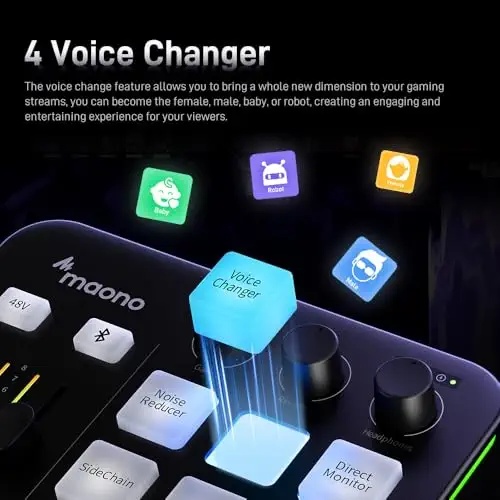
Female, male, baby and robot voices
Compatibility
PC, phones, tablets, PS4 and PS5
Lighting
RGB with 12 color variations

Most recommended by reviewers

Check price at Amazon

Prices and availability on Amazon change often.

Why it wins

  • XLR input with 48 V phantom power for condenser mics
  • Voice changer and four custom soundpads
  • Listed support for OBS, Discord, Twitch and YouTube
  • One-click mute and loopback for game streams

One catchthe maker says it is not for USB microphones, Xbox or MAONO devices.

Why it's our top pick

The MAONO G1 Neo is built around streaming with a microphone. It has an XLR input with 48 V phantom power for condenser mics, and the maker says to switch the phantom power off for dynamic mics. Four custom soundpads let you trigger effects, and the voice changer offers female, male, baby and robot voices.

It is the only pick that lists PC, phones, tablets, PS4 and PS5 together, along with OBS, Discord, Twitch and YouTube. One-click mute and loopback help during game streams, and the RGB lighting offers 12 color variations.

2Best value for features
PUPGSIS T12 Gaming Audio Mixer, Soundboard for PCPUPGSIS T12 Gaming Audio Mixer, Soundboard for PC, view 2PUPGSIS T12 Gaming Audio Mixer, Soundboard for PC, view 3PUPGSIS T12 Gaming Audio Mixer, Soundboard for PC, view 4PUPGSIS T12 Gaming Audio Mixer, Soundboard for PC, view 5
1 / 5

PUPGSIS T12 Gaming Audio Mixer

A feature-heavy mixer with six voice modes, four soundpads and three mic inputs for a small group talking at once.

Mic inputs
Up to 3 (mic 1, mic 2 and headset)
Mic connections
XLR, 3.5 mm and 6.35 mm
Voice modes
6 voice-changing modes
Soundpads
4 customizable
Bluetooth
Version 5.3
Check price at Amazon

Prices and availability on Amazon change often.

Pros

  • Three mic inputs for up to three people on one board
  • Six voice-changing modes and three reverb presets
  • Zero latency monitoring and one-touch mute
  • Bluetooth 5.3 for wireless audio

Cons

  • The listing does not say how many sounds each soundpad can hold
3Best for multiple devices
FIFINE Ampligame SC3W Gaming Audio Mixer, Soundboard for PCFIFINE Ampligame SC3W Gaming Audio Mixer, Soundboard for PC, view 2FIFINE Ampligame SC3W Gaming Audio Mixer, Soundboard for PC, view 3FIFINE Ampligame SC3W Gaming Audio Mixer, Soundboard for PC, view 4FIFINE Ampligame SC3W Gaming Audio Mixer, Soundboard for PC, view 5
1 / 5

FIFINE Ampligame SC3W Gaming Audio Mixer

A four-channel mixer with individual faders and several audio ports for running more than one PC or device.

Channels
4 individual control channels
Mic input
XLR with built-in 48 V phantom power
Ports
Multiple audio ports on the back
Monitoring
Real-time monitoring
Lighting
RGB
Check price at Amazon

Prices and availability on Amazon change often.

Pros

  • Four separate channels, each with its own volume fader
  • Built-in 48 V phantom power for condenser mics
  • Supports dual PCs for live streaming
  • Customizable sound buttons for audience interaction

Cons

  • The listing does not name specific streaming apps it works with

FAQ

Which board suits you?
  • Streamers with a condenser mic: the MAONO G1 Neo, for XLR input with 48 V phantom power and soundpads.
  • Small groups on one stream or call: the PUPGSIS T12, with three mic inputs and six voice modes.
  • Multi-PC or multi-source setups: the FIFINE SC3W, with four channels and several audio ports.
  • Simple phone music and sound effects: the Saycker board, if you do not need a console connection.
What should you look for in a PC soundboard?

Start with your microphone. A condenser mic needs 48 V phantom power, and several boards list it built in. Next, count the channels you need: one channel is enough for a single voice, but separate faders help when you mix music, game audio and a mic.

  • Mic inputs: XLR, 1/4 inch or combo jacks
  • Soundpads and voice effects for on-the-fly sounds
  • Streaming app support, such as OBS and Discord
  • Console compatibility, if you play on a PS4 or PS5
What should you skip?

Check compatibility before you buy. The MAONO G1 Neo is not for USB microphones, Xbox or MAONO devices, and the Saycker board does not work with gaming devices such as the PS5. If your mic is USB, a board with an XLR input will not suit it.

How do I use a soundboard on PC?

Connect your microphone to the board's mic input, then connect the board to your PC. Select the board as the input in your streaming or voice app, and trigger sounds from the soundpads. Several listings name OBS and Discord as compatible apps.

What is the best soundboard for PC to use in Discord?

The MAONO G1 Neo and PUPGSIS T12 listings both name Discord as a compatible app. The MAONO suits a single XLR condenser mic with 48 V phantom power, while the PUPGSIS suits more people talking at once. Check that your microphone type matches the board before buying.

What is the best soundboard for PC gaming and Roblox?

For PC gaming, the MAONO G1 Neo is the only listing that names PC, PS4 and PS5 together, and it offers one-click mute and loopback for game streams. None of the listings mention Roblox, so confirm compatibility with that game before buying.

Meet the reviewer

Jhoana de Toro

Jhoana de Toro

Contributing Reviewer

I'm a writer, horror junkie, and home baker who believes life is better with a good book in one hand and a freshly baked treat in the other. When I'm not researching products, you'll find me chasing after my preschooler, getting lost in a creepy novel, or putting my mixer to good use in the kitchen. I love finding products that are genuinely worth the money and sharing my useful finds with readers. After all, nothing's scarier than spending money on something that doesn't live up to the hype!

    Why trust ConsumerEcho

    How we made this guide

    • 3 listings compared
    • 5 in stock and available
    • 3 picks in the shortlist

    Each board was checked against its Amazon listing for stock and features. The picks reflect what each listing says about microphone inputs, channels, sound controls and streaming app support, with setup complexity weighed alongside those features.

    Our expert team tests products when it is needed and researches online and in interviews. Every guide is fact-checked and edited by a real person.

    The ConsumerEcho editorial team · Updated Oct 17, 2026

    Checking our work: 5 sources

    We earn a commission when you buy through our links, at no extra cost to you. It never decides the winner.