
 Fujitsu ScanSnap S1300iBest overall
- Scan speed
- 12 pages per minute, double-sided
- Feeder capacity
- 10 pages
- Weight
- About 3 lb
- Duplex
- Yes
Most recommended by reviewers
Check price at Amazon


How we make money. If you buy through our links we may earn a commission. It never changes what we recommend. Learn more ›

Reviewed by
Commerce Writer & Editor
Luka Lucheski is a content writer and editor with more than five years of experience in commerce content and digital publishing.
We earn a commission when you buy through our links, at no extra cost to you. How this works.
If you have stacks of paper to digitize, a multi page scanner with an automatic feeder saves hours. You load the pages once and let the machine run, instead of feeding each sheet by hand.
Our top pick is the Fujitsu ScanSnap S1300i, a compact duplex scanner that handles stacks of ten pages at 12 pages a minute. Four other scanners cover faster desktop work, larger feeders and tighter budgets.
1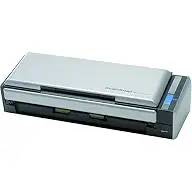 Fujitsu ScanSnap S1300i | 2 Epson WorkForce ES-865 | 3 Canon imageFORMULA R40 | 4 ScanSnap iX2500 | 5 Epson WorkForce ES-400 II | |
|---|---|---|---|---|---|
| Best for | Best overall | Fastest for big stacks | Best for receipts and bookkeeping | Best with a touchscreen | Best mid-range desktop |
| Scan speed | 12 pages per minute, double-sided | Up to 65 pages per minute, duplex | Up to 40 pages per minute, duplex | 45 pages per minute, double-sided | 35 pages per minute |
| Feeder capacity | 10 pages | 100 pages | 60 sheets | 100 sheets | 50 sheets |
| Duplex | Yes | Yes | Yes | Not listed | Yes |
| Software | Not listed | Nuance OCR, TWAIN driver | CaptureOnTouch, QuickBooks Online plugin | Not listed | ScanSmart, TWAIN driver |
| Check price at Amazon | Check price at Amazon | Check price at Amazon | Check price at Amazon | Check price at Amazon |
Fujitsu ScanSnap S1300iBest overallMost recommended by reviewers
Check price at Amazon Epson WorkForce ES-865Fastest for big stacks
 Canon imageFORMULA R40Best for receipts and bookkeeping
 ScanSnap iX2500Best with a touchscreen
 Epson WorkForce ES-400 IIBest mid-range desktop
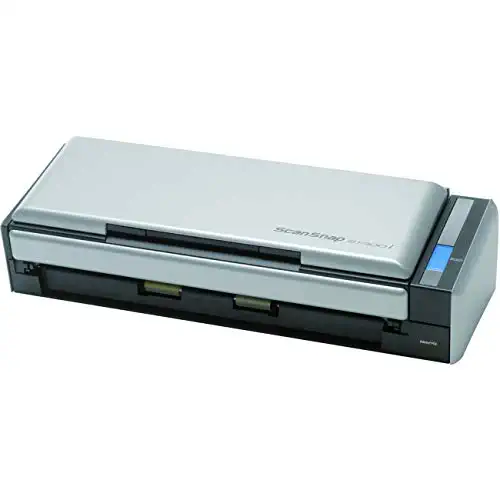

A compact, portable duplex scanner that feeds ten pages at a time and suits a home office or travel bag.
Most recommended by reviewers
Check price at AmazonPrices and availability on Amazon change often.
The Fujitsu ScanSnap S1300i is our pick for a multi-page scanner, because it scans both sides of a stack in one pass at 12 pages per minute and stays light enough to move around.
Owners and reviewers consistently point to the S1300i's double-sided feeding as its strongest trait, and one owner says they have scanned entire books this way. Its roughly three-pound body makes it easy to carry, and the bundled software automatically handles colour detection, rotation and blank pages. Reviewers also note that OCR turns scans into searchable PDFs or editable Word and Excel files.
The ten-page feeder is the real limit, so large batches mean reloading often. One owner notes that you can load 50-plus pages once the paper is prepped, but the feeder itself holds only ten at a time. If you routinely scan hundreds of sheets, a larger-feeder model will save time.
If it's not for you, the Epson WorkForce ES-865 suits big stacks with its 100-page feeder and 65 pages per minute, while the Canon imageFORMULA R40 Receipt Edition suits QuickBooks users who scan receipts.


A high-speed desktop duplex scanner with a 100-page feeder for large document runs.
Prices and availability on Amazon change often.


A 40-page-per-minute duplex scanner that extracts payee, date and amount from receipts into QuickBooks.
Prices and availability on Amazon change often.


A wireless duplex scanner with a large touchscreen, a 100-sheet feeder and cloud sending.
Prices and availability on Amazon change often.


A 50-sheet duplex desktop scanner with image clean-up and a TWAIN driver for office software.
Prices and availability on Amazon change often.
Check duplex support first, so both sides of each page scan in one pass. Then match the feeder size to the stacks you handle, and confirm the scanner supports your computer and cloud destinations.
The Epson ES-865 has the largest feeder and fastest speed on this list, which suits high volumes. For lower volumes, the ES-400 II balances speed and cost.
Scanners with built-in OCR, such as the ScanSnap S1300i and Epson ES-865, create searchable PDFs directly from the scanner software.
Load the pages into the automatic feeder, choose duplex scanning and a single-file output in the software, then start the scan. The software combines the pages into one file.
Scanning itself uses little consumable cost, but feeder rollers wear over time. Plan for occasional roller replacement, and check the manufacturer's rated service life for your model.
Meet the reviewer
Commerce Writer & Editor
Luka Lucheski is a content writer and editor with more than five years of experience in commerce content and digital publishing. He specializes in product reviews, buying guides, and comparison content. Over the years, he has edited and reviewed hundreds of articles across a wide range of categories, from tech and software to ecommerce and everyday consumer products.
Why trust ConsumerEcho
This shortlist is built from five Amazon listings that are in stock today, weighed against editorial reviews, retailer rankings and owner discussions. We check speed, feeder capacity, duplex support and recurring running costs before a scanner earns a place.
Our expert team tests products when it is needed and researches online and in interviews. Every guide is fact-checked and edited by a real person.
The ConsumerEcho editorial team · Updated Nov 16, 2026
How we pickEditorial standardsAffiliate disclosureReport a mistake
We earn a commission when you buy through our links, at no extra cost to you. It never decides the winner.
 The Best Airbrush Kits with Compressor for Models
 The Best AWD Robot Mowers for Your Lawn
 The Best Drill Bits for Hardened Steel
 The Best Outdoor Mouse Traps
 The Best Pool Line Blowers
 The Best Portable Propane Tankless Water Heaters
 The Best Seat Covers for Subaru Forester
 The Best Sewing Machines for Quilting
