Add Consumer Echo as a preferred source on Google

How we make money. If you buy through our links we may earn a commission. It never changes what we recommend. Learn more ›

The Best Keyboards for Graphic Design

We earn a commission when you buy through our links, at no extra cost to you. How this works.

If you design for a living, your keyboard is doing a lot of quiet work: holding shortcuts for your design app, sitting under your hand while you draw, and sometimes doing double duty for typing briefs and client emails. The right board makes that smoother. Our No. 1 pick is the Logitech MX Creative Console, a dedicated panel of keys and dials built to sit beside your keyboard and handle the shortcuts design software leans on most.

The other two picks cover different needs: a compact one-handed pad for drawing tablets, and a wireless creative keypad for iPad and Mac users. Pick the one that matches how you actually work.

The rundown

1Logitech MX Creative Console, best keyboard for graphic designLogitech MX Creative Console2Pomya Mini Drawing Keyboard, best keyboard for graphic designPomya Mini Drawing Keyboard3Frunsi Wireless Keyboard, best keyboard for graphic designFrunsi Wireless Keyboard
Best forBest for shortcut-heavy design appsBest compact pad for drawing tabletsBest budget wireless pad for iPad and Mac
Keys9 customizable keys with LCD display35 keys18 keys
Check price at AmazonCheck price at AmazonCheck price at Amazon
1Best for shortcut-heavy design apps
Logitech MX Creative Console, best keyboard for graphic designLogitech MX Creative Console, best keyboard for graphic design, view 2Logitech MX Creative Console, best keyboard for graphic design, view 3Logitech MX Creative Console, best keyboard for graphic design, view 4Logitech MX Creative Console, best keyboard for graphic design, view 5
1 / 5

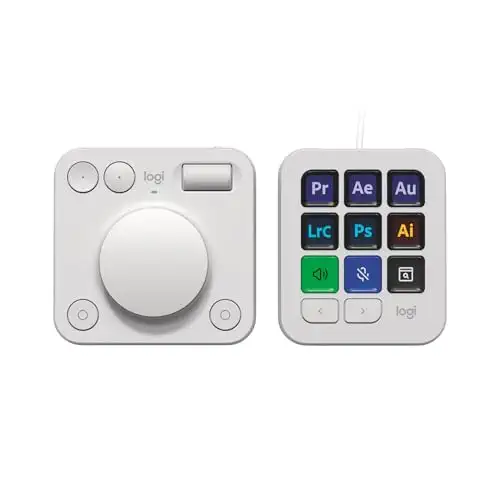
Logitech MX Creative Console

A programmable keypad with dials and an LCD display that sits beside your keyboard and puts design-app shortcuts within reach.

Keys
9 customizable keys with LCD display
Controls
Analog dial and roller
Apps
Adobe Photoshop, Illustrator, Premiere Pro, Lightroom, Figma and more
Included
3-month Adobe Creative Cloud membership
Pages
Up to 15 keypad pages by profile

Most recommended by reviewers

Check price at Amazon

Prices and availability on Amazon change often.

Why we picked the Logitech MX Creative Console

The Logitech MX Creative Console is our pick for designers who live in shortcut-heavy apps, because it puts the actions you repeat most under your fingers.

What we like

Its tactile analog dial handles precise adjustments like brush size or zoom, and the roller and nine customizable keys with LCD display cover the rest. It works across major design and video apps including Photoshop, Illustrator, Lightroom and Figma, and you can assign up to 15 keypad pages by profile. Owners aside, the included three-month Adobe Creative Cloud membership is a useful extra for anyone starting out in those tools.

Worth knowing

This is an add-on rather than a full keyboard, so you will still need a separate keyboard for typing. Plan for that cost and desk space before you buy.

If it's not for you, the Pomya Mini Drawing Keyboard suits drawing-tablet users who want a compact one-handed pad, and the Frunsi Wireless Keyboard for Procreate suits iPad and Mac users who want a low-cost wireless option.

2Best compact pad for drawing tablets
Pomya Mini Drawing Keyboard, best keyboard for graphic designPomya Mini Drawing Keyboard, best keyboard for graphic design, view 2Pomya Mini Drawing Keyboard, best keyboard for graphic design, view 3Pomya Mini Drawing Keyboard, best keyboard for graphic design, view 4Pomya Mini Drawing Keyboard, best keyboard for graphic design, view 5
1 / 5

Pomya Mini Drawing Keyboard

A small one-handed shortcut pad made for graphics tablets, keeping your other hand free for the pen.

Keys
35 keys
Layout
One-handed, compact
Compatibility
iOS and OS X
Design
Ergonomic palm fit
Check price at Amazon

Prices and availability on Amazon change often.

Pros

  • Compact enough to sit beside a drawing tablet
  • Keys have different shapes so you can find them by touch
  • Works with many common design programs

Cons

  • Limited to shortcut use; not a full typing keyboard
  • Compatibility details are listed generically in the listing
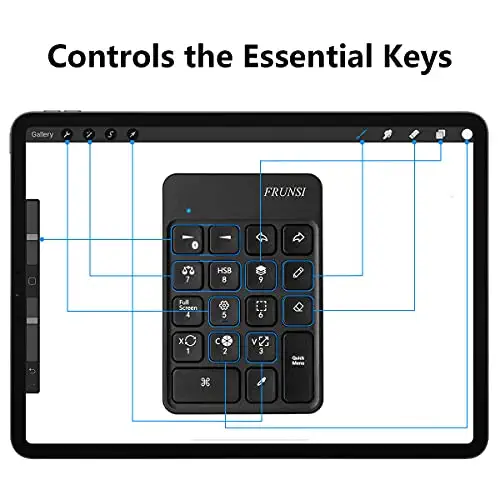
3Best budget wireless pad for iPad and Mac
Frunsi Wireless Keyboard, best keyboard for graphic designFrunsi Wireless Keyboard, best keyboard for graphic design, view 2Frunsi Wireless Keyboard, best keyboard for graphic design, view 3Frunsi Wireless Keyboard, best keyboard for graphic design, view 4Frunsi Wireless Keyboard, best keyboard for graphic design, view 5
1 / 5

Frunsi Wireless Keyboard

A small rechargeable shortcut keypad built for iPad and Mac drawing apps like Procreate.

Keys
18 keys
Connection
Wireless, up to 5m
Battery
280mAh rechargeable, about 6 months
Size
3.3 x 4.93 x 0.49 in
Check price at Amazon

Prices and availability on Amazon change often.

Pros

  • Low price for a wireless shortcut pad
  • Lightweight and easy to carry
  • Rubber feet keep it steady on the desk

Cons

  • Requires English input method for drawing use
  • Fewer keys than larger creative consoles

FAQ

Which keyboard setup suits your design work?

A dedicated creative panel suits designers who repeat the same shortcuts all day. A compact pad suits illustrators working on a drawing tablet. A wireless pad suits iPad and Mac users on the move.

What to look for?
  • Key count and layout, so the shortcuts you use are close at hand.
  • Connection type: wireless gives placement flexibility, wired is usually the most reliable.
  • PBT keycaps resist wear and shine better than ABS.
What's the best keyboard layout for graphic design?

A full-size or tenkeyless layout suits designers who use the number pad for data entry. Many designers prefer compact 65% or 75% layouts to save desk space and keep the mouse closer.

How long do 50 million keystrokes last on a keyboard?

Mechanical keys are generally more durable than rubber domes. Exact lifespan depends on the switch and build, and the sources in this guide did not state a keystroke rating for these picks.

Which keyboard is good for learning design?

A keyboard with customizable shortcuts is a good start, because it lets you assign the commands you use most in your design app.

Why trust ConsumerEcho

How we made this guide

  • 3 Amazon listings checked
  • 5 Expert and community sources read
  • 3 Picks compared

This shortlist is built from three Amazon listings that are in stock now, checked against the product details and the advice in expert and community discussions on design keyboards. Each pick was weighed on the kind of work it suits, how it connects, and how it fits a creative desk.

Our expert team tests products when it is needed and researches online and in interviews. Every guide is fact-checked and edited by a real person.

The ConsumerEcho editorial team · Updated Nov 22, 2026

Checking our work: 7 sources

We earn a commission when you buy through our links, at no extra cost to you. It never decides the winner.