Acer Nitro VBest overall
- Processor
- Intel Core i5-13420H
- Graphics
- NVIDIA GeForce RTX 4050
- Display
- 15.6-inch Full HD, 165Hz
- Memory
- 8GB DDR5
Most recommended by reviewers
Check price at Amazon


How we make money. If you buy through our links we may earn a commission. It never changes what we recommend. Learn more ›
We earn a commission when you buy through our links, at no extra cost to you. How this works.
Buying a gaming laptop for a child can feel like a big leap. You want something that runs the games they love without costing a fortune or becoming a headache to look after.
Our top pick is the Acer Nitro V, which gives a young gamer a solid graphics card and a smooth 165Hz screen at a sensible price. It suits most 11-year-olds for school work and popular games. Our other picks cover a bigger budget and a more capable machine.
1 Acer Nitro V | 2 MSI Cyborg 15 | 3 ASUS ROG Strix G16 | |
|---|---|---|---|
| Best for | Best overall | Best for more power | Best for longevity |
| Processor | Intel Core i5-13420H | AMD Ryzen 9 270, 8-core | Intel Core i7-14650HX |
| Graphics | NVIDIA GeForce RTX 4050 | NVIDIA GeForce RTX 5060, 8GB GDDR7 | NVIDIA GeForce RTX 5060 |
| Display | 15.6-inch Full HD, 165Hz | 15.6-inch Full HD IPS, 144Hz | 16-inch FHD+, 165Hz |
| Memory | 8GB DDR5 | 16GB DDR5 | 16GB DDR5 |
| Storage | 512GB SSD | 512GB SSD | 1TB PCIe Gen 4 SSD |
| Check price at Amazon | Check price at Amazon | Check price at Amazon |
Acer Nitro VBest overallMost recommended by reviewers
Check price at Amazon MSI Cyborg 15Best for more power
 ASUS ROG Strix G16Best for longevity


A sensible gaming laptop for a kid with a real graphics card and a smooth 165Hz screen.
Most recommended by reviewers
Check price at AmazonPrices and availability on Amazon change often.
For an 11-year-old's first gaming laptop, the Acer Nitro V is the pick we'd make, because it pairs a real RTX 4050 graphics card with a smooth 165Hz Full HD screen at a price well below most gaming machines.
The RTX 4050 is a dedicated graphics card built to run popular games, and the 165Hz screen keeps motion looking smooth and responsive. The Intel Core i5-13420H handles gaming and everyday schoolwork without fuss, and the 512GB PCIe Gen 4 SSD gives plenty of room for a handful of games. Owners have no reports to share here, but the specs make the value clear for a kid who wants a laptop that can really play games. Owners on r/GamingLaptops report that a BIOS update improved stability on an Acer Nitro V 15 but also capped processor performance.
The 8GB of DDR5 memory is on the low side, so heavier multitasking or demanding newer games may feel tight. The good news is that the laptop has two memory slots, with a maximum of 32GB, so memory can be upgraded later for more headroom.
If it's not for you, the MSI Cyborg 15 suits families who want more graphics power and 16GB of memory for smoother multitasking, though it costs noticeably more and is a bulkier machine to carry to school. The ASUS ROG Strix G16 suits those who want the most storage and strong cooling for longevity, but it is priced well above the others.


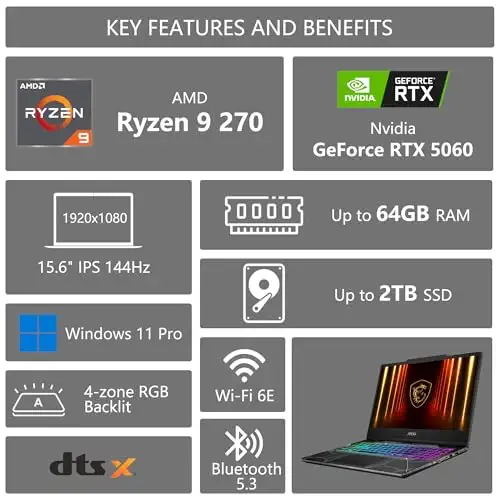


A stronger machine that will keep up with games for longer.
Prices and availability on Amazon change often.


A premium gaming laptop with strong cooling and a bright high-refresh screen.
Prices and availability on Amazon change often.
These laptops suit an 11-year-old who plays popular games and needs a machine for school as well. The budget pick works for most homes; step up if the child plays more demanding titles.
If your child mainly plays simple games or uses the laptop for school work, a Chromebook or a console may be enough and cost less. Community discussions often suggest a console is easier to look after for younger players.
For most families the Acer Nitro V is the best starting point. It has a real RTX graphics card and a smooth screen without a high price.
A Chromebook suits web browsing and school work. A gaming laptop like the Acer Nitro V is better if your child wants to play modern PC games.
Owners often say they cannot run modern games well at that price.
Windows 11 Home is enough for gaming. The Professional edition adds business features most families do not need.
Why trust ConsumerEcho
This shortlist is built from Amazon listings checked for stock and price, plus owner discussions from gaming laptop communities. Each pick is weighed on its processor, graphics card, display and what a kid will actually use it for.
Our expert team tests products when it is needed and researches online and in interviews. Every guide is fact-checked and edited by a real person.
The ConsumerEcho editorial team · Updated Nov 22, 2026
How we pickEditorial standardsAffiliate disclosureReport a mistake
We earn a commission when you buy through our links, at no extra cost to you. It never decides the winner.