Galaet 22MP Film ScannerBest overall
- Formats
- 35mm, 120, 127, 126
- Resolution
- Up to 22 megapixels
- Screen
- 4.3 inch LCD
- Storage
- 128MB built-in, SD card up to 32GB
Most recommended by reviewers
Check price at Amazon


How we make money. If you buy through our links we may earn a commission. It never changes what we recommend. Learn more ›
 Galaet 22MP Film ScannerBest overallRunner-up2
 PioMue 22MP Film ScannerBest for both formats

Reviewed by
Commerce Writer & Editor
Luka Lucheski is a content writer and editor with more than five years of experience in commerce content and digital publishing.
We earn a commission when you buy through our links, at no extra cost to you. How this works.
If you have a box of 35mm negatives and a few 120 rolls, you want one scanner that handles both without a lot of fuss. Most dedicated film scanners do one format well and the other poorly, so the choice matters.
Our top pick is the Galaet 22MP scanner. It handles both 35mm and 120, has a 4.3 inch screen and can save scans to an SD card without a computer. The other two picks cover a near-identical design and a Film scanner with a different feature set.
1 Galaet 22MP Film Scanner | 2 PioMue 22MP Film Scanner | 3 KUSOLE 22MP Film Scanner | |
|---|---|---|---|
| Best for | Best overall | Best for both formats | Best value |
| Formats | 35mm, 120, 127, 126 | 35mm, 120, 127, 126 | 35mm, 120, 126, 127 |
| Resolution | Up to 22 megapixels | 22 megapixels | 22 megapixels |
| Screen | 4.3 inch LCD | 4.3 inch LCD | Not listed |
| Storage | 128MB built-in, SD card up to 32GB | 128MB built-in, SD card up to 32GB | Computer or SD card up to 128GB |
| Computer needed | No | No | Optional |
| Check price at Amazon | Check price at Amazon | Check price at Amazon |
Galaet 22MP Film ScannerBest overallMost recommended by reviewers
Check price at Amazon PioMue 22MP Film ScannerBest for both formats
 KUSOLE 22MP Film ScannerBest value


A standalone scanner that handles 35mm and 120 with a built-in screen and no computer needed.
Most recommended by reviewers
Check price at AmazonPrices and availability on Amazon change often.
The Galaet 22MP 35mm & 120 Film Scanner is our pick for anyone who wants to digitize both 35mm and 120 film without a computer, since it runs entirely on its own built-in 4.3 inch screen.
The Galaet handles 35mm, 120, 127 and 126 film, so one device covers most of the old negatives and slides people tend to have stored away. Its built-in 4.3 inch LCD lets you preview, play back and adjust exposure and color right on the scanner, and it saves to 128MB of internal memory or an SD card of up to 32GB. Owners on r/Scanners say the no-computer workflow makes it easy to get started quickly.
The listing does not state the optical resolution or the sensor type, so it is hard to compare its real detail against other scanners based on the specs alone. Its 22 megapixel rating is the headline figure, and that number is the only resolution detail given.
If it's not for you, the PioMue 22MP Film Scanner shares the same specs and suits buyers who want the same formats with a different brand, while the KUSOLE 22MP Film & Slide Scanner suits those who prefer USB power and a larger SD card option of up to 128GB.


A near-identical 35mm and 120 scanner with a 4.3 inch screen and SD card storage.
Prices and availability on Amazon change often.


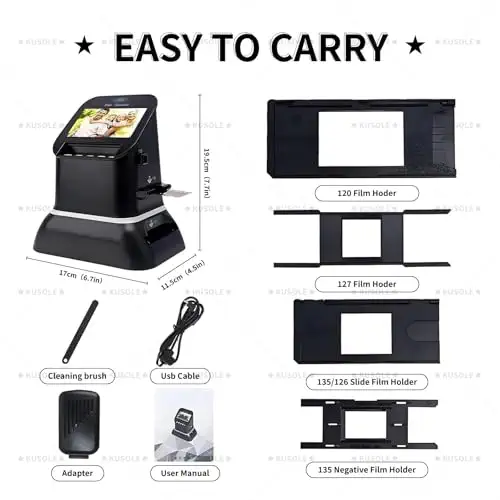

A USB-powered 35mm and 120 scanner that can also save to a computer.
Prices and availability on Amazon change often.
Look for a scanner that lists both formats, has a screen for previewing scans, and saves to a card or computer. Expert reviewers note that dedicated 35mm scanners often outperform all-in-one units for fine detail, so weigh that against how often you shoot 120.
The Galaet 22MP scanner is our top pick because it handles both formats in one unit and saves without a computer.
Any of the three picks covers 120 film. Check the listing for the frame sizes you use before buying.
If you only shoot 35mm, a dedicated 35mm scanner may give finer detail, and expert reviews favour those models.
Load the film into the scanner's 120 holder, preview the frame on the screen, adjust exposure and colour, then save the image.
The listings here quote megapixels rather than DPI, so compare resolution figures directly rather than DPI settings.
Meet the reviewer
Commerce Writer & Editor
Luka Lucheski is a content writer and editor with more than five years of experience in commerce content and digital publishing. He specializes in product reviews, buying guides, and comparison content. Over the years, he has edited and reviewed hundreds of articles across a wide range of categories, from tech and software to ecommerce and everyday consumer products.
Why trust ConsumerEcho
This shortlist is built from three Amazon listings checked for stock, along with editorial reviews and owner discussions. Each pick is weighed for the film formats it handles, its scan approach and what owners say about results.
Our expert team tests products when it is needed and researches online and in interviews. Every guide is fact-checked and edited by a real person.
The ConsumerEcho editorial team · Updated Nov 16, 2026
How we pickEditorial standardsAffiliate disclosureReport a mistake
We earn a commission when you buy through our links, at no extra cost to you. It never decides the winner.