UNIHOW Bluetooth ControllerBest overall
- Connection
- Bluetooth and USB-C
- Battery
- 650mAh, up to 15 hours
- Motion
- 6-axis gyro
- Warranty
- 60 days
Most recommended by reviewers
Check price at Amazon


How we make money. If you buy through our links we may earn a commission. It never changes what we recommend. Learn more ›
 UNIHOW Bluetooth ControllerBest overallRunner-up2
 WZUICOV RGB Wireless ControllerBest budget
We earn a commission when you buy through our links, at no extra cost to you. How this works.
Apple Arcade games are a lot more fun on the big screen, but only if your controller actually works with your Apple TV. Most people want something that pairs quickly, lasts a full evening, and doesn't feel cheap in the hand.
Our No. 1 pick is the UNIHOW Bluetooth Controller (Black with Clip). It's a solid all-rounder with a long battery, a phone clip, and a price that won't hurt. The other picks cover a budget option, a wired-friendly set and a premium retro-style pad.
1 UNIHOW Bluetooth Controller | 2 WZUICOV RGB Wireless Controller | 3 8Bitdo SN30 Pro | 4 UNIHOW Bluetooth Controller | |
|---|---|---|---|---|
| Best for | Best overall | Best budget | Best premium retro pad | Best for variety |
| Connection | Bluetooth and USB-C | Bluetooth 5.0 and USB-C wired | Bluetooth and USB-C | Bluetooth and USB-C |
| Battery | 650mAh, up to 15 hours | 800mAh+, 10 to 15 hours | Not listed | 650mAh, up to 15 hours |
| Motion | 6-axis gyro | Not listed | 6-axis gyro with rumble | Not listed |
| Warranty | 60 days | Not listed | Not listed | 60 days |
| Check price at Amazon | Check price at Amazon | Check price at Amazon | Check price at Amazon |
UNIHOW Bluetooth ControllerBest overallMost recommended by reviewers
Check price at Amazon WZUICOV RGB Wireless ControllerBest budget
 8Bitdo SN30 ProBest premium retro pad
 UNIHOW Bluetooth ControllerBest for variety


A well-rounded Bluetooth pad with a 650mAh battery, a phone clip and wide compatibility, including Apple Arcade games.
Most recommended by reviewers
Check price at AmazonPrices and availability on Amazon change often.
For an Apple TV Arcade controller, the UNIHOW Bluetooth Controller (Black with Clip) is our pick for its mix of everyday practicality and solid game support.
It connects over Bluetooth or USB-C and is listed to work with Apple TV, iPhone, iPad and Apple Arcade games, so it covers the devices most people use for arcade titles. Its 650mAh battery is rated for up to 15 hours of play, which is a full evening on a single charge, and the programmable turbo and button remapping add useful flexibility. The 6-axis gyro and 60-day warranty round out a sensible package.
The body is plastic and the thumbstick feel is basic for the price, so it will not match a premium pad for precision. Its 15-hour battery rating is the same as the blue version and the budget WZUICOV, which only gives a range of 10 to 15 hours. If build quality matters more to you, the 8Bitdo SN30 Pro is the step up.
If it's not for you, the 8Bitdo SN30 Pro suits anyone who wants Hall effect sticks and official Apple TV support and does not mind paying more, while the WZUICOV RGB suits buyers who want the lowest price and a wired option.
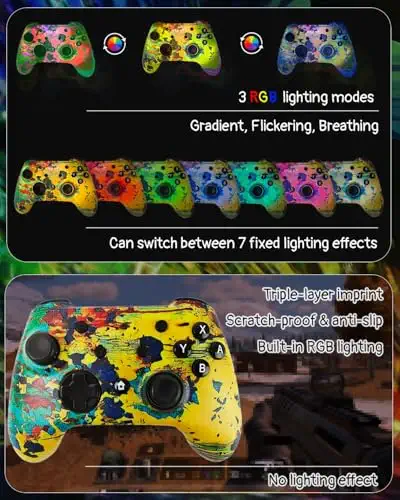


A lower-priced, lit-up controller that handles Apple TV, iPhone and wired play with the included USB-C cable.
Prices and availability on Amazon change often.

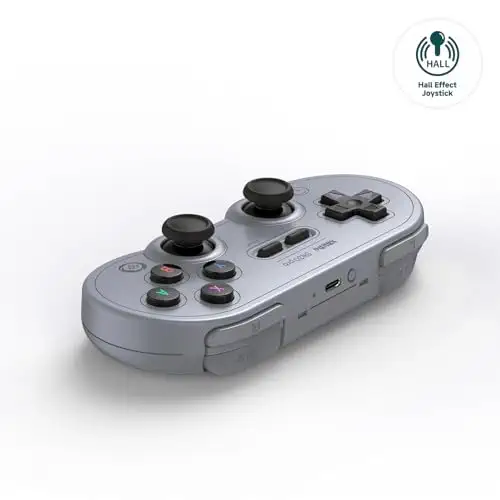


A retro-styled pad with Hall effect sticks and official Apple TV support, aimed at players who want a more premium feel.
Prices and availability on Amazon change often.


The same Bluetooth pad with a different colour, a good choice if you want the clip-on phone mount without the extra cost of the top pick.
Prices and availability on Amazon change often.
Anyone who wants to play Apple Arcade on the big screen will benefit. Controllers are also useful for players who want better control than a touchscreen or remote gives them.
Reader discussions also warn that cheap pads can start showing problems within a year, so a warranty matters.
Bluetooth controllers that support Apple MFi or the Apple TV controller profile work with Apple TV. The picks on this page all list Apple TV or iOS compatibility.
That depends on how much you play. Arcade gives you a large catalogue of games without in-app purchases, which many players find good value.
Both work with Apple TV in many cases, but dedicated Apple-compatible pads are usually simpler to pair. Reader discussions note official controllers can have stick drift at a similar price.
Apple Arcade titles and most MFi games support controllers. Check each game's listing for controller support before buying.
Why trust ConsumerEcho
Our shortlist is built from four Amazon listings that were in stock at the time of writing, weighed against what owners say in reader discussions. We looked at Apple MFi compatibility, battery life, and the extras each controller brings.
Our expert team tests products when it is needed and researches online and in interviews. Every guide is fact-checked and edited by a real person.
The ConsumerEcho editorial team · Updated Nov 15, 2026
How we pickEditorial standardsAffiliate disclosureReport a mistake
We earn a commission when you buy through our links, at no extra cost to you. It never decides the winner.