
 MSI PRO B760M-PBest overall
- Socket
- LGA 1700
- Memory
- DDR4, dual channel
- Form factor
- Micro ATX
- PCIe
- PCIe 4.0 M.2
Most recommended by reviewers
Check price at Amazon


How we make money. If you buy through our links we may earn a commission. It never changes what we recommend. Learn more ›

Reviewed by
Contributing Reviewer
I'm a writer, horror junkie, and home baker who believes life is better with a good book in one hand and a freshly baked treat in the other.
We earn a commission when you buy through our links, at no extra cost to you. How this works.
Picking a motherboard for a 13th Gen Intel chip comes down to a few practical choices: the memory type you want, how much storage you plan to add, and whether you need built-in Wi-Fi. Most people are well served by a board that matches their processor and budget without extra frills.
Our top choice is the MSI PRO B760M-P DDR4, a sensible all-rounder that supports 12th, 13th and 14th Gen Intel chips at a modest price. The rest of the list covers a stronger Z790 board for overclocking, a budget board for lighter builds and a Wi-Fi option for those who want wireless built in.
1 MSI PRO B760M-P | 2 ASUS Z790-AYW II | 3 ASUS B760M-AYW II | 4 MSI PRO Z790-A II | |
|---|---|---|---|---|
| Best for | Best overall | Best for overclocking | Best budget | Best for DDR5 and expansion |
| Socket | LGA 1700 | LGA 1700 | LGA 1700 | LGA 1700 |
| Memory | DDR4, dual channel | DDR5 | DDR4 | DDR5 |
| Form factor | Micro ATX | Not listed | Micro ATX | ATX |
| Chipset | Not listed | Intel Z790 | Intel B760 | Intel Z790 |
| Storage | Not listed | 3x PCIe 4.0 M.2 | Not listed | 4x M.2 Gen4 |
| Networking | Not listed | Not listed | Wi-Fi 6, 2.5Gb Ethernet | Wi-Fi 6E, 2.5G LAN |
| Check price at Amazon | Check price at Amazon | Check price at Amazon | Check price at Amazon |
MSI PRO B760M-PBest overallMost recommended by reviewers
Check price at Amazon ASUS Z790-AYW IIBest for overclocking
 ASUS B760M-AYW IIBest budget
 MSI PRO Z790-A IIBest for DDR5 and expansion

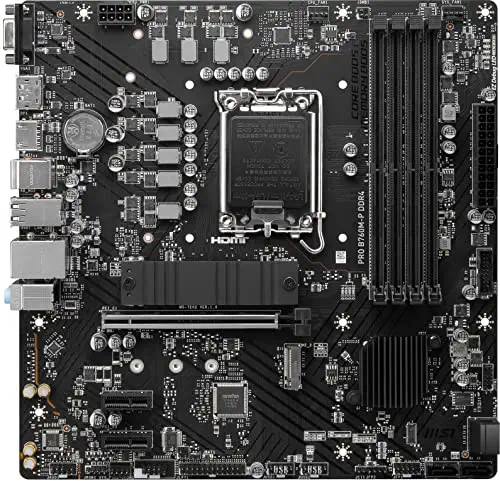


A sensible DDR4 board that supports 12th, 13th and 14th Gen Intel chips with fast M.2 storage.
Most recommended by reviewers
Check price at AmazonPrices and availability on Amazon change often.
For most people shopping for a 13th Gen Intel build, the MSI PRO B760M-P DDR4 is the sensible pick, since it supports 12th, 13th and 14th Gen chips on the LGA 1700 socket while keeping memory costs down.
The board pairs dual channel DDR4 memory, which keeps the overall build cheaper than DDR5 platforms, with a PCIe 4.0 M.2 slot that comes with a shield to help the drive run cool. Its B760 chipset and digital power design are aimed at supporting more cores, so it handles current Intel chips without asking you to pay for overclocking features you may not use. Owners on r/buildapc report that the MSI PRO B760M-P DDR4 works without issues with an i5-12600K when not overclocking.
The Micro ATX size leaves fewer expansion slots than a full ATX board, so it suits builds that don't need many add-in cards. Its feature set is also more modest than the Z790 boards, which is the trade-off for the lower price.
If it's not for you, the ASUS B760M-AYW WiFi D4 II suits buyers who want built-in Wi-Fi 6 and 2.5Gb Ethernet at a lower price, while the MSI PRO Z790-A WiFi II suits those who need DDR5 and four M.2 slots in an ATX form factor.


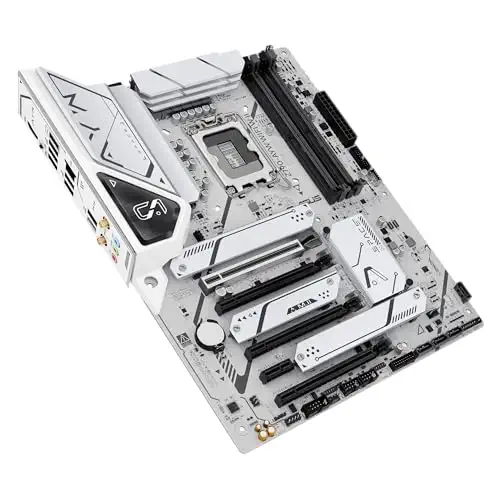

A Z790 board with a stronger power design and three PCIe 4.0 M.2 slots for demanding builds.
Prices and availability on Amazon change often.


A budget-friendly micro ATX board with Wi-Fi 6, two M.2 slots and DDR4 memory.
Prices and availability on Amazon change often.


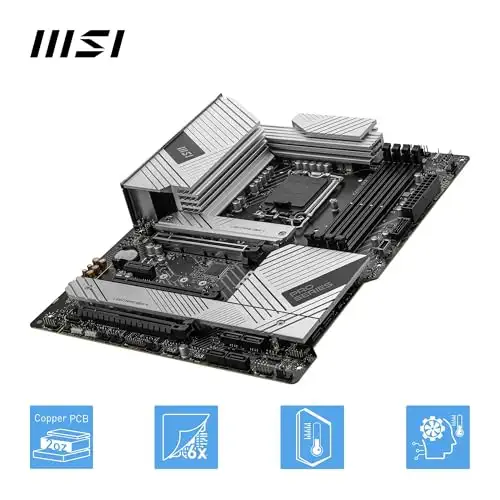

A full ATX Z790 board with DDR5 memory, four M.2 slots and Wi-Fi 6E.
Prices and availability on Amazon change often.
Start with the socket: all of these boards use LGA 1700, which is required for 12th, 13th and 14th Gen Intel chips. Next, decide between DDR4 and DDR5 memory, since the two aren't interchangeable. Choose a Z790 board only if you want to overclock; B760 boards cover most mainstream builds.
Owners of 13th Gen boards often pair a mid-range chip with a B760 board for gaming, since it balances cost and performance. Pick a board that matches the chip you choose.
A 13th Gen i3 can still handle everyday computing and light gaming. Pair it with a budget board like the MSI PRO B760M-P if you want to keep costs down.
The number indicates the performance tier, with i3 at the entry level and i9 at the top. Higher tiers have more cores and cost more, so match the chip to your workload.
The i7-3770 uses a different socket (LGA 1155), so none of the boards on this page will fit it. You need an LGA 1155 board for that chip.
Meet the reviewer
Contributing Reviewer
I'm a writer, horror junkie, and home baker who believes life is better with a good book in one hand and a freshly baked treat in the other. When I'm not researching products, you'll find me chasing after my preschooler, getting lost in a creepy novel, or putting my mixer to good use in the kitchen. I love finding products that are genuinely worth the money and sharing my useful finds with readers. After all, nothing's scarier than spending money on something that doesn't live up to the hype!
Why trust ConsumerEcho
This shortlist is built from four Amazon listings that are in stock now and support 13th Gen Intel chips. We weighed each board's socket, memory type, power design, storage slots and networking against what owners and community discussions say matters.
Our expert team tests products when it is needed and researches online and in interviews. Every guide is fact-checked and edited by a real person.
The ConsumerEcho editorial team · Updated Nov 22, 2026
How we pickEditorial standardsAffiliate disclosureReport a mistake
We earn a commission when you buy through our links, at no extra cost to you. It never decides the winner.


